

From script to stage · Part 08: Live UIs

Cratis: from script to stage, and the long run · Part 08 of 26
In Arc, the difference between a query that loads a list once and a query that keeps pushing new results to a React screen is the return type of one C# method, as long as the data it returns comes from a source that notifies on change. Return a list and the browser gets a snapshot. Return an ISubject of that list and the generated hook subscribes, and the server pushes later results to it over Server-Sent Events or WebSocket. The C# record stays the same. The generator writes an observable query class instead of a plain one, and the component still calls .use(), whose tuple is [result, setSorting] instead of [result, perform, setSorting].
The author screen needs two things: a list of authors that shows a new one without a reload, and a form that registers one. Both sit on the TypeScript that Arc generates from the backend, and both are about the same question, which is what the browser knows and when it learns it.
A live query is a return type
Section titled “A live query is a return type”A C# model-bound query is a static method on a [ReadModel] record. Returning ISubject<IEnumerable<T>>, or ISubject<T> for one item, makes it an observable query. The Ideas board in the Cratis Samples repository keeps its ideas in memory, in one store for the whole process and not one per tenant, and observes them:
[ReadModel, AllowAnonymous]public record Idea(IdeaId Id, IdeaTitle Title, IdeaSummary Summary){    public static ISubject<IEnumerable<Idea>> ObserveIdeas(IdeaStore store) => store.Observe();}
public sealed class IdeaStore : IDisposable{    readonly Lock _gate = new();    readonly BehaviorSubject<IEnumerable<Idea>> _ideas = new([]);
    public void Capture(Idea idea)    {        lock (_gate) { _ideas.OnNext([idea, .. _ideas.Value]); }    }
    public ISubject<IEnumerable<Idea>> Observe() => _ideas;
    public void Dispose() => _ideas.Dispose();}
Arc for Kotlin returns a Flow from the query, and a MutableStateFlow holds the current value for snapshot reads.
@ReadModel@AllowAnonymousdata class Idea(val id: IdeaId, val title: IdeaTitle, val summary: IdeaSummary) {    companion object {        @JvmStatic        fun observeIdeas(@FromServices store: IdeaStore): Flow<List<Idea>> = store.observe()    }}
@Componentclass IdeaStore {    private val ideas = MutableStateFlow<List<Idea>>(emptyList())
    fun capture(idea: Idea) {        ideas.update { listOf(idea) + it }    }
    fun observe(): Flow<List<Idea>> = ideas}
Arc for Java returns a JDK Flow.Publisher from the query, and ObservableState holds the current value for snapshot reads.
@ReadModel@AllowAnonymouspublic record Idea(IdeaId id, IdeaTitle title, IdeaSummary summary) {    public static Flow.Publisher<List<Idea>> observeIdeas(@FromServices IdeaStore store) {        return store.observe();    }}
@Componentpublic final class IdeaStore {    private final ObservableState<List<Idea>> ideas = new ObservableState<>(List.of());
    public synchronized void capture(Idea idea) {        var updated = new ArrayList<Idea>();        updated.add(idea);        updated.addAll(ideas.get());        ideas.set(List.copyOf(updated));    }
    public Flow.Publisher<List<Idea>> observe() {        return ideas;    }}
Arc for TypeScript returns an RxJS Observable from a @query({ observable: true }) method, and a BehaviorSubject holds the current value.
export class IdeaStore {    readonly #ideas = new BehaviorSubject<Idea[]>([]);
    capture(idea: Idea): void {        this.#ideas.next([idea, ...this.#ideas.value]);    }
    observe(): Observable<Idea[]> { return this.#ideas; }}
@readModel()@allowAnonymous()export class Idea {    @field(IdeaId) id!: IdeaId;    @field(IdeaTitle) title!: IdeaTitle;    @field(IdeaSummary) summary!: IdeaSummary;
    @query({ observable: true }, service(IdeaStore))    static observeIdeas(store: IdeaStore): Observable<Idea[]> { return store.observe(); }}
Arc for Elixir doesn’t exist; use the Chronicle Elixir client directly.
In .NET, Task<ISubject<T>> is allowed as well, and an arbitrary IObservable<T> isn’t something Arc discovers as a query. You can compose with Rx operators such as Select or CombineLatest, as long as the subscription you return releases every upstream subscription when it’s disposed and passes terminal errors on. The direct transports dispose the subscription they receive.
The return type alone doesn’t open a connection. The client decides whether it wants a one-off snapshot, a direct SSE or WebSocket connection, or a subscription on a shared hub, and the default is the hub.
For ObserveIdeas, the proxy generator writes an ObservableQueryFor<Idea[]> class. A parameterless query over a list gets a use(sorting?) hook that returns the result and a function to change the sorting. It also gets useWithPaging, useSuspense, useSuspenseWithPaging, useChangeStream and a when(condition) helper. Rename a property in C#, rebuild, and the generated types and every field accessor that used the old name stop compiling until you fix them, the same way commands behave in Arc: commands and queries without the plumbing.
Arc’s real-time tutorial includes a two-tab test. Open the app in two browser tabs connected to the same backend process, add a book in one, and the other updates without a reload. That test covers the tutorial’s own path. A write from a second backend process is a separate case, and it depends on where the data lives.

The same check on the Cratis web template’s name list, with two windows side by side.
From a write to the screen
Section titled “From a write to the screen”The samples show two paths, and they differ in what sits between the command and the subject the query returns.
In the .NET Ideas board there’s no event store. The command’s Handle(IdeaStore store) calls store.Capture(...), which pushes a new list into the BehaviorSubject. The query returns that same subject, so every subscriber gets the new list, the hub sends it to the browser and the hook re-renders. The command writes to a current-state store, and the query observes that same store.
With Chronicle and MongoDB, the chain is longer. In .NET, this is the author list from Cratis’s full-app walkthrough, with the name typed as AuthorName:
[ReadModel][FromEvent<AuthorRegistered>]public record Author(AuthorId Id, AuthorName Name){ public static ISubject<IEnumerable<Author>> AllAuthors(IMongoCollection<Author> collection) => collection.Observe();}Arc for Kotlin and Java observe the collection with MongoObservableQuery, which resumes its MongoDB change stream after transient failures.
@ReadModel@io.cratis.chronicle.readModels.ReadModel@FromEvent(AuthorRegistered::class)data class Author( @FromEventSourceId val id: AuthorId = AuthorId(UUID(0, 0)), val name: AuthorName = AuthorName("")) { companion object { @JvmStatic fun allAuthors(@FromServices queries: MongoObservableQuery): Flow<List<Author>> = queries.observe<Author>() }}Arc for Kotlin and Java observe the collection with MongoObservableQuery, which resumes its MongoDB change stream after transient failures.
@ReadModel@io.cratis.chronicle.readModels.ReadModel@FromEvent(eventType = AuthorRegistered.class)public class Author {    @FromEventSourceId    public AuthorId id = new AuthorId(new UUID(0, 0));
    public AuthorName name = new AuthorName("");
    public static Flow.Publisher<List<Author>> allAuthors(@FromServices MongoObservableQuery queries) {        return queries.observePublisher(Author.class);    }}
In Arc for TypeScript, ChronicleReadModels watches the read model through Chronicle. mongoCollection(...).observe() is the MongoDB change-stream form.
@readModel()@fromEvent(AuthorRegistered)export class Author {    @field(AuthorId) id!: AuthorId;    @field(AuthorName) name!: AuthorName;
    @query({ observable: true }, service(ChronicleReadModels))    static allAuthors(models: ChronicleReadModels): Observable<Author[]> {        return models.observeAll(Author, author => author.id.toString());    }}
Arc for Elixir doesn’t exist; use the Chronicle Elixir client directly.
The command returns an AuthorRegistered event and Chronicle appends it. In .NET, the projection declared by [FromEvent<AuthorRegistered>] writes the Author document to MongoDB. collection.Observe() sees that document change through a MongoDB change stream, and Arc pushes the new result to every subscribed client.
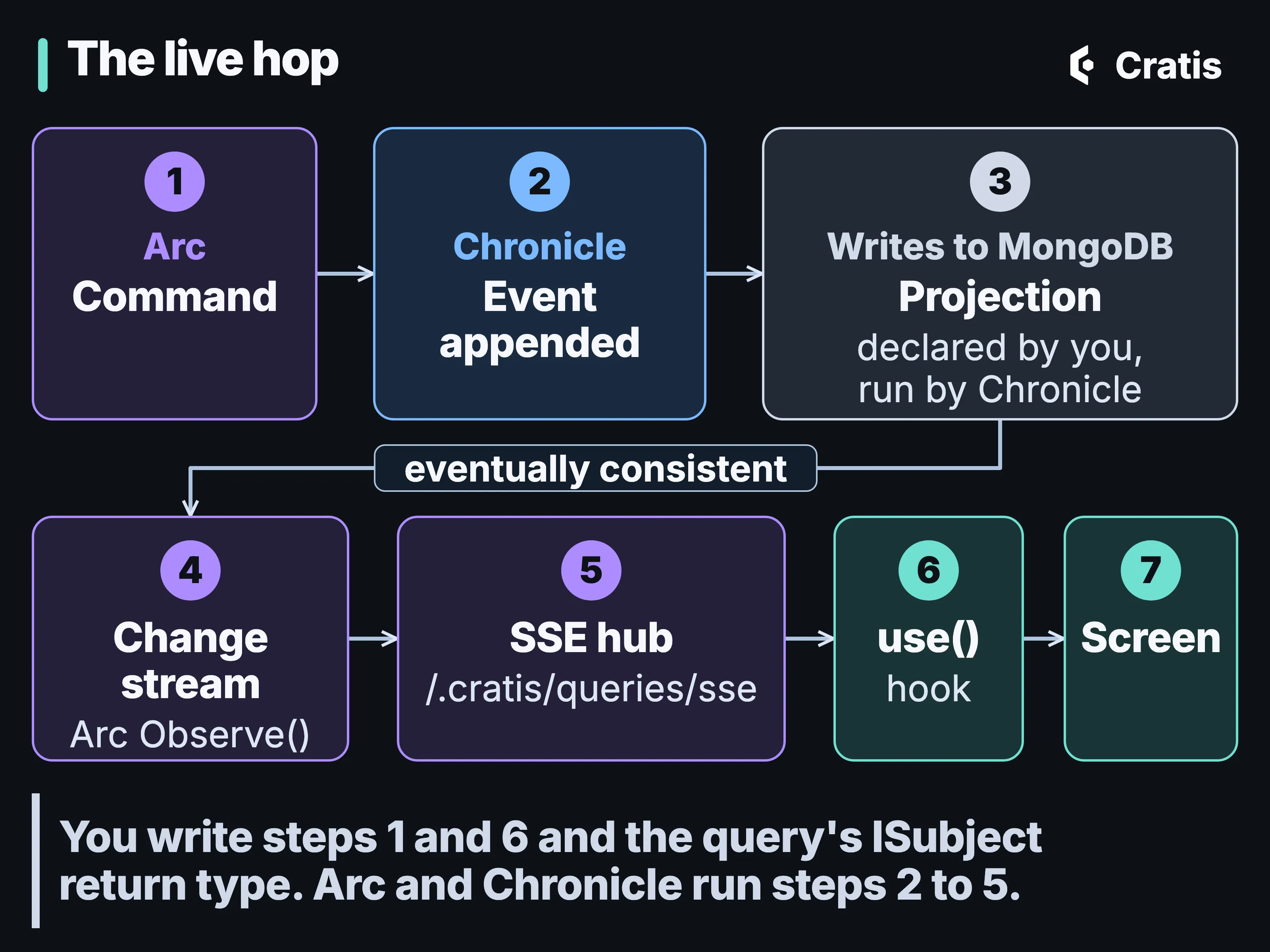
The Chronicle path to the screen. The UI observes the document, not the event log.
In .NET, Observe() is database observation. It watches the MongoDB collection the projection writes to, and it isn’t a Chronicle projection or a Chronicle API. Change streams need a MongoDB replica set or a supported sharded deployment. If the MongoDB watcher fails, Arc logs the failure and completes the stream instead of raising an error, so a stream that completed doesn’t prove the data is current. Arc for Kotlin and Java observe the collection with MongoObservableQuery, which resumes its MongoDB change stream after transient failures, and Arc for TypeScript’s experimental Chronicle integration watches the read model through Chronicle.
The read model catches up after the append, asynchronously. A command that returns success has recorded the event. The projection may not have written the document yet, and the screen may not have changed yet either. There’s nothing to refresh by hand, and also nothing that promises the list has updated by the time the command’s promise resolves.
For EF Core in .NET, an observed DbSet gets in-process notifications from Arc’s SaveChanges interceptor. SQLite relies on that path only. SQL Server and PostgreSQL can pick up writes from other processes once their database notification setup is in place. If that setup fails, EF observation can fall back to in-process only. Without a notification source, an observable query can stay connected and never send fresh data.
How the result travels
Section titled “How the result travels”Two settings on <Arc>, queryTransportMethod and queryDirectMode, choose the transport, and they’re independent of each other:
| Transport | Direct mode | What happens |
|---|---|---|
| SSE (React default) | off | One shared EventSource at /.cratis/queries/sse; subscribe and unsubscribe are POSTs |
| WebSocket | off | One shared socket at /.cratis/queries/ws; subscribe and unsubscribe are socket messages |
| SSE or WebSocket | on | One connection per query URL, bypassing the hub |
On the SSE hub, GET /.cratis/queries/sse answers with a connected message and a connection id. The client then POSTs each subscription with the connection id, a subscription id, the query name and its arguments, and results come back tagged with the subscription id. Many subscriptions share one EventSource, and the client handles reconnecting and subscribing again.
<Arc> defaults to the SSE hub with one connection slot. SSE hub connections are capped at four, so that the browser’s per-origin connection limit under HTTP/1.1 still leaves room for the control POSTs. HTTP/2 doesn’t lift Arc’s cap, and direct SSE connections are outside it. The multiplexer is module-global, shared by every <Arc> on the page, so nesting a second <Arc> doesn’t give you an isolated hub.
An observable query is also an ordinary GET. If the observable hasn’t emitted yet, the server answers 202 with isReady: false. For MongoDB’s Observe(), a snapshot without waitForFirstResult always answers 202 and can leave its watcher running, so use waitForFirstResult=true there. waitForFirstResult=true makes it wait for the first emission, 30 seconds by default, adjustable with waitForFirstResultTimeout, and a timeout is a 408. HTTP snapshots bypass read-model interception and emission guards, so masking or guarding that only happens on the streaming path doesn’t protect the snapshot endpoint.
For collection subscriptions on the hub, each item needs a stable, unique Id for Arc to send change sets in delta mode. Without one, Arc sends the whole collection every time and logs a warning once per subscription. When something looks wrong, arc.observableQueryDiagnostics.getSnapshot() and snapshots$ show the transport, the multiplexer’s state, the cache and a health summary.
One hook and its states
Section titled “One hook and its states”The board’s React component is short. Adapted from the sample, without its header and styling, it reads:
export const Board = withViewModel(BoardViewModel, ({ viewModel }) => {    const [ideasResult] = ObserveIdeas.use();    const [CaptureDialog, showCaptureDialog] = useDialog(CaptureIdeaDialog);    const ideas = viewModel.filter(ideasResult.data ?? []);
    return (        <main>            <Button label='Capture idea' onClick={() => { void showCaptureDialog(); }} />            <input value={viewModel.searchTerm}                   onChange={event => viewModel.setSearchTerm(event.target.value)} />            {ideasResult.isPerforming && !ideasResult.hasData && <p>Connecting to the live board…</p>}            {ideas.map((idea, index) => <IdeaCard key={idea.id.toString()} idea={idea} sequence={index + 1} />)}            <CaptureDialog />        </main>    );});
ObserveIdeas.use() returns a tuple, [result, setSorting], and an observable query for a single item returns [result]. The first line destructures it and keeps the result, which is the element the component reads.
The result carries data, isSuccess, isReady, isAuthorized, isValid, hasExceptions, paging and isPerforming. Two of those are easy to confuse. isReady says a result has been produced. isPerforming says the client is fetching or subscribing right now. The initial state isn’t ready, and isReady: false after a 202 is transient and isn’t a failure. The board shows its “Connecting” line only while it’s performing and has no data yet.
ObserveSingle and ObserveById emit null when the document is gone, including when it was removed through [RemovedWith<T>], and the subscription stays open. Guard with hasData or isReady before you read a property.
Each <Arc> mount keeps a query instance cache, keyed by the query name and its arguments. Components that use the same query with the same arguments share one subscription. When the last of them unmounts, the subscription stays open for queryCacheRetentionMs, 30,000 ms by default, so going back to a screen doesn’t start from empty. It isn’t an isolation boundary between users.
useChangeStream(getKey) gives you what was added, replaced and removed since the last result. Arc computes it by comparing snapshots, on the server or in the client, so a write that happened between two emissions and was overwritten before the second one can be missing from the delta. It’s a view of the difference between results. When every operation matters, read the event log. A reconnect creates a new subscription, and it doesn’t resume from where the old one stopped.
A subscription that stays open
Section titled “A subscription that stays open”Authorization for an observable query runs once, when the subscription is established. The attributes from Arc: commands and queries without the plumbing are checked then, and the verdict doesn’t expire on its own when a token does or when a role is revoked. Keep-alive pings stop proxies from dropping the connection, and the client reconnects by itself, so a subscription can outlive the session that opened it.
For re-checking during a long subscription, Arc has emission guards. A class implementing IGuardObservableQueryEmission is discovered by convention, and Arc asks it about every emission on every transport, the hub, direct WebSocket and direct SSE alike. It answers Allow, Suppress for a single emission, or DenyAndTerminate. Guards cover streaming emissions only, not the HTTP snapshot. On a WebSocket the principal is the one from the handshake. A guard that throws counts as DenyAndTerminate. A filter can capture a serializable QueryContext.SubscriptionScope after the filters succeed and before the query runs, and the guard gets a fresh copy of it for each emission. An application without a guard pays nothing per emission. Controller-based queries always get a null subscription scope.
The form
Section titled “The form”After each build, Arc’s proxy generator writes a TypeScript version of the command, and Components binds a form to it. Following the Components form recipe, the form looks like this. RegisterAuthor is the generated proxy class, not something you write:
<CommandDialog<RegisterAuthor> command={RegisterAuthor} title='Add author' okLabel='Add' initialValues={{ id }} validateOn='change'> <InputTextField<RegisterAuthor> value={(command) => command.name} title='Name' placeholder='Sample Author' /></CommandDialog>The field accessor is typed against the command. Rename Name in C#, rebuild, and that line stops compiling. That’s why we generate the proxy at all, so drift between frontend and backend shows up as a compile error in your own build. Add stays disabled until the validation rules the backend shared with the proxy pass, and server messages land on their fields.
The generated validator is a partial copy, with the omissions and dropped conditions covered in Validation all the way down. Keep its output in a folder of its own; Arc gotchas covers what a full regeneration deletes.
What CommandDialog does for you
Section titled “What CommandDialog does for you”A CommandDialog takes the command’s constructor. It creates the command, validates it and keeps the confirm button disabled until client validation passes. On confirm it runs the command and shows a busy state, with the buttons and fields disabled and a spinner. Server field errors land on their fields, and a success closes the dialog with DialogResult.Ok. Cancel, the close button, Escape and a click on the backdrop close it with Cancelled and fire no callback.
The Ideas board’s dialog seeds a value that no field shows, the new idea’s id.
export const CaptureIdeaDialog = () => ( <CommandDialog<CaptureIdea> command={CaptureIdea} title="Capture an idea" okLabel="Add to board" initialValues={{ id: Guid.create(), title: '', summary: '' }}> <InputTextField<CaptureIdea> value={command => command.title} title="Title" placeholder="Make local setup self-explanatory" /> </CommandDialog>);A generated proxy starts with every property unset, and a required Guid isn’t filled in for you. A value that no field renders, such as the new idea’s id, goes in initialValues, which counts toward validity. The sample calls Guid.create() inline, which makes a new id on every render. The CommandDialog guide recommends creating it once, for example with useState(() => Guid.create()). onBeforeExecute can transform values too, but it runs after confirm, which is too late to make an invalid command valid.
With autoServerValidate, the dialog also calls the command’s /validate route once local checks have settled, after 500 ms by default. The option has Throttle in its name and behaves as a debounce. The preflight’s limits, including the name race it can’t prevent, are in Validation all the way down.
The rule for choosing is in Components’ own guide. If confirming the dialog executes a generated command, use CommandDialog. If the dialog only gathers values and hands them back, use Dialog.
Arc also has dialogs without Components. useDialog<TResponse, TInput>(Component) returns three elements: the wrapper to render, a function that shows the dialog and the dialog’s context. Showing it resolves to a DialogResult and an optional response. DialogResult has None, Ok, Yes, No and Cancelled. useConfirmationDialog resolves to a bare DialogResult. Arc draws no dialog itself, and DialogComponents is where you supply the confirmation and busy renderers. One dialog hook stores one pending result, so don’t open the same one twice at once.
When a screen has behavior
Section titled “When a screen has behavior”The board wraps its component in withViewModel. Arc’s MVVM support makes the view model an @injectable() class from tsyringe, observable through MobX, and the view re-renders when a property it read changes.
In the Ideas board, the whole view model is this:
import { injectable } from 'tsyringe';import { Idea } from './Idea';
@injectable()export class BoardViewModel {    searchTerm = '';
    setSearchTerm(value: string) {        this.searchTerm = value;    }
    filter(ideas: Idea[]): Idea[] {        const normalizedSearch = this.searchTerm.trim().toLowerCase();        if (!normalizedSearch) {            return ideas;        }
        return ideas.filter(idea =>            idea.title.toLowerCase().includes(normalizedSearch) ||            idea.summary.toLowerCase().includes(normalizedSearch));    }}
Filtering the list that’s already loaded is view behavior, so it lives in the view model, and a spec in the sample tests the filter by title and summary without rendering anything. The live data still comes from the hook in the component.
withViewModel observes only the render of the component it wraps. A child component that reads observable view-model state directly sits outside that boundary and won’t re-render when the state changes. Pass plain values down as props, or wrap the child in observer() from @cratis/arc.react.mvvm.
A view model can ask the user something through IDialogs, with show, showConfirmation and showBusyIndicator, and the view registers the dialogs it can show. The MVVM useDialog takes a request type and a component and returns two elements, the wrapper and the function that shows it, which is one fewer than the base hook. Arc’s own advice is to stay with plain hooks unless a screen has substantial behavior.
Tables and pages
Section titled “Tables and pages”For the author list, a table is often the right screen. DataTableForObservableQuery from Components subscribes when it mounts and unsubscribes when it unmounts, and rows appear, change and disappear as the server pushes results:
export function LiveAuthors() { return ( <div style={{ height: '480px' }}> <DataTableForObservableQuery query={AllAuthors} emptyMessage='No authors yet' dataKey='id'> <Column field='name' header='Name' sortable /> </DataTableForObservableQuery> </div> );}AllAuthors is the generated proxy for the Chronicle-backed query above. The table needs a parent with a definite height, which is why the example wraps it in a 480-pixel box. Set dataKey, or the selection is lost when an update arrives. Server paging is 20 rows per page. Sorting, column filters and the global search all work on the page that’s loaded, so filtering across the whole result belongs in query arguments, before paging.
DataPage puts a table like that into a page with an action bar and a resizable details panel. DataPage.MenuItems holds the actions, and disableOnUnselected ties an action to having a row selected. Components’ list-screen recipe wires a live table to two CommandDialog actions, and with Chronicle the new row arrives once the projection has updated the read model. Grouping, row expansion and controlled server-side sorting aren’t part of the Components tables.
Components needs React 19, and @cratis/arc and @cratis/arc.react in the range from 20.3.1 up to, but not including, 23.
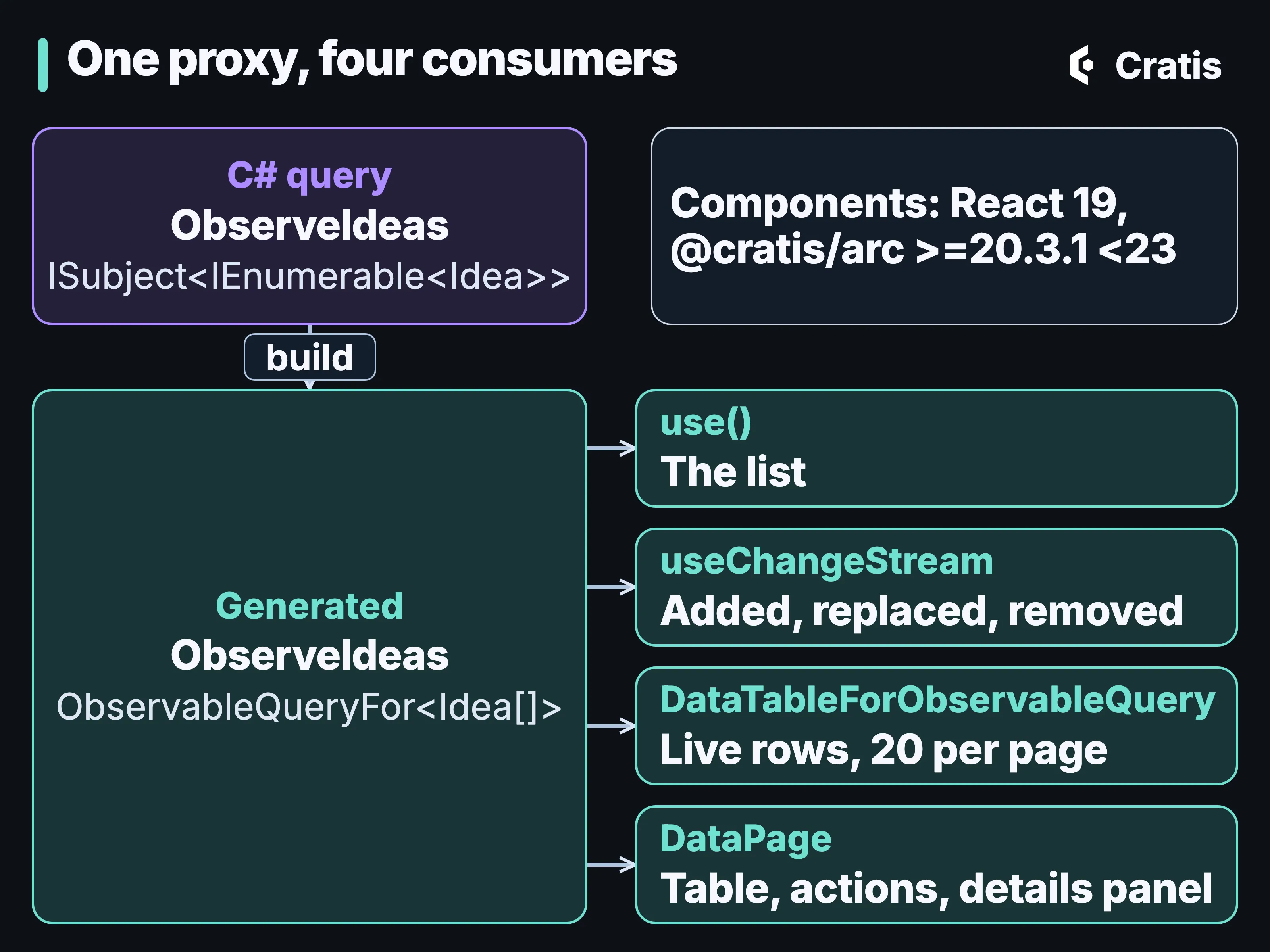
The same generated query class feeds a hook, a change stream, a table and a page.
Which hop is live
Section titled “Which hop is live”For the author screen, the list and the form meet in one place. The form’s command appends AuthorRegistered, the projection writes the document, the change stream notices, and the hub pushes a new list to every tab that subscribed. The screen code is a hook call and a dialog, and on the backend it’s a return type and an Observe() call, over a projection you declared.
Each hop has its own terms. The projection writes the document after the append, asynchronously, and the change stream reports changes to that document. A snapshot GET skips read-model interception and emission guards, and for MongoDB it needs waitForFirstResult to return data. Deltas compare snapshots and can miss a write between two results. Authorization is checked at subscribe time unless a guard checks each emission. A live screen built on Arc tells the browser about new results of a query, and the event log remains the place to look when each individual change matters.
The Kotlin and TypeScript servers expose observable queries too, each with its own shape on the backend and its own differences from .NET, which Beyond .NET goes through.