

From script to stage · Part 25: AI across the Cratis stack

Cratis: from script to stage, and the long run · Part 25 of 26
In Claude Code and Pi, the Cratis store-mutation guard can stop an assistant’s cratis chronicle observers replay before the shell runs it, even with --yes. It reads the command text, so a call hidden in a script file or made through MCP is outside what it sees.
That guard is one of seven places an assistant meets the Cratis stack. The others run from the corpus in your repository to an MCP server on a running Chronicle. Most of them let an assistant read something, and a few let it propose or change something. The corpus states the principle behind all of them in one of its rules: “A tool grant is not authority. A configured token, an installed CLI, a writable branch, or an MCP server in the session says only that the action is mechanically possible.”
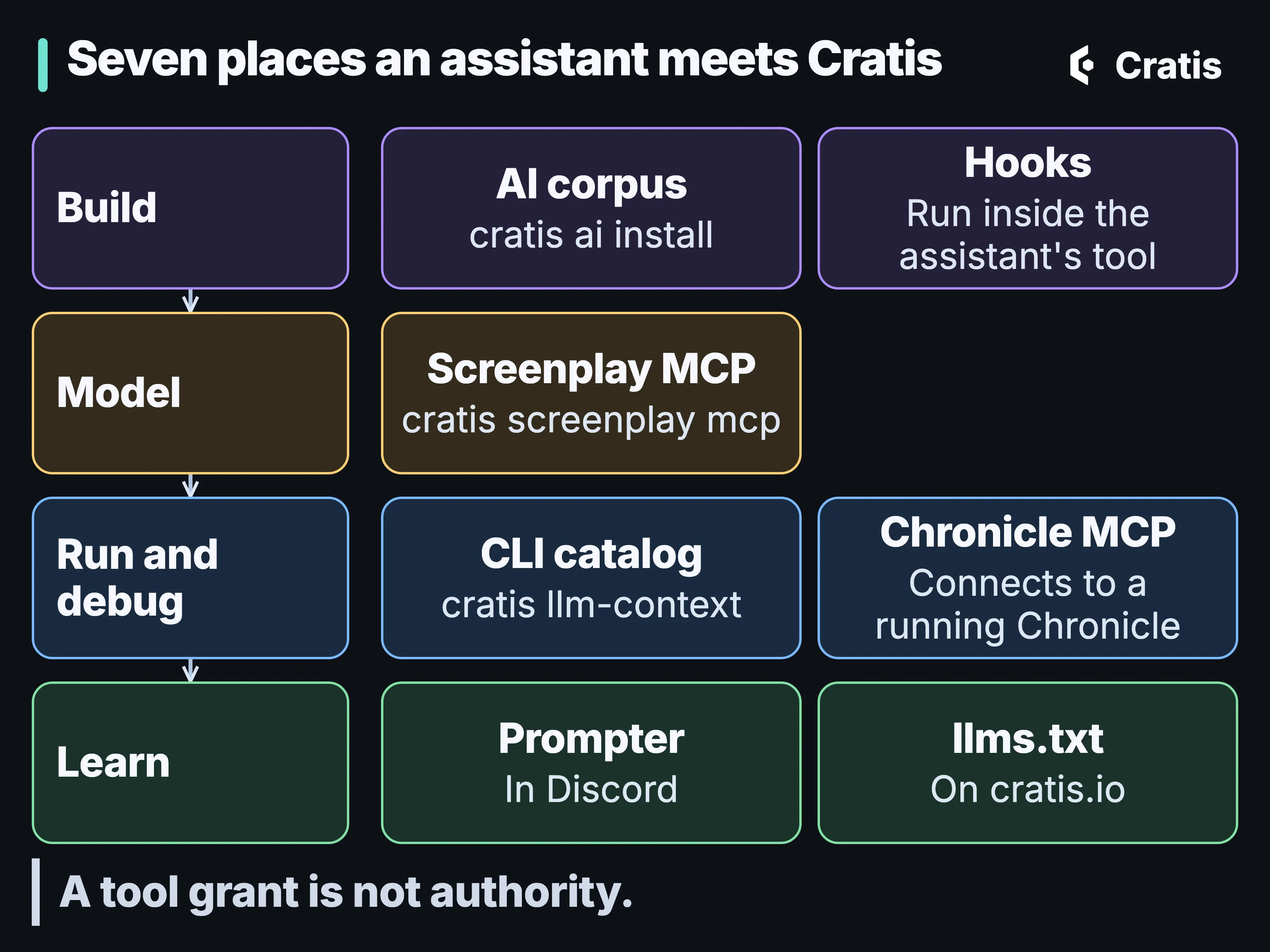
Seven touchpoints, from the repository to the running store.
A spec the compiler reads
Section titled “A spec the compiler reads”Cratis Direct and our agentic development life cycle covers deciding what an agent works on and checking what comes back. The event model gives that work an intent a compiler can read.
The most useful critique we’ve read comes from the spec-driven development side. In her look at three spec-driven tools on martinfowler.com, Birgitta Böckeler separates three levels. Spec-first writes a spec to guide one change. Spec-anchored keeps the spec and evolves it with the feature. Spec-as-source makes the spec the only thing people edit. She finds the markdown these tools produce can be harder to review than the code, and she wonders whether spec-as-source, and even spec-anchored, could end up with the downsides of both model-driven development and language models: inflexibility and non-determinism.
We sit at spec-anchored, with a spec a compiler reads. The event model is the spec and the .play file is its text. Its commands, events and projections are the concepts Arc and Chronicle run, so the spec and the running system share one vocabulary. For the narrow part Stage can render, it moves a step toward spec-as-source. A textual model with a code generator is the model-driven shape she warns about. The renderer is deterministic, so that step adds no unpredictability of its own, but the rigidity risk does apply to us, and it’s why hand-written code has its own place.
For the narrow backend vertical Stage supports, cratis render writes the code. Code written by hand, by a person or an agent, belongs in Customizations/, and an edit to a generated file shows up as a refused render instead of a silent overwrite, unless someone passes --force. Stage and Scene goes through it.
Guidance in the repository
Section titled “Guidance in the repository”The Cratis AI corpus is a free, MIT-licensed set of rules, skills, agents and prompts for building with Cratis, and it’s still in preview. It lives in one folder, .cratis/ai/, and each supported assistant gets a thin adapter that points back to it, so the guidance is installed once instead of being copied into each tool’s instructions. cratis ai install puts it into your repository:
cratis ai install \ --harnesses claude,codex,copilot,cursor,opencode,pi \ --profiles cratis/application/csharp,cratis/documentation \ --languages csharp,typescriptcratis ai statusIt records the selection in .cratis/ai.json and every file with its hash in .cratis/ai.manifest.json, refuses to overwrite files you own, and cratis ai status tells you when a managed file was edited locally. Profiles choose the scope, such as a C# application or documentation, and rules are scoped by language, so only the languages you list install theirs. In a terminal it asks for the harnesses, profiles and languages, and in a script or an agent’s own terminal you pass them as above. The Cratis templates preselect it. cratis new runs the sync itself, and dotnet new prints a reminder to run cratis ai update.
That gives an assistant context about how Cratis is meant to be used, with dozens of skills for commands, projections, reactors, concepts and specs. It doesn’t give it access to anything, and it doesn’t make its output correct. The corpus’s own checks are static and don’t run anything through a model. The CLI installs the corpus from its current main unless you give it a local source.
An assistant that hasn’t read your conventions guesses at your framework, and the result is plausible code that’s subtly wrong. Each layer of Cratis also gives an assistant something concrete to read so it doesn’t have to guess. AuthProxy’s configuration is declarative JSON, the generated TypeScript proxies are typed contracts the frontend compiles against, registered event types have schemas it can look up, and a .play file is text a compiler checks.
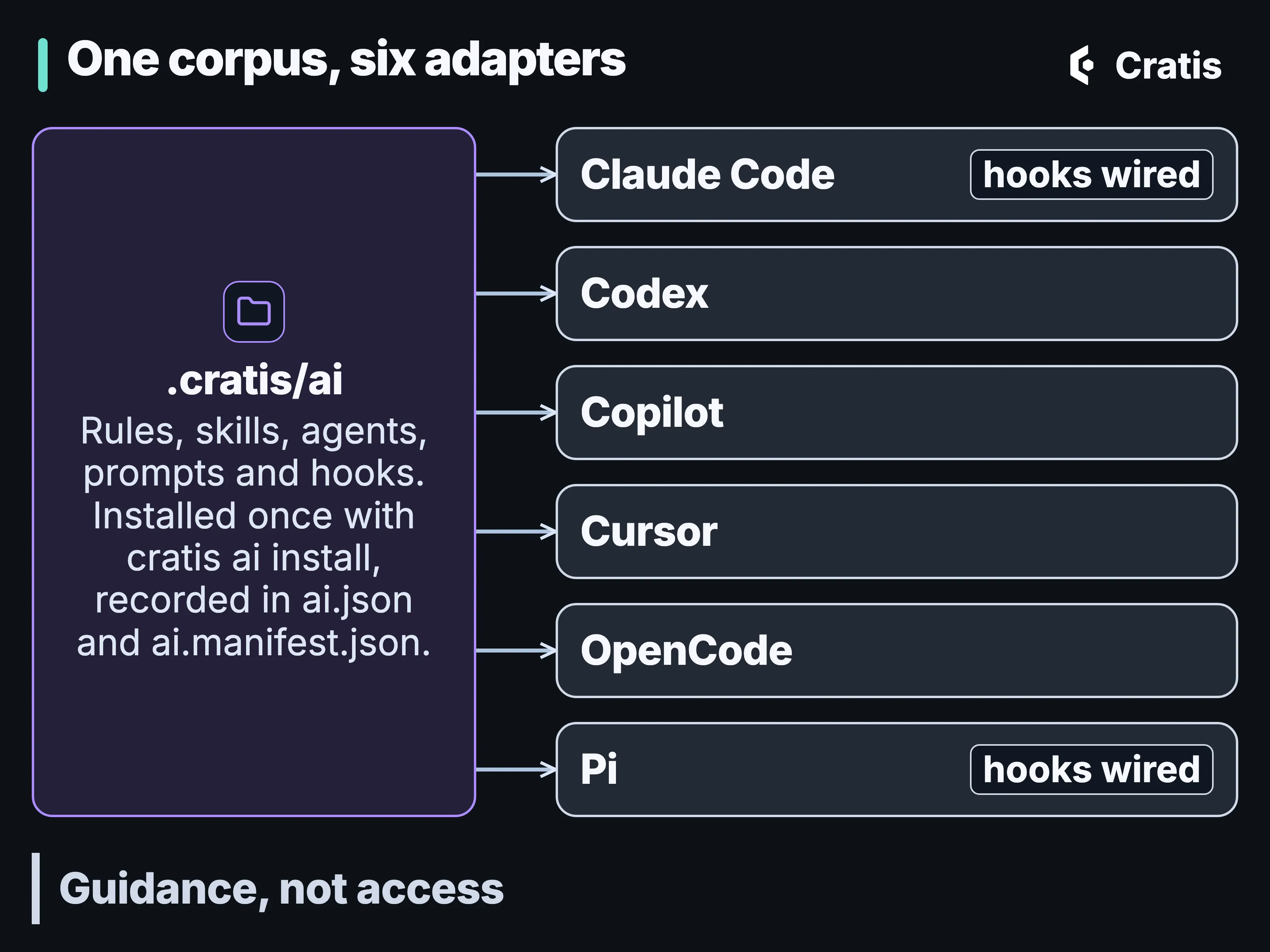
One folder of guidance, and an adapter for each assistant that points back to it.
Checks that run whether the agent listened or not
Section titled “Checks that run whether the agent listened or not”Böckeler also notes that agents often ignore the instructions they’re given, and asks whether all those files and checklists give a “false sense of control”. A rules file is advice. What holds is a check that runs either way, and the author feature meets several:
cratis screenplay validaterejects a broken model before any code exists, and the Stage specification runner checks the model’s Given/When/Then examples against the model.- The compiler and the generated TypeScript proxies turn a renamed field into a compile error on both sides.
- Arc and Chronicle’s .NET client ship Roslyn analyzers that report some misuses of their APIs as build diagnostics. They aren’t specific to agents, and they treat an agent’s code like anyone else’s.
- The corpus ships hooks that run inside the assistant’s own tool.
The hooks are the part written with agents in mind. Each one runs on an event in the assistant’s tool:
Pattern pass PostToolUse on a write appends a one-line reminder to context, never blocksHard block PreToolUse on a write exits 2 - the write does not happenHard block PreToolUse on Bash exits 2 - the store-changing cratis chronicle command does not runQuality gate Stop (Claude) exits 2 - the turn does not endThe write guard blocks edits to a file whose header marks it as Cratis-generated output, such as the proxies Arc writes, and to package-management files, lock files and .env files. Arc gotchas explains why the generated files matter.
Take the store-mutation guard. Say an assistant working on the author feature decides the Authors read model is stale and reaches for a replay:
cratis chronicle observers replay <observer-id> --yesWith --yes, the CLI doesn’t stop to ask first. In Claude Code and Pi, the hook runs before the shell does. It finds every cratis in command position, including after && or |, inside $( ), behind wrappers such as env, sudo or timeout, and in the script of bash -c, and checks each cratis chronicle command against a read-only allowlist. observers replay is on its list of known mutations, so the hook exits 2 and the command never runs. A command on neither list, including one a newer CLI adds, is blocked as unknown, so the allowlist fails closed.
The block message is written for the agent. It lists each refused command path and what it changes, tells the agent not to retry or work around the guard, and asks it to report the exact command, the target context or server, what it changes and why, and to ask the user. From there the replay is a person’s decision. If they want it, they set CRATIS_HOOKS_ALLOW_STORE_MUTATIONS=1 in the environment the assistant was started from. The hook reads its own environment, so an agent that writes the assignment into the command changes nothing.
The guard is there to stop an agent reaching for --yes, and it isn’t a sandbox. It reads the command text, so cratis reached through a variable, an alias or a script file is invisible to it, and it doesn’t see MCP tool calls.
In Claude Code, when the assistant tries to finish and relevant files have changed, a quality gate runs one build and test pass, and a failure goes back to the assistant instead of letting it stop. In Pi the gate doesn’t run on its own. It’s a tool called at a verification checkpoint, it stops after 300 seconds by default, and a gate that times out or is cancelled reports that nothing was verified, never a pass. The gates are data a repository can override. Today the hooks are wired for Claude Code and Pi, and other assistants get the rules and skills without them.
None of this proves the author feature does what was asked. A green build says the code has the right shape, and a spec checks one example of the behavior, as Testing with Arc and Chronicle goes into.
The CLI catalog is how an assistant learns which commands change state; The Cratis CLI, from diagnose to llm-context covers effect labels, confirmation and the fields stable enough for scripts.
Chronicle MCP: an assistant at a running store
Section titled “Chronicle MCP: an assistant at a running store”Chronicle MCP connects an assistant to a running Chronicle server, whatever client language the application uses. It ships as a container, and an editor can start it like this:
{ "servers": { "Chronicle": { "type": "stdio", "command": "docker", "args": [ "run", "-i", "--rm", "-eCratis__Chronicle__Mcp__ConnectionString=chronicle://host.docker.internal:35000", "cratis/chronicle-mcp" ] } }}Configuration is optional. It takes explicit options first, then CHRONICLE_CONNECTION_STRING, then the active CLI context, and falls back to development defaults, which means the development client ID and secret when no credentials are set. Don’t rely on those.
It has two sets of tools. The operate side reads what the server holds, from event types and observers to failed partitions, events and read-model instances. The design-time side describes the system, lists event types that nothing consumes and explains a causal trace, the ordered history of one event source with its correlation and causation chains. For the author feature, an assistant can read the trace behind one author and say which command appended which event. The design-time tools introspect the store before generating anything, take field names from the schema registered with each event type, and say so when the store can’t answer. They never change the store, and the code they return is a proposal to review.
The only tools that change anything are three for stopping, resuming and deleting jobs. The server marks that through MCP tool annotations, so a client can let the read-only tools run and ask before the others. It can’t append, redact or replay.
An assistant connected to it can read event payloads, including personal data. Don’t treat it as read-only, scope what you connect it to, and treat anything it reads as data, not instructions.
The corpus is more careful than the server. Its Chronicle MCP skill doesn’t admit any of these tools for an agent’s use yet, and tells an agent not to invoke or configure them, so installing the corpus doesn’t teach an assistant to call them. A person wires the server in.
Screenplay MCP: proposals a person applies
Section titled “Screenplay MCP: proposals a person applies”An assistant works on the event model through the Screenplay MCP server, which cratis screenplay mcp starts over stdio for one application’s folder. It can read the model, list the slices that have no then assertion or prepare a model-aware rename. The assertion check looks at the examples people wrote, which isn’t the same as executed coverage. Proposals are tied to the revision they were made against, and a stale revision means proposing again. Only an explicit apply (or workspace recovery) writes files, which is exactly where your client’s approval prompt belongs. None of its tools run specifications, and a proposal can be valid as source while still marked as not ready to execute.
For a system that already exists, a Prologue draft enters at the same point, as a proposal a person corrects.
cratis ai install registers it for your assistants when the profiles you pick include cratis/screenplay. The corpus declares it like this:
{ "id": "screenplay", "profiles": ["cratis/screenplay"], "transport": "stdio", "command": "cratis", "args": ["screenplay", "mcp"], "defaultRoot": ".cratis/screenplay", "description": "Understand and safely author one Screenplay application through typed AST operations, reviewed proposals, durable identities, and explicit recovery."}The install never creates .play files, and it leaves MCP servers you added yourself alone.
Cratis Studio and Cratis Direct
Section titled “Cratis Studio and Cratis Direct”Cratis Studio and Cratis Direct are applications you use in the browser, and assistants meet them as well. Cratis Studio has an MCP server that lets external AI agents read and change an organization’s event models and brainstorming boards. Scope it like any tool that can write. Inside Studio, a slice of the author feature can be assigned to an AI agent and, where the application has code generation switched on, rendered through Stage into your connected Git repository. Cratis Direct’s issue admission and gates are covered in Cratis Direct and our agentic development life cycle.
The docs, for an assistant that asks or reads
Section titled “The docs, for an assistant that asks or reads”Prompter, still experimental, answers questions about the Cratis docs in Discord. It grounds each answer in cratis.io with citations you can follow, or declines when it can’t ground an answer. Its /issue command files a GitHub issue only when the person asking says so, and the question text goes to two outside providers, as its privacy page explains. For an assistant that reads instead of asking, cratis.io publishes llms.txt, llms-full.txt and an llms.txt for each product, and the index says the bulk archives aren’t the best default context for one question.
A person reviews, or sets who merges
Section titled “A person reviews, or sets who merges”Reviewing a pull request an agent wrote is a different job from reviewing a colleague’s. One recent piece on it makes two points we agree with. The intent sits in a prompt that rarely travels with the pull request, and tests the same agent wrote tend to share its blind spots.
The Cratis pieces give the reviewer the intent as a diff of its own. A change to the author feature can arrive as a .play change that states the command, its rules and its event, a render manifest that says which files are generated, and code in one feature folder. The reviewer reads the intent first, then checks the code against it. The second point applies here too. A spec an agent wrote next to its code can miss what the code misses, so read the model’s examples as intent.
A proposal, a declared model, a passing specification and a recorded event each answer a different question, and a passing spec neither approves a proposal nor proves deployed behavior. An assistant’s diff that stops two authors in tenant Acme registering under the same name is a proposal. The rule written into the event model is a declaration. A spec that registers the same name twice and expects a rejection checks one example. The event log in Acme’s namespace shows what was actually recorded. Someone writes the first three, and the fourth is what happened. In a review, it helps to say which of the four you’re looking at.
With the public pieces, however a pull request was produced, whether it merges is a person’s decision. The corpus’s own pull-request rule lets an assistant take a change through to merge only when a person asks it to ship, and even then it stops before a major release until a person explicitly confirms the break. That rule is about an assistant working in your repository. The separate repository merge policy is covered in Cratis Direct and our agentic development life cycle.
Read, propose, change
Section titled “Read, propose, change”Put side by side, the touchpoints form a ladder. On the lowest rung an assistant reads, through Chronicle MCP’s list and get tools, Screenplay’s understanding tools, the CLI’s read-only commands and llms.txt. One rung up it proposes, with Screenplay’s proposal tools and Chronicle’s design-time code. Above that it can change state, but the tools don’t all enforce confirmation. The CLI’s add commands don’t prompt, and --yes bypasses the prompt on commands that do. In Claude Code and Pi, the store-mutation guard blocks those cratis chronicle commands unless a person set the variable. Chronicle MCP’s three job tools carry annotations; whether to ask for approval is up to the client. Writing model files takes Screenplay’s apply behind your client’s approval, and the write guard keeps it out of generated files. None of these tools merges or releases.
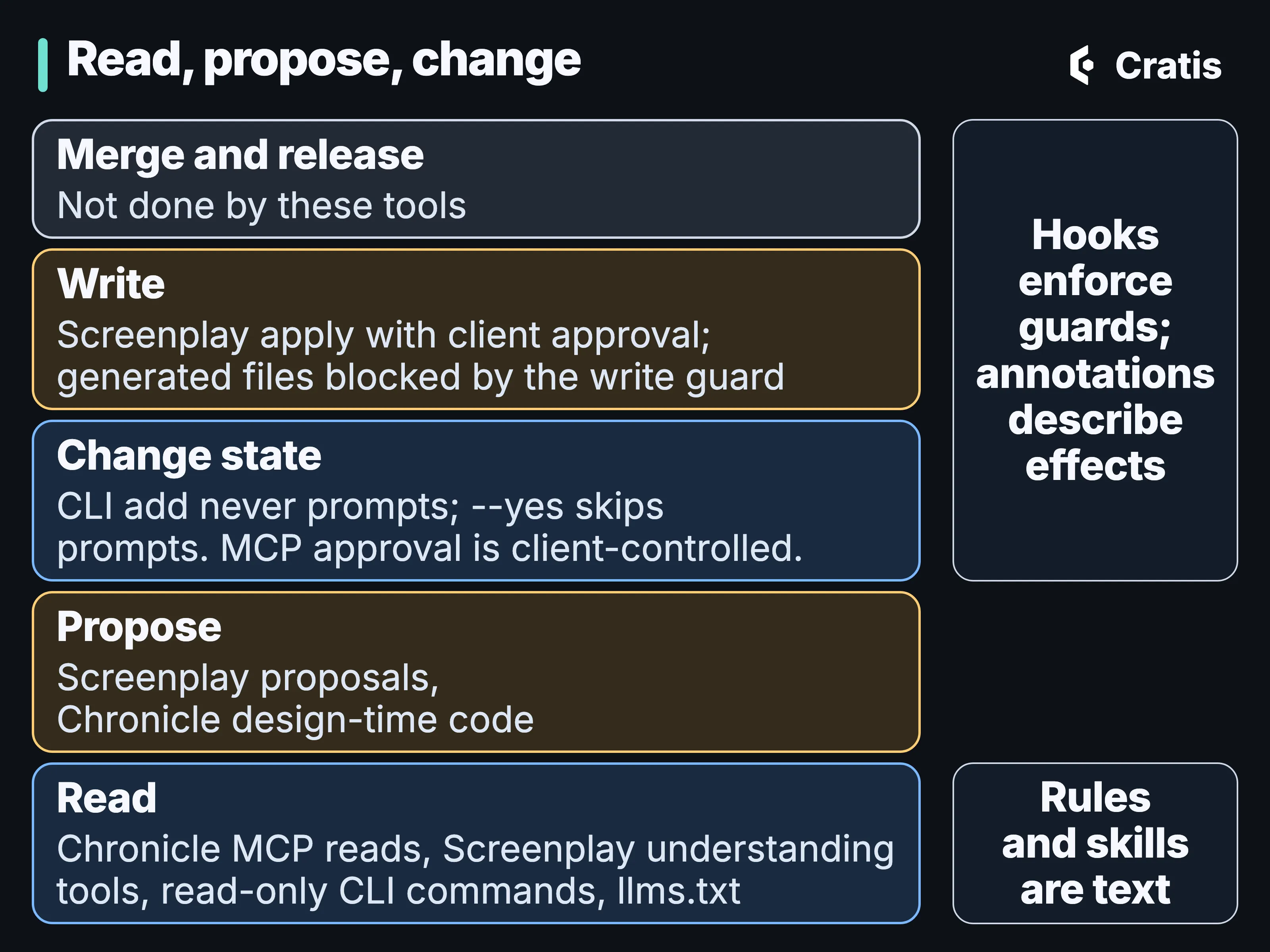
Each rung up asks more of a person.
Run it, read the log, start again
Section titled “Run it, read the log, start again”The loop closes at the event log. The model says what the system is meant to record, and the log says what it did record. An event type nothing consumes, a partition that keeps failing, or a causal trace that surprises someone is the input to the next change. None of the public tools here turns that finding into work on its own. An agent can read it, and a person decides what starts.
For the alert-to-backlog path and where it stops, see Cratis Direct and our agentic development life cycle.
The rendered vertical is narrow, and taking a second model change through to a running application isn’t proven yet, so the model anchors the code without replacing it. The hooks cover two assistants, and nothing here makes an agent’s code correct. Whether agents working this loop ship faster or with fewer defects is unmeasured. The AI assistant walkthrough shows one of these tools on a real task, including where the assistant was told not to use one.
To start, run cratis ai install in your repository for the corpus and its hooks, and cratis init to write the command catalog into your assistant’s context files.