

From script to stage · Part 17: The Cratis CLI, from diagnose to llm-context

Cratis: from script to stage, and the long run · Part 17 of 26
cratis chronicle diagnose exits nonzero when the server is unreachable or when a failed partition exists. An observer that’s far behind the tail leaves the exit code at zero, and that’s deliberate.
The Cratis CLI inspects and diagnoses Chronicle from a terminal, full-screen workbench included, and it also hosts cratis new, cratis ai, cratis screenplay and cratis render.
Installing it
Section titled “Installing it”The release binaries for macOS and Linux, on arm64 and x64, are self-contained and need no runtime. The .NET tool needs the runtime its package declares, .NET 10 or later.
brew tap cratis/cratis && brew install cratis # macOS and Linuxdotnet tool install -g Cratis.Cli # or, with .NET 10+cratis completions installAgainst a Chronicle on your own machine there’s nothing to configure. The first run writes a default context pointing at chronicle://localhost:35000, and the first chronicle command asks which event store to use by default and remembers the answer. Other servers get contexts of their own, with cratis context create and cratis context set.
Completion asks the running server. cratis completions install sets it up for bash, zsh, fish or PowerShell, and pressing Tab after a command that takes an observer, a read model or an event type asks the live server what it has registered right now.
When a view stops updating
Section titled “When a view stops updating”We built the CLI so you can ask the running system instead of comparing sequence numbers by hand. Start with diagnose. Run against a bookshop store (the sample is from an older server), it prints this:
❯ cratis chronicle diagnose
── Chronicle Diagnostics  14:18:21 ─────────────────────────────────────────────  server:      chronicle://chronicle-dev-client:***@localhost:35100/  event store: Bookshop  /  Default
  ✓  Connection            connected  ✓  Server version        16.7.0  ✓  Event stores          2 stores: System, Bookshop  ✓  Observers             9 active  ✗  Failed partitions     1 need attention  → cratis chronicle failed-partitions list  ✓  Recommendations       none  ✓  Event sequence        tail: 22
  ✗ Issues detected — review items above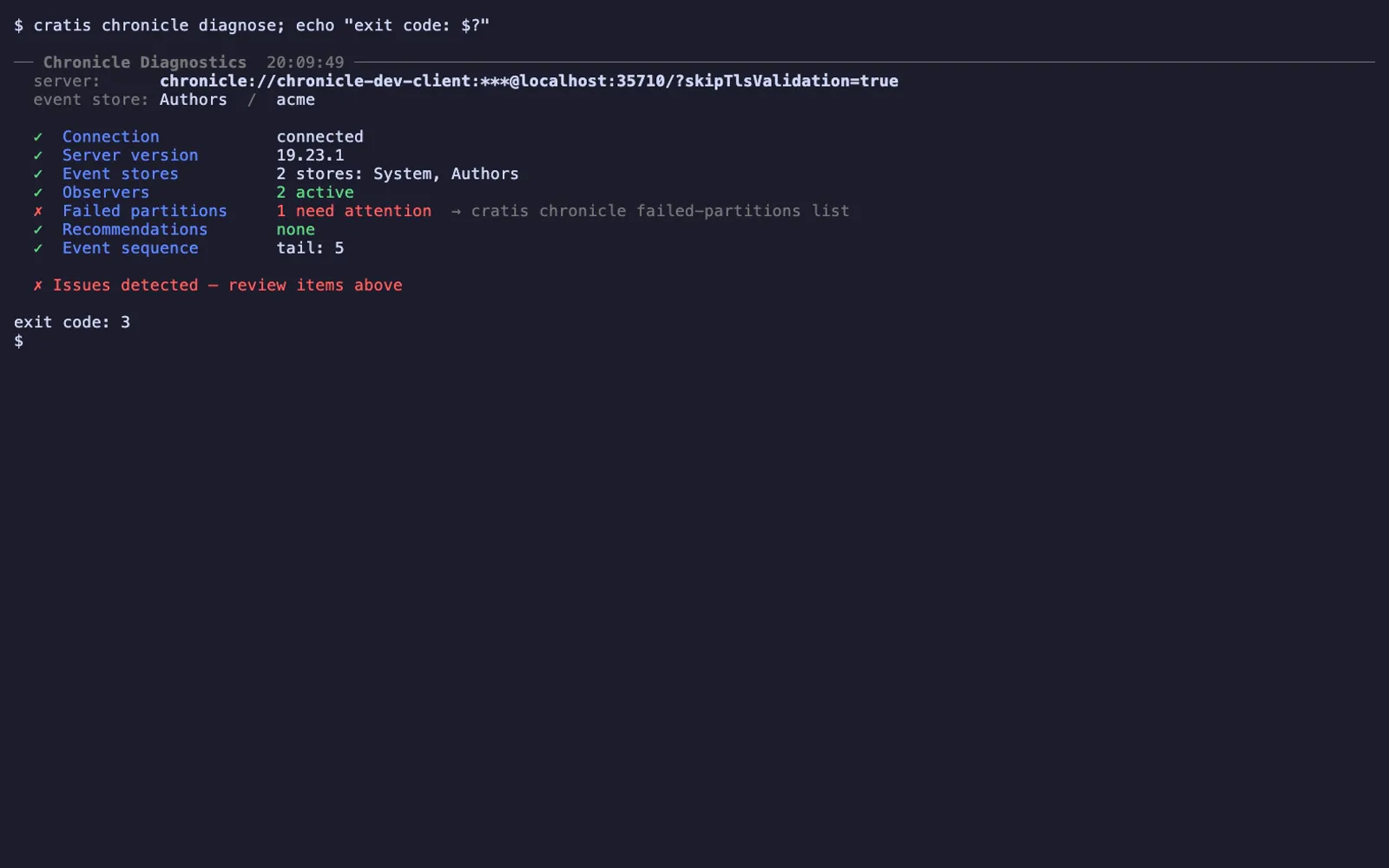
The same summary from a current server, with the author feature’s store. The exit code is 3 while a partition has failed.
The failing row names the next command, and diagnose exits nonzero when failed partitions exist, so it works as a check in a script too. failed-partitions show then gives the exception and a short stack trace for each attempt, shown here trimmed:
FailedPartition: caadc869-1251-41d0-9063-6947eaf74043Observer:        Bookshop.OverdueNoticesPartition:       978-0131177055Attempts:        5
  --- Attempt at 2026-07-28T12:17:56.6680000+00:00 (Seq# 22) ---  Exception has been thrown by the target of an invocation.  smtp.bookshop.local: connection refused  StackTrace:    at System.Reflection.MethodBaseInvoker.InvokeWithFewArgs(…)    at System.Reflection.RuntimeMethodInfo.Invoke(…)    at Cratis.Chronicle.Reactors.ReactorInvoker.Invoke(Object content, EventContext eventContext)
The partition is a book’s ISBN, because that’s the event source ID the application uses. For us it would be the author’s ID. Failures are addressed by your own keys, so you can go straight from “this author is missing” to “this author’s partition failed, and here’s why”.
Behind that is Chronicle’s failure model. When one partition fails, it stops and is retried with backoff while every other partition keeps going. After the configured number of attempts it’s quarantined until someone looks. For a failed partition that isn’t quarantined, fix the cause, then ask the observer commands for exactly one more attempt:
cratis chronicle observers retry-partition Bookshop.OverdueNotices 978-0131177055 -yA quarantined partition refuses an ordinary retry, as Year two explains. A quarantined observer also blocks retries, and the CLI exits nonzero with a suggestion when the kernel refuses. Even a success only says the retry started, so run diagnose again.
Retry the partition before you replay anything. observers replay is the bigger hammer. It reprocesses the observer from sequence zero and rebuilds its read model, and on a large store that takes time and costs something.
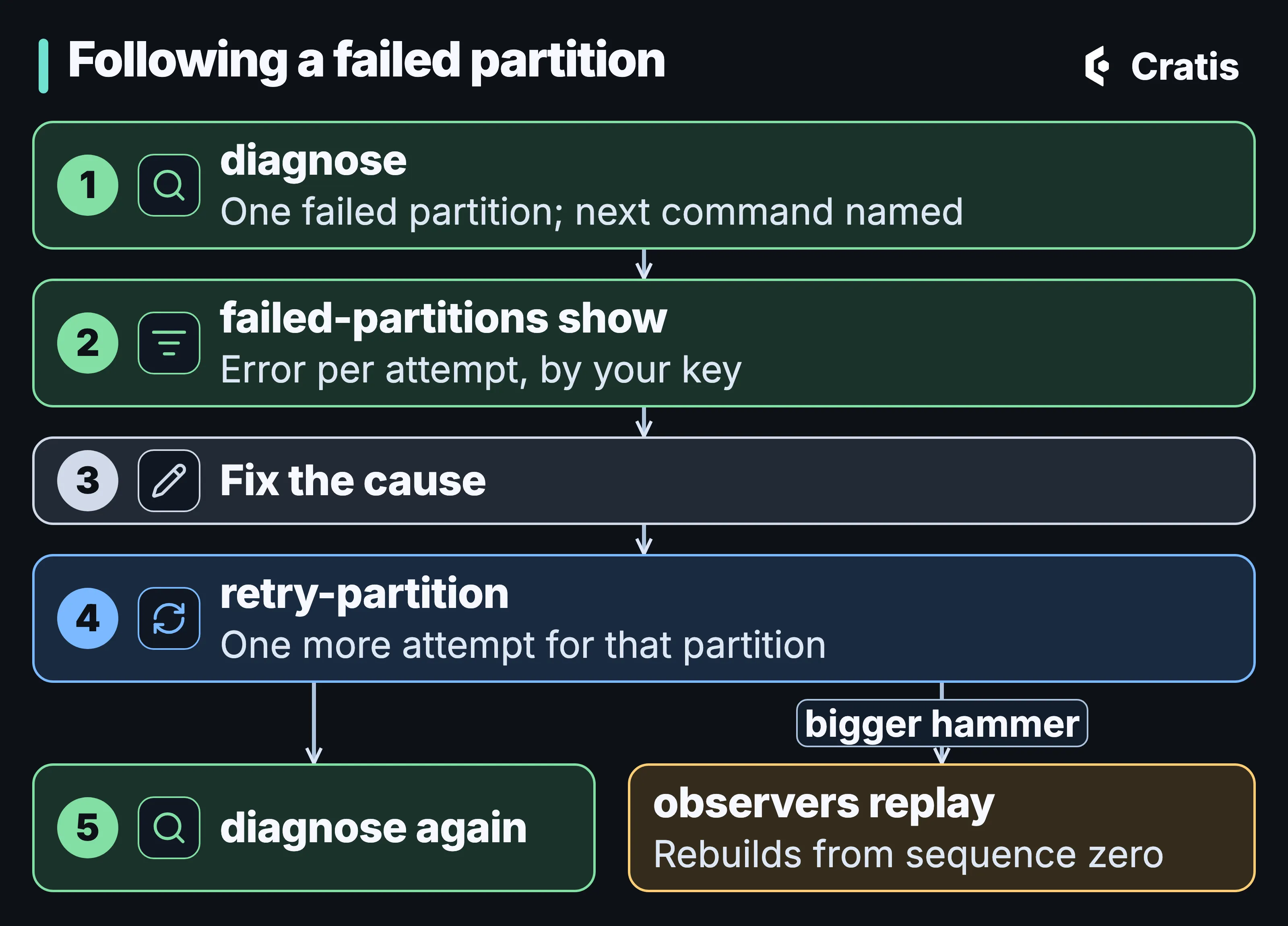
Inspect, fix the cause, retry one partition, inspect again.

The same loop in a terminal. The fix itself isn’t shown; a comment stands in for it.
The rest of the debugging kit depends on where you are:
- In a terminal on a server.
cratis chronicle workbenchopens a full-screen terminal dashboard over the same connection.Ctrl+Psearches observers, event types, projections, read models and failed partitions at once, which helps because “author” isn’t a name in one list. It’s a thread through five of them. Actions such as replaying an observer or retrying a partition sit in place, behind a confirmation dialog. Tab completion asks the live server for observer and read-model names. - In a browser. Chronicle Workbench, screen by screen covers the browser tool’s views, projection preview and permissions.
- In your editor. Narrator, a VS Code extension we still treat as experimental, browses event stores, event types, read models and observers, and pages through events. It only reads.
Reading an observer row
Section titled “Reading an observer row”cratis chronicle observers list is the table you’ll spend the most time in. From the same bookshop store:
Id Type State Quarantined Next# LastHandled# SubscribedBookshop.Members Reducer Active False 23 2 FalseBookshop.Books Reducer Active False 23 10 FalseBookshop.BorrowedBooks Projection Active False 23 18 FalseBookshop.OverdueBooks Projection Active False 23 22 FalseBookshop.OverdueNotices Reactor Active False 23 22 FalseTwo of its columns are easy to misread. Next# is the next sequence number the observer will look at, and LastHandled# is the last event it actually processed. The tail here is 22, so every observer with Next# 23 has read everything there is. Members last handled sequence 2 because nobody has registered as a member since, and nothing between 3 and 22 was addressed to it. Next# is how far an observer has read. LastHandled# is the last thing it cared about.

One more event moves the tail, Next# and LastHandled# by one. The register line stands in for registering a name in the app.
State is one of Active, Replaying, Suspended, Disconnected, Quarantined or Unknown. Disconnected means no client is attached, which usually means the application isn’t running. For a store whose application is stopped, that’s the normal state.
Past the first retry
Section titled “Past the first retry”Two flags go further than the loop above. failed-partitions show --detailed prints the full stack trace for every attempt, and failed-partitions list --observer narrows the list to one observer. The stuck-observer scenario puts them in order:
cratis chronicle diagnosecratis chronicle failed-partitions show <OBSERVER_ID> <PARTITION> --detailedcratis chronicle observers retry-partition <OBSERVER_ID> <PARTITION>Inside Chronicle explains failure kinds, retry defaults and quarantine thresholds. failed-partitions show in CLI 3.21.0 prints the messages and stack trace, not the kind. Workbench shows the same failed partitions from the browser.
A quarantined observer needs observers clear-quarantine, or Clear quarantine on the browser Workbench’s Observers page. The terminal workbench has no key for it.
When the partition’s state is wrong and not merely stuck, observers replay-partition discards that partition’s state and rebuilds it, and leaves every other partition alone. It’s the step between one retry and a full replay.
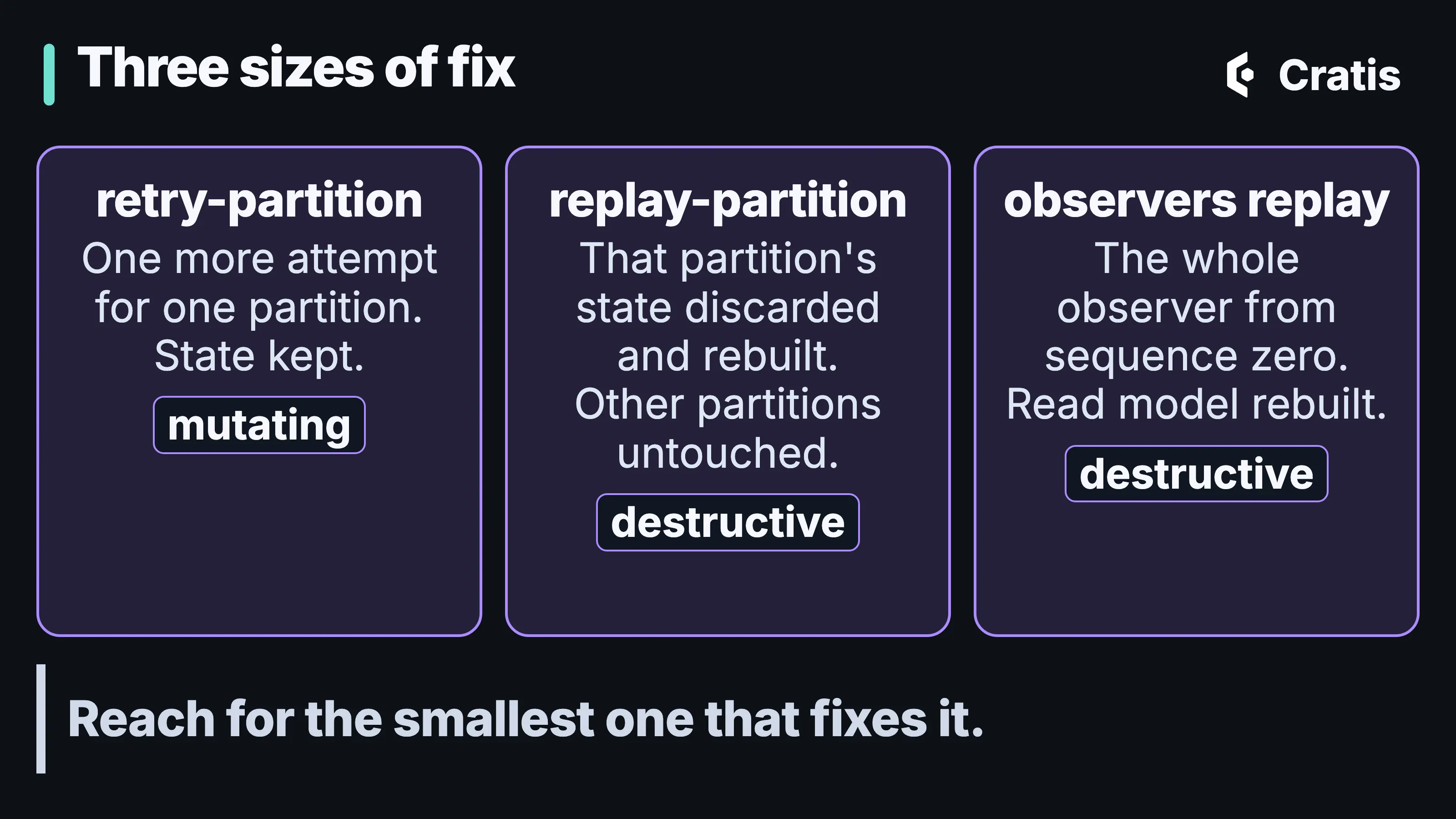
Retry one partition, rebuild one partition, or rebuild the observer.
The loop is finished when diagnose shows no failed partitions and the observer’s Next# has reached the tail plus one. diagnose --watch --interval <seconds> keeps the summary refreshing while you wait, and diagnose -o json gives a pipeline the same summary with the exit code intact.
Every command that asks for confirmation defaults to No. In a script or another non-interactive shell, it fails with a validation error unless you pass --yes, so nothing in a pipeline replays an observer because a prompt went unanswered.
After changing a projection
Section titled “After changing a projection”A deployment can leave a replay recommendation, depending on the definition change and policy described in From event to read model.
A filed recommendation appears in recommendations list, in the Recommendations row of diagnose and on the Workbench’s Recommendations page. recommendations perform carries it out, which means replaying the observer, and recommendations ignore drops it. You can also replay directly, following Replay a projection:
cratis chronicle observers list --type projection -qcratis chronicle observers replay <OBSERVER_ID> # asks for confirmationcratis chronicle diagnose --watchThe replay runs as a job, and jobs list and jobs get follow it. When it’s done, read-models instances, occurrences and snapshots show what the rebuilt Author read model holds. Jobs, scale and performance covers what the replay does in between.
The terminal workbench
Section titled “The terminal workbench”cratis chronicle workbench exists for one situation in particular. The browser Workbench is served by the server, behind the server’s authentication, and you’re on a box you reached over SSH.
It has fifteen views: Overview on its own, then Observation (Observers, Failures, Jobs, Recommendations), Events (Event Sequences, Event Types), Projections (Projections, Read Models) and Server (Event Stores, Namespaces, Applications, Users, Identities, Subscriptions). The views refresh on an interval, and it reopens on the view you left.
The terminal workbench, from Overview to the palette.
The actions sit on keys in the view where they apply. R replays the selected observer, T retries and P replays a failed partition, S and U stop and resume a job, and A and I apply or ignore a recommendation. F filters the current view, and Ctrl+E and Ctrl+N switch event store and namespace.
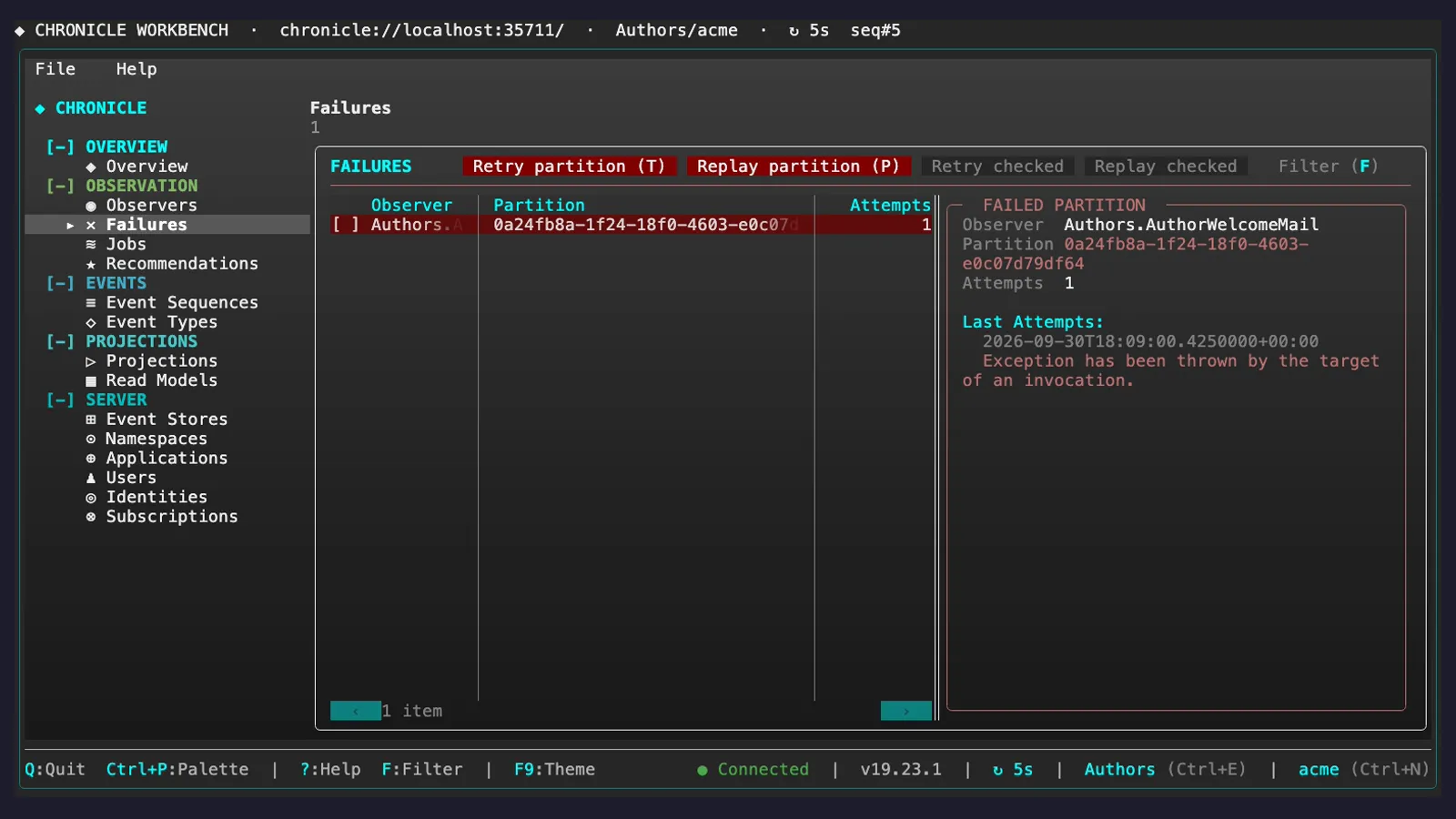
The Failures view, with the retry and replay keys on its toolbar.
For the author feature, typing “author” into the Ctrl+P palette would bring up the projection’s observer, the AuthorRegistered event type, the projection declaration and the Author read model in one list, and picking one jumps to its view with the filter already applied.
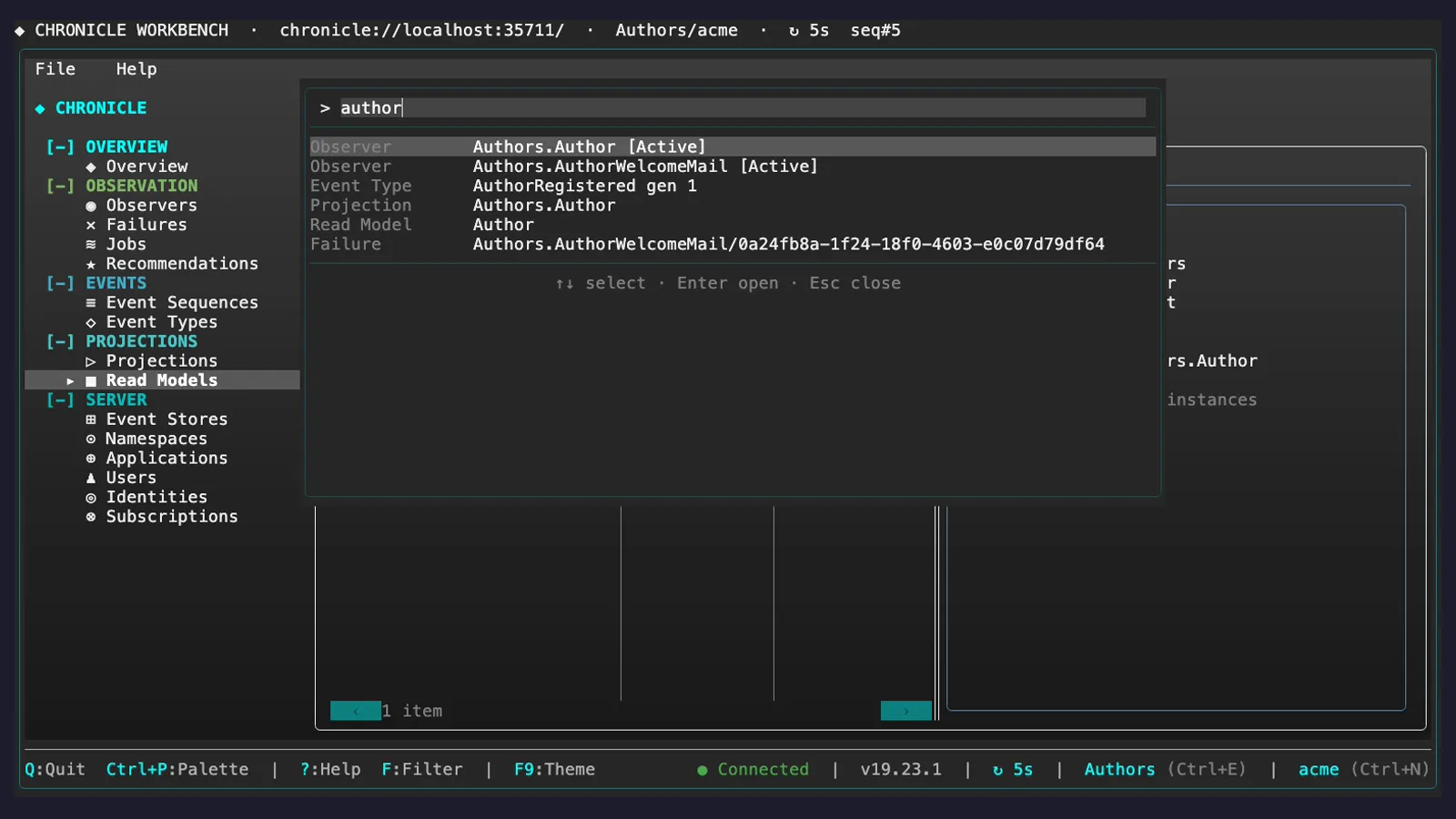
Ctrl+P with “author”: five kinds of result in one list.
Each action opens a confirmation dialog that shows only its target. The event store and namespace are in the status bar, so read them and the target before confirming, because the dialog confirms whatever is selected. The terminal workbench covers observation and jobs. It has no screens for appending, revising or redacting events, and no projection editor.
Output for scripts
Section titled “Output for scripts”The CLI picks its output format from where it’s running. An interactive terminal gets a table, redirected output gets JSON, and NO_COLOR gets tab-separated plain text. -o table|plain|json|json-compact chooses explicitly, and -q prints only identifiers, for piping into the next command.
For anything automated, pick the format with -o and pin the CLI version the script was written against. The output formats are current behavior, and they aren’t declared as a stable machine contract between versions.
A command catalog for agents
Section titled “A command catalog for agents”Once the feature runs, an assistant that helps operate it needs to know which of its actions change anything. cratis llm-context prints the CLI’s command catalog as JSON, and every command states its effect, read-only, local, mutating or destructive, and whether it requires confirmation. An agent can tell observing commands from state-changing ones without keeping its own list. cratis init writes that catalog into context files for the tools you use, and you refresh it after upgrading. When the CLI recognizes it’s running under an agent tool, it defaults to compact JSON. Only the effect and confirmation fields are meant to stay stable between versions, so pin the CLI version if you rely on anything else.
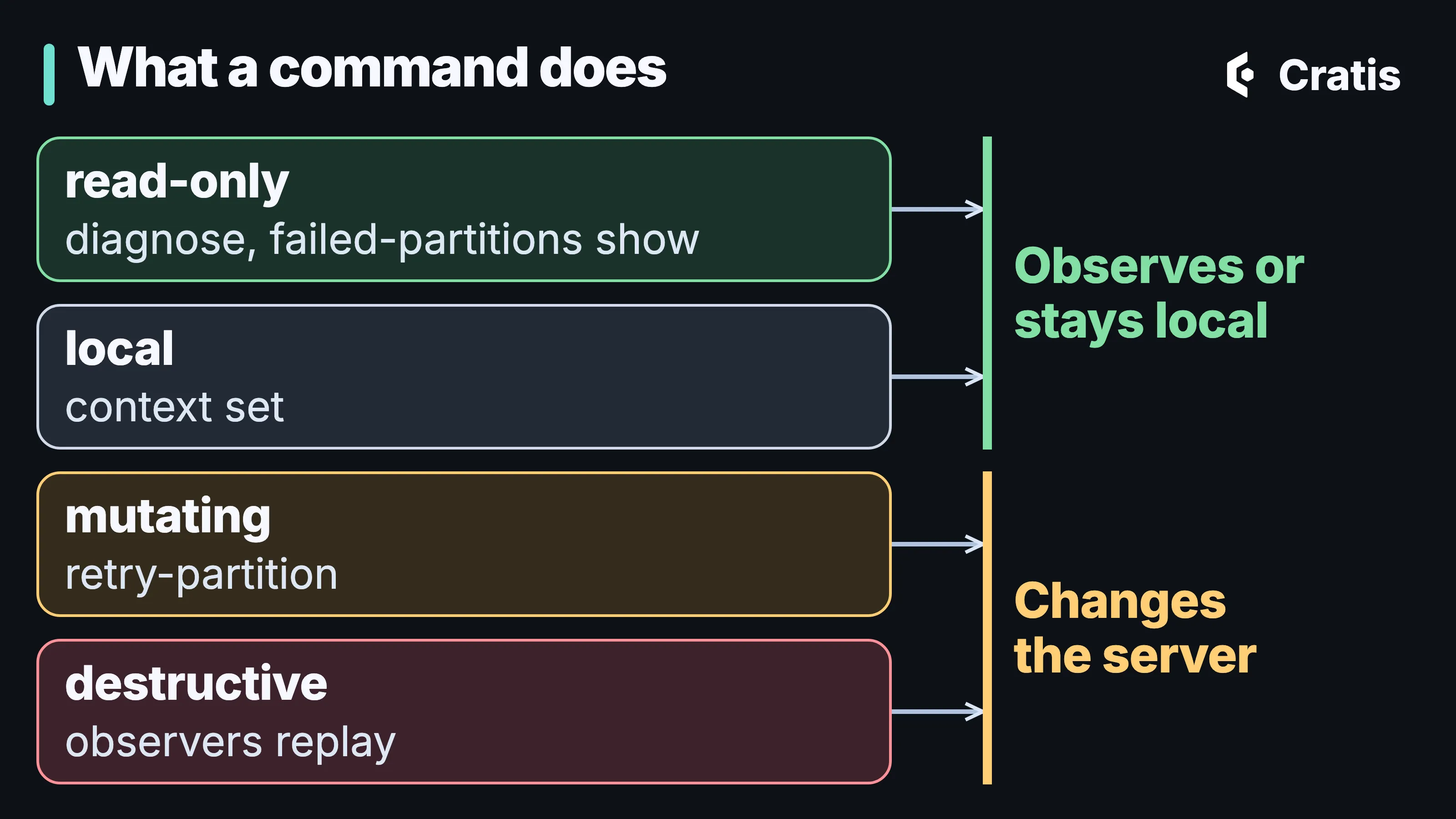
The catalog marks each command’s effect, so an agent can tell observing from changing.
Besides the effects, the catalog lists every group, command, argument and option, with connection details and guidance on output formats. An effect is the strongest change a command can make, and an option such as --dry-run can lower it for one run but never raise it. The Chronicle commands in CLI 3.21.0 carry these effects:
| Group | read-only |
mutating |
destructive |
|---|---|---|---|
observers |
list, show |
retry-partition, clear-quarantine |
replay, replay-partition, remove |
failed-partitions |
list, show |
||
jobs |
list, get |
stop, resume |
|
recommendations |
list |
ignore |
perform |
events |
get, tail |
||
read-models |
list, get, instances, occurrences, snapshots |
||
users, applications, subscriptions |
list |
add |
remove |
diagnose |
diagnose |
Every mutating and destructive command in that table also requires confirmation, except add. recommendations perform is classed destructive because it replays an observer. local covers commands that change only your machine, such as context set, login, init and ai install. cratis chronicle workbench is classed destructive as a whole, because actions can be run from inside it, and it confirms each one in its own dialog.
Some things aren’t in the catalog because the CLI can’t do them. No CLI command appends, revises or redacts an event, and there’s no jobs delete. cratis llm-context --schema prints the JSON Schema for the catalog itself, and effect should be parsed as a string, with any value an agent doesn’t recognize treated as a state change.
The label informs an agent, and it enforces nothing. An agent that can run cratis in a shell with production credentials can run observers replay there, whatever the catalog says. The confirmation default helps, since a non-interactive replay needs an explicit --yes. The Cratis AI corpus adds a guard that blocks the store-changing cratis chronicle commands it can see in an assistant’s shell commands, in Claude Code and Pi, the two assistants its hooks are wired for. AI across the stack covers the hooks, and Chronicle MCP, a separate way for an assistant to reach a running Chronicle.
cratis ai and the other groups
Section titled “cratis ai and the other groups”cratis ai installs the Cratis AI corpus, rules, skills, agents, prompts and hooks for building with Cratis, into a repository. The corpus is still in preview. It goes into .cratis/ai/ once, and each supported assistant (Claude Code, Codex, Copilot, Cursor, OpenCode and pi) gets a thin adapter that links back to that one copy. The selection is recorded in .cratis/ai.json and the installed files in a manifest with hashes. cratis ai install runs once per repository, cratis ai update re-synchronizes the recorded choice after that, and cratis ai uninstall removes the managed content you haven’t changed.
The profile is the choice that matters. cratis/application/* is for building an application on Cratis, and cratis/engineering/* is for working on a Cratis framework repository itself. install and update never touch a file you own, and they leave a managed file you’ve edited alone unless you pass --force. cratis ai status exits nonzero when managed files were modified locally, which makes it usable as a CI check. Getting started has the full selection.
The CLI doesn’t call a language model itself. cratis llm use stores model-provider settings, for Anthropic, OpenAI or a local model, that tools such as Prologue read.
Several other groups live in the same binary. cratis new scaffolds a project from the Cratis templates, in C#, Kotlin or Java, without a .NET SDK installed, and Getting started with Cratis, and the tools around it walks through it. cratis screenplay, cratis render and cratis run work on .play models and belong to the modeling tools in Screenplay and the experimental Stage and Scene. cratis prologue belongs to Prologue, experimental as well. cratis arc inspects the commands and queries a running Arc application has registered, and it doesn’t need Chronicle.
After fixing the missing author’s partition, use retry-partition for one more attempt and inspect the result. The catalog decides nothing about who runs that command. It tells a person or an agent, before they run it, that it changes the server.