

Cratis: from script to stage, and the long run · The sticky-note feature

A signed-in user registers an author, and author names have to be unique within the user’s organization. The whole feature fits on a sticky note.
In a Cratis application, that uniqueness rule is one attribute on an event. Nobody writes a lookup before the write or a lock around it, and there’s no per-tenant version of the check either. Chronicle checks the [Unique] constraint in its kernel when the event is appended, and Arc’s Chronicle integration has already given each tenant a namespace of its own, so the rule holds per organization. Register two different authors under the same name in the same second, and one of the two appends is rejected.
Shipping the feature is the short part. It then lives for years, and in most stacks even this one has a lot of moving parts.
- Sign-in, and working out which organization the user is acting for.
- An endpoint for the command, with a controller and DTOs on both sides of it, and validation written once for the server and again for the form.
- A uniqueness check that still holds when two requests arrive in the same second.
- The author’s name, which is personal data someone can ask you to erase.
- A list of authors that stays in step with what was written, and specs with something to run them against.
- Finding out in month nine why the list stopped updating, and in year two a new field and a second service that wants to hear about new authors.
- An assistant writing part of the code without having read your conventions.
Cratis has a piece for almost every line on that list. It isn’t tied to one language or one database, and event sourcing is one strand of it. Arc doesn’t require it, and Chronicle can be used without Arc.
This post walks the author feature through all of it, one short stop per moving part. Twenty-six more posts follow. Each takes one part of Cratis down to its mechanism and its limits: why no projection has run yet when your append returns, the clustering default that gives two servers two clusters, the ways a green spec proves nothing, and how Cratis Direct keeps an agent from starting issue work a person hasn’t admitted. Between them they cover every product this post names, the experimental ones included. If you just want the product list, that’s the ecosystem at a glance.
The series
Section titled “The series”- Events are facts. A message is gone once it’s sent, and a recorded fact can still feed next year’s view.
- Inside Chronicle. What the kernel does during an append, and why no projection has run yet when the call returns.
- From event to read model. One attribute turns
AuthorRegisteredinto a read model, and a reducer takes over when attributes can’t say it. - Reacting to facts. Reactors, webhooks and outbox-to-inbox subscriptions, each of which has to cope with running twice.
- Rules that hold when you write. Constraints, concurrency scopes, decision reads and aggregates, and which one we’d reach for first.
- Arc: commands and queries without the plumbing. Arc gives a record with a
Handlemethod its route, validation, authorization and the TypeScript your frontend compiles against. - Validation all the way down. Every place a rule can live, from the rules copied into the browser to Chronicle’s append, what each layer can’t guarantee, and which rejections find their way back to a form field.
- Live UIs. Queries that push updates to React, and forms that keep their button disabled until the backend’s shared rules pass.
- Cratis Components, the React layer. The author list and the register dialog built with Components 4, how a field binds to a generated command, how a taken name gets back to the Name field, and where the library stops.
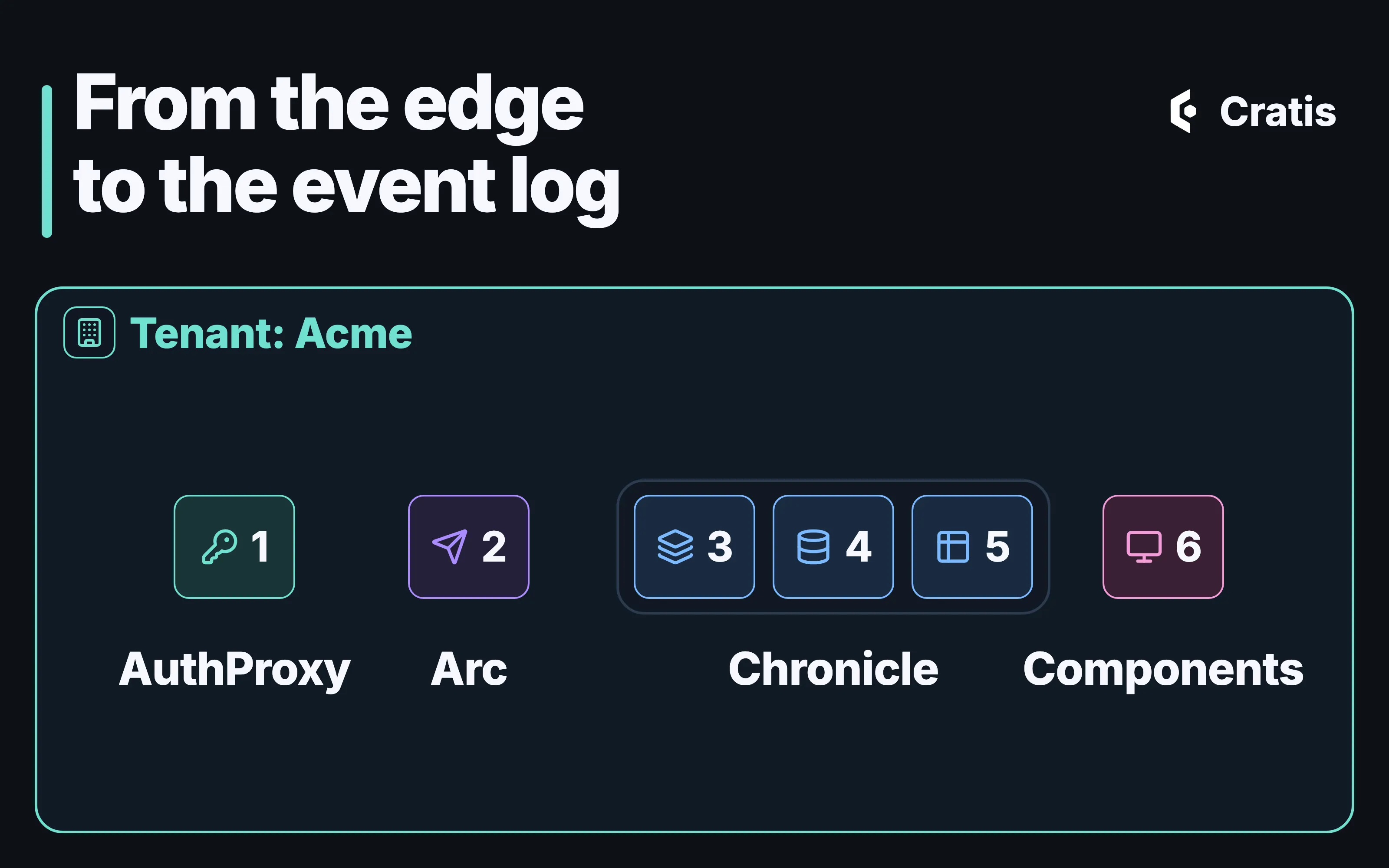
- Tenancy and identity end to end. A tenant picked at AuthProxy travels as a header Arc reads, and Arc’s Chronicle integration turns it into a Chronicle namespace. Membership is still yours to check.
- Testing with Arc and Chronicle. The ladder from a direct method call to a real Chronicle, and the ways a green spec proves nothing.
- Beyond .NET. Arc and Chronicle in other languages, four storage providers, and where each still differs from .NET.
- Personal data in an event log. Making a person’s data unreadable in an append-only log, and exactly where that stops.
- Year two. Why a new event shape, a new view, a correction and a stopped processor are four kinds of change, none of them a script against the store.
- Arc gotchas. Validation that runs in two places, a proxy folder that gets cleared, and names that do the mapping for you until they don’t.
- Workbench. The browser tool that ships with Chronicle, screen by screen.
- The Cratis CLI. From
diagnoseto a full-screen terminal workbench, and a command catalog that tells an agent which commands change the server. - Running Chronicle and a Cratis application in production. What the production image won’t start without, what a client trusts until you tell it otherwise, where a trace stops today, and the order a restore has to follow.
- Jobs, scale and performance. Replays you can stop and resume, and the clustering default that, with two servers, quietly gives you two clusters.
- Screenplay. An event model written as text that a compiler can check in CI before the application has ever started.
- Stage and Scene. A model rendered into an Arc and Chronicle application by a renderer that refuses what it can’t express.
- Prologue. A first model drafted from a running system that nobody ever modeled.
- Cratis Studio. A team and its AI agents on one event model, and a slice’s code generated into your repository.
- Cratis Direct. How a person admits agent work, what each gate records and who merges. We run our own engineering on it today, and it’s coming soon for everyone else.
- AI across the stack. The AI corpus, its hooks and the MCP servers, what each lets an assistant read or change, and the checks that run whether it listened or not.
- Getting started with Cratis, and the tools around it.
cratis new, the samples, and the supporting pieces, from Fundamentals and Specifications to Synopsis and Narrator.
One application’s life at a glance
Section titled “One application’s life at a glance”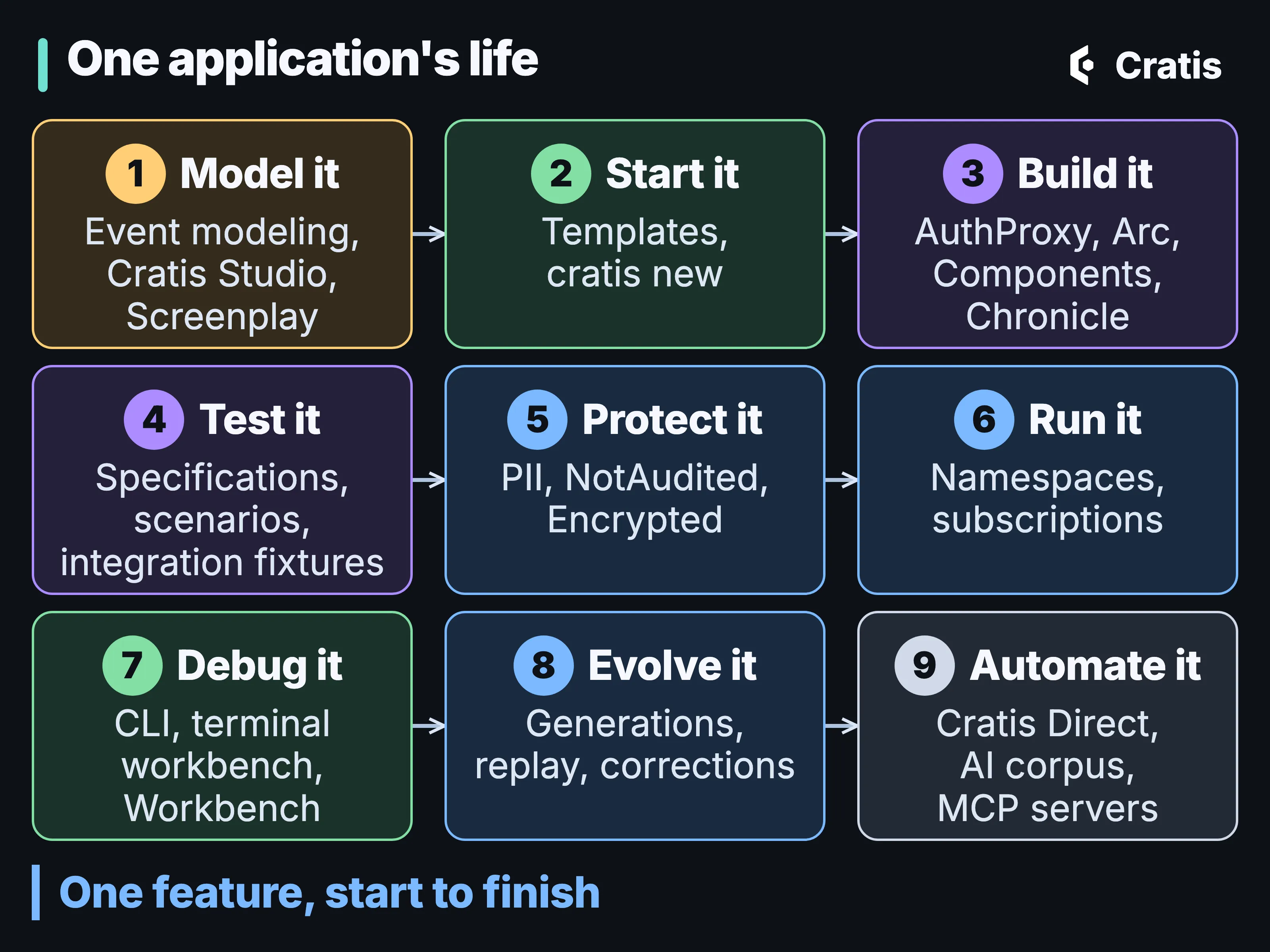
One application’s life, and the pieces you reach for at each point.
None of this has to be adopted in one go. Maturity varies widely, from released and MIT-licensed to experimental. Two of the products, Cratis Studio and Cratis Direct, are applications you use in the browser, and you don’t install them as packages. Where each piece stands near the end says which is which.
![A grid titled What you no longer write, with six rows, one per stage, and two cells in each. Each cell names what you stop writing and, beneath it, what does it instead. Model and start: drifting design docs, a validated .play file; project wiring, cratis new. Build: controllers and DTOs, Arc-routed commands; fetch wrappers, generated proxies. Data: per-field encryption, a type marked [PII]; lookups before writes, [Unique] at append. Run: tenant filters, a namespace per tenant; store-to-store relays, outbox and inbox. Evolve: repair scripts, fix then replay; store rewrites, event generations. Assist: retyped conventions, cratis ai install; hand-kept command lists, cratis llm-context.](/_astro/no-longer-write.CPPMfWVx_ZlG1KL.webp)
Two of the things you stop writing at each stage. Cells are colored by the product that does the work.
The map: products by layer
Section titled “The map: products by layer”Grouped by the question each layer answers, these are the products the author feature meets. The docs for all of them are at cratis.io.
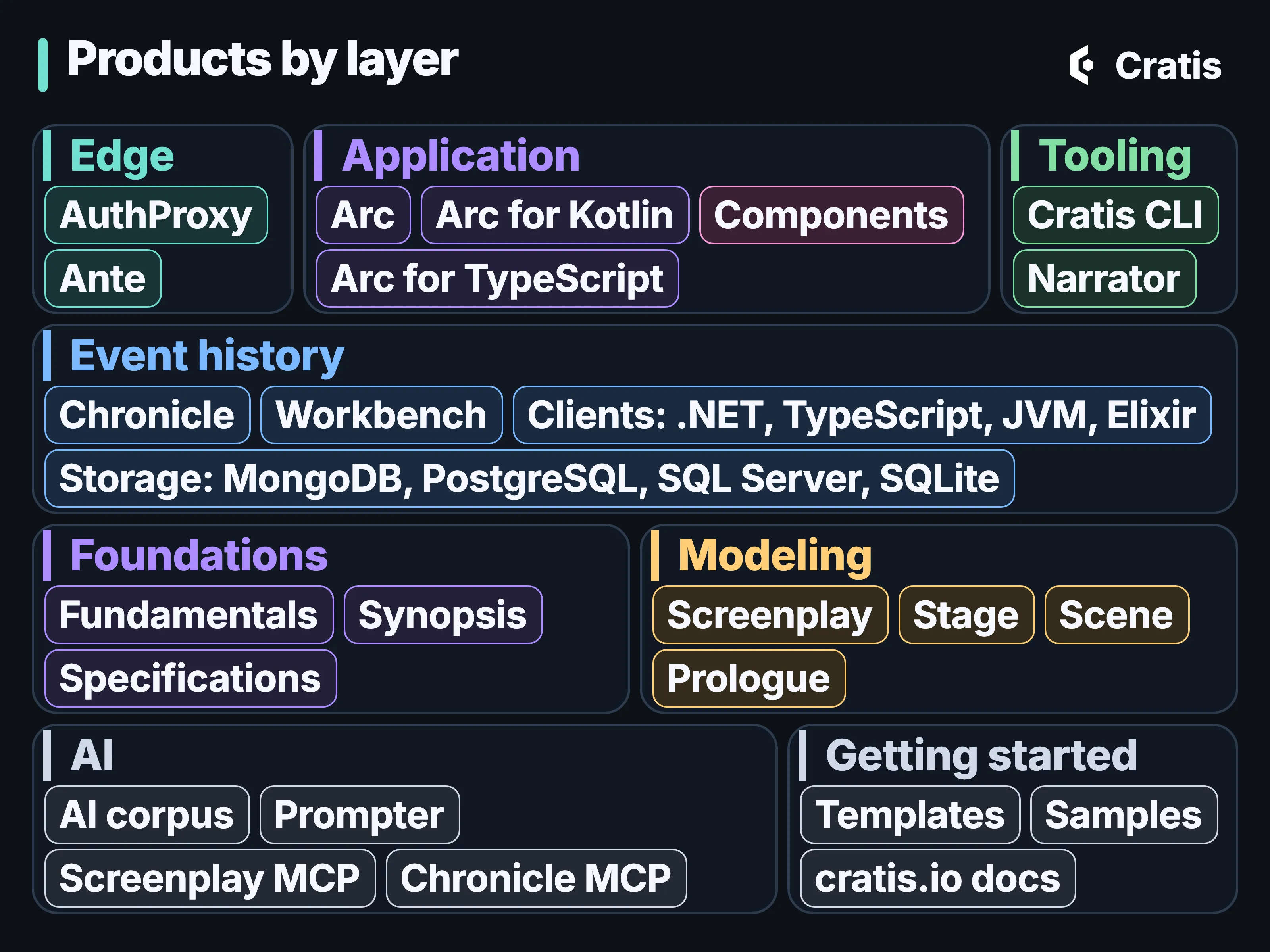
Each layer answers one question.
The figure shows the libraries and tools you install. Cratis Studio and Cratis Direct, which you use in the browser, aren’t in it.
Cratis is designed to make the right pattern the path of least resistance. It’s also a set of separate products with seams you can open.
Where the products join
Section titled “Where the products join”The author feature crosses three joins, a header, a generated proxy and a namespace mapping, and you can open, read and test each of them.
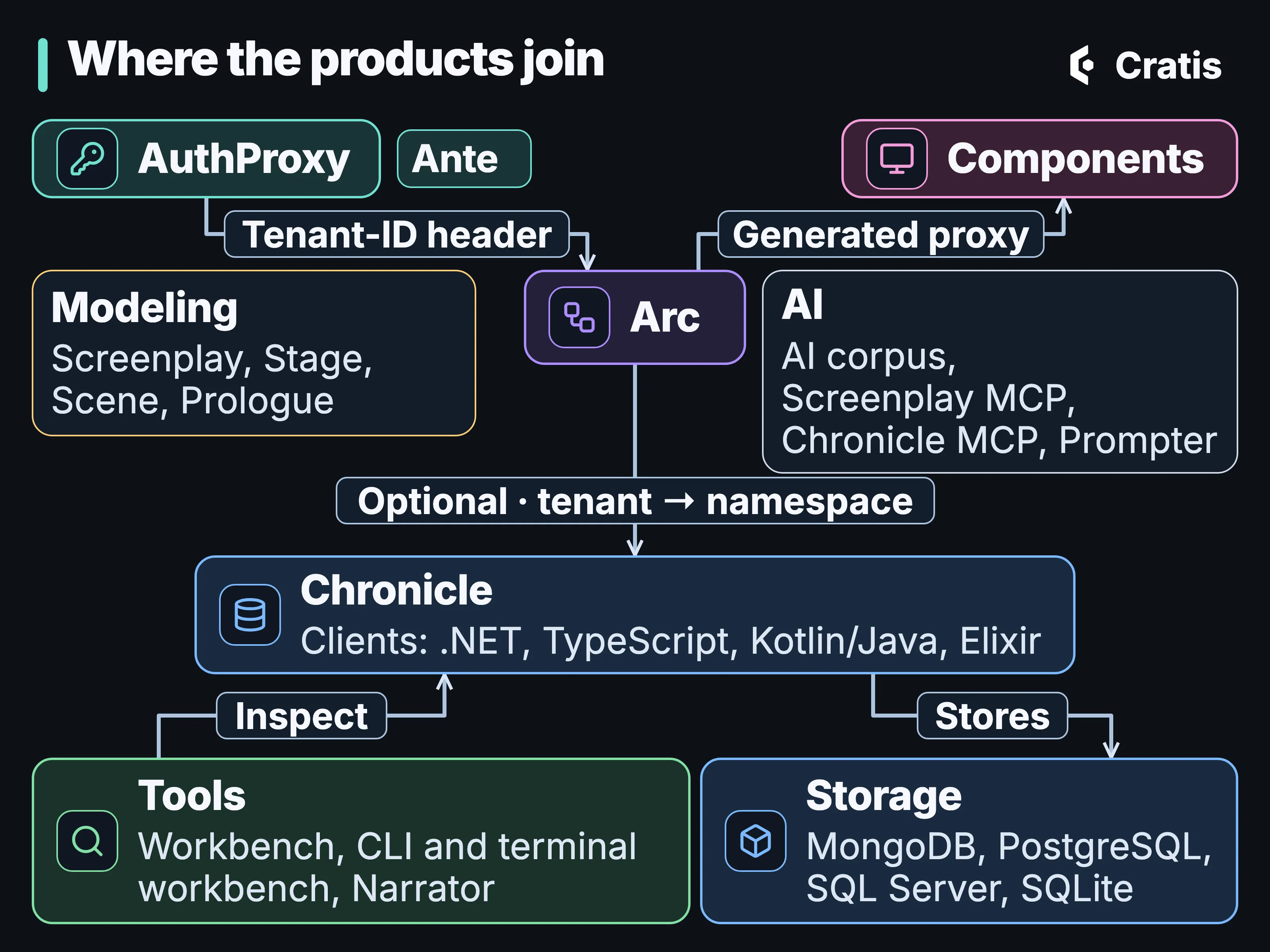
Three joins carry the author feature; the tools and storage sit around Chronicle.
A seam is also a place to stop, so take the boundary you need and leave the rest.
Model it: write the intent down first
Section titled “Model it: write the intent down first”Event modeling draws a feature as a timeline of screens, commands, events, read models and automations. For the author feature that timeline is short. A librarian fills in a form, the system records that an author was registered, and a list shows the authors.
An event model on a whiteboard stops matching the code soon after the code exists. Screenplay writes the model down as a versioned .play file next to the code it describes. Checking the model needs nothing running:
cratis screenplay validate ./plays --warnings-as-errorsIt checks the model only. Whether a renderer can build it is a separate question. The experimental Stage renderer turns a .play model into a reviewable C# application on Arc and Chronicle, for a narrow backend vertical. cratis render is deterministic, never overwrites a file it didn’t generate, never reads or touches the Customizations/ folder it leaves you, and publishes nothing if the model holds anything it can’t express. Outside what Stage renders, nothing checks your code against the model.
Most systems exist long before anyone models them, and for those Prologue, also experimental, stands beside a running system, captures selected database changes, HTTP calls and telemetry metadata, and proposes candidate slices as a .play draft. It can’t know what the events mean in your domain, so a person corrects the draft, and the metadata it captures can still be sensitive. Part 20 runs the compiler on a broken model, part 21 renders one, and part 22 follows Prologue from a live database to a draft.
Cratis Studio: the model, together
Section titled “Cratis Studio: the model, together”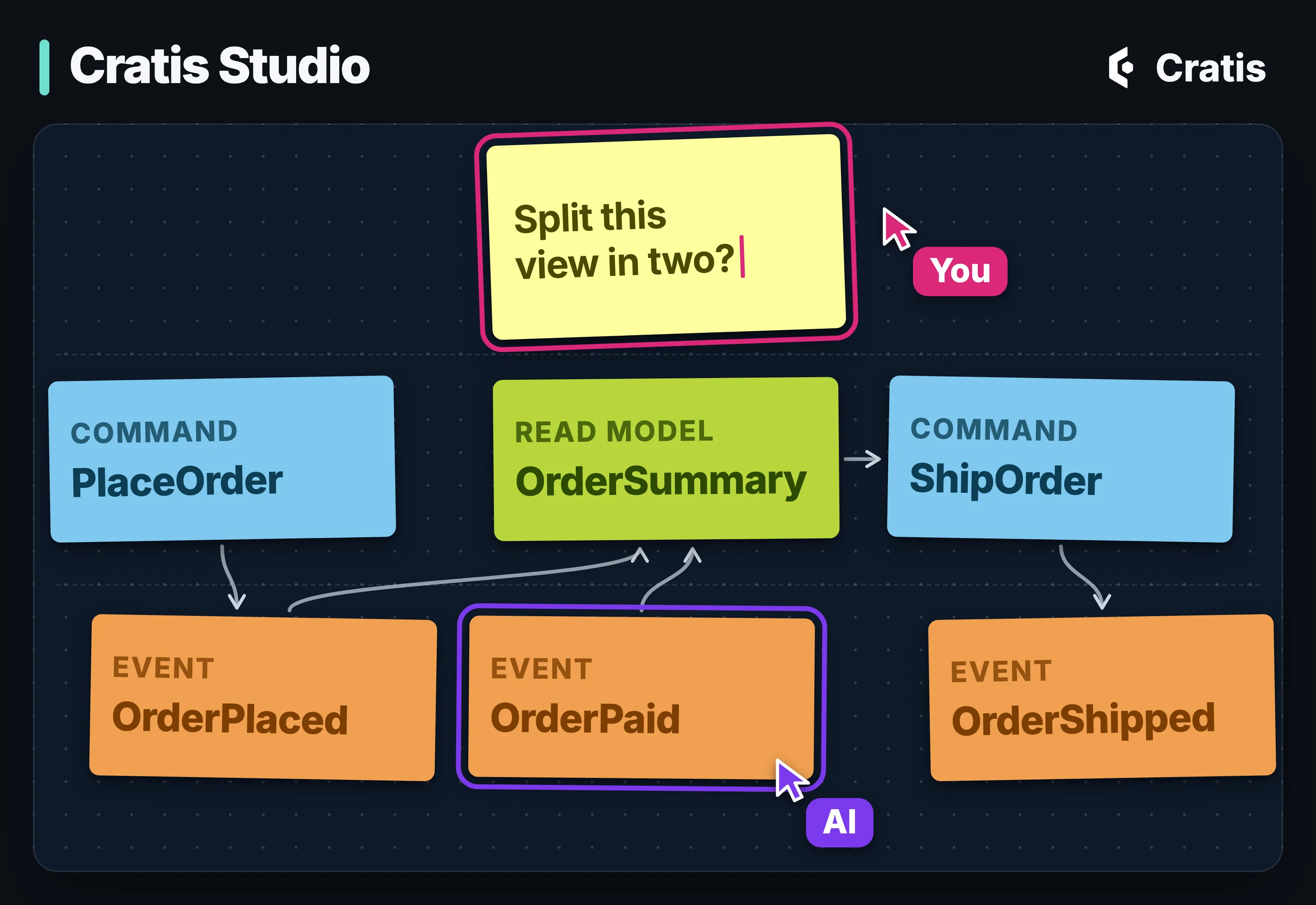
People and AI on one event model.
Event modeling happens in a room, or on a call, with a product owner, someone who knows the domain and a couple of developers arguing about what actually happens in the business. The wall of sticky notes that comes out of it usually ends up as a photo.
Cratis Studio is where that conversation can happen instead. It’s a collaborative workspace in the browser where people and AI agents design, visualize and edit the same event model, and it’s built on Chronicle and Arc. Cratis Studio is live and in beta. Open signup is coming soon at cratis.studio, with a 14-day free trial.
The team brainstorms on a shared board with live cursors, transfers the events that hold up into the event model, and exports it as Screenplay to commit next to the code. Press Play, and Studio starts a disposable Stage session so you can try the application the model describes before anyone has written it. Code generation is opt-in for each application. When a slice assigned to an AI agent is marked ready for implementation, Studio renders it through Stage into your connected Git repository. Generation goes one way, one slice at a time, and nothing reads the code back into the model. Studio uses Stage’s older direct-write path, where what the renderer can’t express is marked with a TODO rather than refused, and cratis render refuses it instead. Studio doesn’t ship a language model. Every AI feature runs on a provider your organization configures, and until one is configured the AI features stay switched off.
Start it: from nothing to a running skeleton
Section titled “Start it: from nothing to a running skeleton”cratis new creates a full-stack skeleton from the Cratis templates, in C# or on Spring Boot with Kotlin or Java, for the database you pick, with proxy generation configured:
cratis new cratis --language csharp -n MyApp -o MyAppcratis new cratis --language kotlin -n MyApp -o MyAppcratis new cratis --language java -n MyApp -o MyAppNo TypeScript template: --language takes csharp, kotlin or java.
No Elixir template: --language takes csharp, kotlin or java.
Arc recommends a vertical slice, with the command, the read model, the screen and the specs in one feature folder, so one change is one diff. Arc doesn’t enforce it.
Build it: from the edge to the event log
Section titled “Build it: from the edge to the event log”At the edge: sign-in, tenant and onboarding
Section titled “At the edge: sign-in, tenant and onboarding”AuthProxy sits in front of the backend and the frontend. It handles OIDC and OAuth2 sign-in, plus JWT bearer authentication, resolves a tenant for each request and forwards it downstream in a header named Tenant-ID. Arc reads the tenant from a header once you point it at that name, and Arc’s Chronicle integration maps each tenant to its own Chronicle namespace. Selecting a tenant isn’t authorizing it, and membership stays your rule. A user who has signed in but belongs to no tenant yet goes to Ante, a separate invitation and onboarding lobby that publishes the acceptance for your application to act on.
The command
Section titled “The command”In Arc, RegisterAuthor is a command, which means a record with a Handle method. AuthorId and AuthorName are the feature’s own types:
[EventType]public record AuthorRegistered(AuthorName Name);
[Command]public record RegisterAuthor(AuthorId Id, AuthorName Name){ public AuthorRegistered Handle() => new(Name);}@EventTypedata class AuthorRegistered(val name: AuthorName)
@Commanddata class RegisterAuthor(@CommandKey val id: AuthorId, val name: AuthorName) { fun handle(): AuthorRegistered = AuthorRegistered(name)}@EventTypepublic record AuthorRegistered(AuthorName name) { }
@Commandpublic record RegisterAuthor(@CommandKey AuthorId id, AuthorName name) { public AuthorRegistered handle() { return new AuthorRegistered(name); }}@eventType()export class AuthorRegistered { @field(AuthorName) name: AuthorName; constructor(name: AuthorName = new AuthorName('')) { this.name = name; }}
@command()export class RegisterAuthor { @key() @field(AuthorId) id!: AuthorId; @field(AuthorName) name!: AuthorName;
handle(): AuthorRegistered { return new AuthorRegistered(this.name); }}Arc for Elixir doesn’t exist; use the Chronicle Elixir client directly.
That’s the whole command. Arc gives it an HTTP route and runs validation and declared authorization on it. The handler returns an AuthorRegistered event, and the command can append the event it returns. You write no controller, no DTO and no registration list. The service code, the authorization policy and the storage stay yours.
The form
Section titled “The form”After each build, Arc’s proxy generator writes a TypeScript version of the command, and Components binds a form to it. A CommandDialog keeps its button disabled until the rules the backend shared with the proxy pass, and puts server messages on their fields. Rename Name in C#, rebuild, and the form stops compiling, so drift between frontend and backend shows up as a compile error in your own build.
The validation rules are written once, on the server, and the generator carries a supported subset of them into the TypeScript. Conditions aren’t carried over, so a rule inside one can apply unconditionally in the browser. Test the generated validation, and keep in mind the server remains authoritative. Part 7 follows a rule through every layer it can live in, from the browser to the append. A full regeneration also clears the proxy output folder, handwritten files included, which is one of the Arc gotchas in part 15.
The rule that holds when it’s written
Section titled “The rule that holds when it’s written”A uniqueness check against a read model races. Two requests in the same second both look, both see no “Jane Austen”, and both write.
Chronicle checks constraints, such as uniqueness, in the kernel when an event is appended, and rejects the append that would break one. A constraint is scoped to its event sequence and namespace, and with a namespace per tenant, the name is unique within each tenant, which is the rule the sticky note asked for.
The view
Section titled “The view”A projection turns AuthorRegistered events into an Author read model, and in the model-bound form the read model declares its own projection. This is the Author from Arc’s event sourcing walkthrough:
[ReadModel][FromEvent<AuthorRegistered>]public record Author(AuthorId Id, AuthorName Name){ public static ISubject<IEnumerable<Author>> AllAuthors(IMongoCollection<Author> collection) => collection.Observe();}@io.cratis.arc.artifacts.ReadModel@io.cratis.chronicle.readModels.ReadModel@FromEvent(AuthorRegistered::class)data class Author( @FromEventSourceId val id: AuthorId = AuthorId(UUID(0, 0)), val name: AuthorName = AuthorName("")) { companion object { @JvmStatic fun allAuthors(@FromServices queries: MongoObservableQuery): Flow<List<Author>> = queries.observe<Author>() }}@io.cratis.arc.artifacts.ReadModel@io.cratis.chronicle.readModels.ReadModel@FromEvent(eventType = AuthorRegistered.class)public class Author { @FromEventSourceId public AuthorId id = new AuthorId(new UUID(0, 0)); public AuthorName name = new AuthorName("");
public static Flow.Publisher<List<Author>> allAuthors(@FromServices MongoObservableQuery queries) { return queries.observePublisher(Author.class); }}@readModel()@fromEvent(AuthorRegistered)export class Author { @field(AuthorId) id!: AuthorId; @field(AuthorName) name!: AuthorName;
@query({ observable: true }, service(ChronicleReadModels)) static allAuthors(models: ChronicleReadModels): Observable<Author[]> { return models.observeAll(Author, author => author.id.toString()); }}defmodule MyApp.ReadModels.Author do use Chronicle.ReadModels.ReadModel
alias MyApp.Events.AuthorRegistered
defstruct id: %MyApp.AuthorId{}, name: %MyApp.AuthorName{}
from AuthorRegistered, set: [ id: :event_source_id, name: :name ]end[FromEvent<AuthorRegistered>] is the whole projection. Chronicle projections map matching property names by default, so the event’s Name lands on the read model’s Name with no mapping to write, and the instance is keyed by the event source, the author. The projection runs inside Chronicle’s kernel. The append returns before it has run, and the read model catches up afterwards, with each author’s events processed in order. When a fold needs real code, a reducer is a method that takes the event, the current state and the event context and returns the next state.
AllAuthors is an observable query, a static method on the read model that Arc also routes. The generated React client gets the current result and then supported later updates. In .NET, collection.Observe() watches the MongoDB collection the projection writes to, through change streams, so it needs a MongoDB replica set, and Arc’s MongoDB setup has to agree with Chronicle’s sink on database, collection names and keys.
Test it: the smallest test that can catch the bug
Section titled “Test it: the smallest test that can catch the bug”The decision in RegisterAuthor is a method. Call Handle(), compare the event it returns, and the decision is tested without starting a server or faking an event log. Arc’s testing guide makes that direct call the starting point for a deterministic decision:
#if DEBUGusing Cratis.Specifications;using Xunit;
public class when_deciding_to_register_an_author : Specification{    readonly AuthorName _name = "Jane Austen";    AuthorRegistered _event = null!;
    void Because() => _event = new RegisterAuthor(AuthorId.New(), _name).Handle();
    [Fact] void should_record_the_name() => _event.Name.ShouldEqual(_name);}#endif
import kotlin.test.assertEqualsimport org.junit.jupiter.api.Test
class RegisterAuthorTest { private val name = AuthorName("Jane Austen")
@Test fun `records the name`() { val event = RegisterAuthor(AuthorId.new(), name).handle()
assertEquals(name, event.name) }}import static org.junit.jupiter.api.Assertions.assertEquals;
import org.junit.jupiter.api.Test;
public class RegisterAuthorTest { private final AuthorName name = new AuthorName("Jane Austen");
@Test void recordsTheName() { var event = new RegisterAuthor(AuthorId.newId(), name).handle();
assertEquals(name, event.name()); }}import { chai, describe, it } from 'vitest';
chai.should();
describe('when deciding to register an author', () => { const event = Object.assign(new RegisterAuthor(), { id: AuthorId.create(), name: new AuthorName('Jane Austen') }).handle();
it('should record the name', () => { event.name.value.should.equal('Jane Austen'); });});Arc for Elixir doesn’t exist; use the Chronicle Elixir client directly.
An event is a record, so expecting one is an equality check on a value. The uniqueness rule isn’t in Handle(), though. Chronicle checks it at append, so a duplicate name needs the next step up. A reducer can be tested with a direct call too, by passing it an event and the current state, as the Processing sample does. A Handle() that calls a service or reads the clock is still testable, but it isn’t a pure function just because it lives on a command.
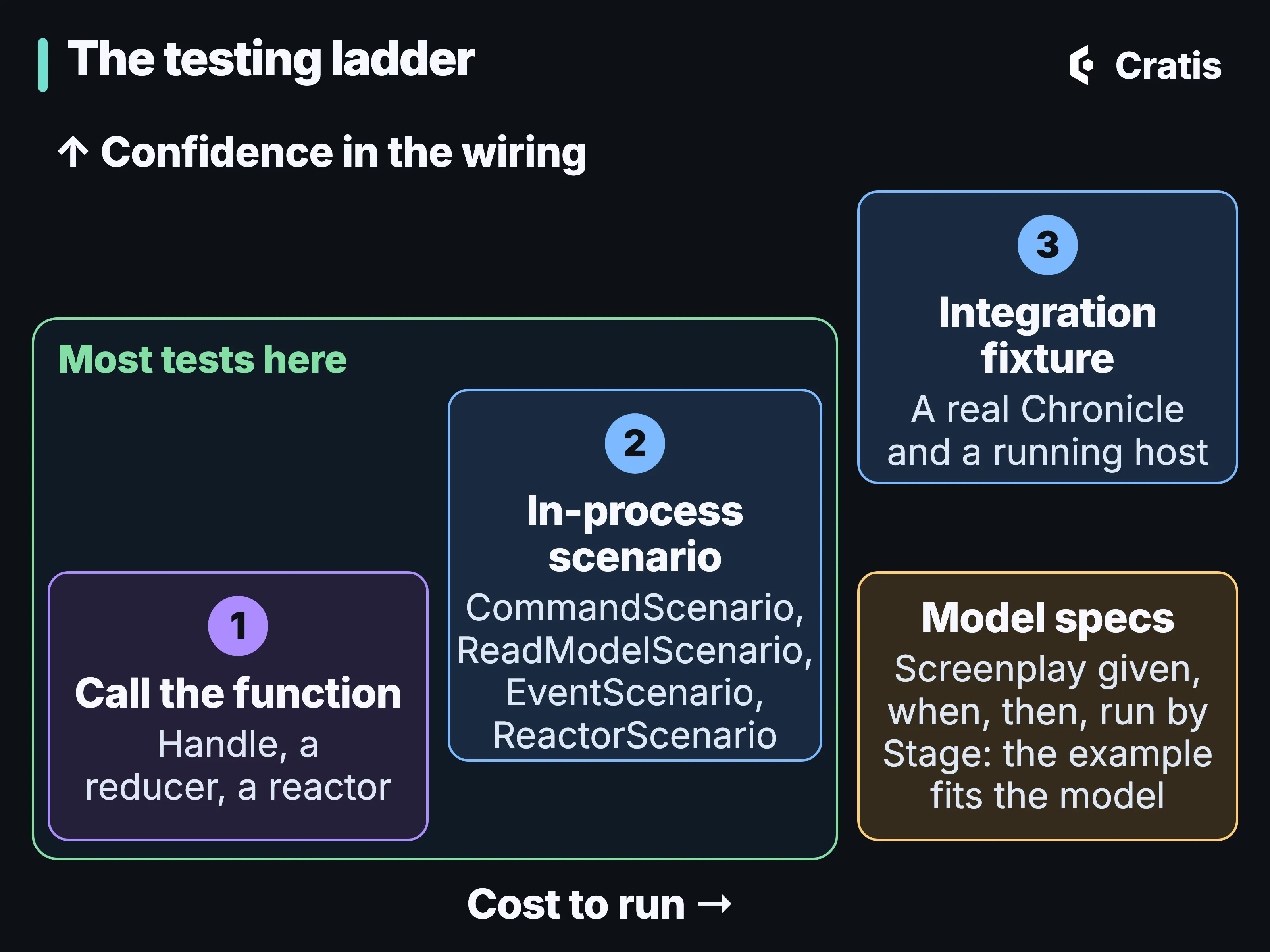
Cheapest first. Most specs belong on the first two steps.
When the rule depends on validation, authorization or the append itself, Arc’s CommandScenario runs the real command pipeline with an in-memory Chronicle event log in one process. In .NET, Chronicle’s testing package adds ReadModelScenario for projections, and EventScenario and ReactorScenario for appends, constraints and reactors. A .play slice can carry given/when/then examples that the Stage specification runner checks against the model, though not against your code. Routing, authentication middleware, real storage and redelivery need a real host, and Chronicle’s integration fixtures, which need Docker, run a real Chronicle for that.
The C# specs can all be written with Cratis Specifications, given/when/then on xUnit or NUnit, and a spec at for_RegisterAuthor/when_registering/and_the_name_is_taken.cs reads as a sentence about the feature. We’d keep most of a suite on the first two steps and save the hosted specs for the wiring, and part 11 goes through the ways a green spec can still prove nothing.
One contract, several ecosystems
Section titled “One contract, several ecosystems”The author feature is in C#, but neither half of Cratis is limited to .NET or to one database.
On the application side, Arc’s HTTP contract has three server implementations. Arc runs on ASP.NET Core in C#. Arc for Kotlin is a Spring Boot implementation for Kotlin and Java, published to Maven Central. Arc for TypeScript is an early preview of a TypeScript command and query server on Node.js, available as source only and not on npm. Each generates TypeScript proxies for the frontend, and each has gaps of its own. In C#, Arc’s queries can read from MongoDB or, through its Entity Framework Core integration, from a relational database. The Chronicle path in this post uses MongoDB.
On the event side, Chronicle has a first-class .NET SDK and clients for TypeScript, Kotlin/Java (JVM) and Elixir, and each deployment picks a storage provider: MongoDB (the default), PostgreSQL, SQL Server or SQLite. Services in one system can use different clients against the same kernel. The clients aren’t interchangeable, and they differ in places such as the default concurrency check.
Protect it: personal data, marked once
Section titled “Protect it: personal data, marked once”The author’s name is personal data. Mark its ConceptAs<T> type [PII] once, and Chronicle encrypts every event property of that type with the key of the event’s subject. With Arc’s Chronicle integration the value also stays out of the causation record. Erasure is one call:
await eventStore.PII.DeleteEncryptionKeyFor("person-42");eventStore.compliance.deleteEncryptionKey("person-42")ComplianceServiceJavaBridge.deleteEncryptionKey(eventStore.unwrap().getCompliance(), "person-42");await eventStore.pii.deleteEncryptionKey('person-42');Chronicle.Compliance.delete_encryption_key("person-42")Once the key has been destroyed, Chronicle can’t decrypt anything encrypted with it, and the event keeps its place in the log. The key belongs to a subject within a namespace, so a person in two tenants needs two erasures, and backups and copies outside Chronicle need their own handling. [NotAudited] keeps a command’s secret out of the causation record, and [Encrypted] protects an operational secret under a key that erasing a person doesn’t touch. Part 13 lists the other places erasure stops, and how a restore can undo one.
Run it: tenants and services
Section titled “Run it: tenants and services”Events, observers and read models are processed per namespace, so each tenant’s data stays apart from the edge to the store. Caller-controlled headers don’t prove membership, so check it before any tenant-scoped work, and decide what a request without the header may do: in .NET, with Arc’s default resolvers it lands in Chronicle’s default namespace.
When a Catalog service needs to hear about new authors, persistent subscriptions carry the events you put in one store’s outbox to another store’s inbox, and the events you don’t publish stay in your own log. Appending the private fact and the public event are two appends, not one transaction, so the window between them is yours to design for. Reactors and webhooks act on facts too, and both have to allow for running twice. If you run more than one Chronicle server, watch the default localhost clustering: two servers pointed at the same database each form their own single-node cluster, and nothing errors at startup.
Debug it: when a view stops updating
Section titled “Debug it: when a view stops updating”An observer that has stopped looks exactly like one with nothing to do. For the author feature, that shows up as an author who registered fine but never appears in the list. The Cratis CLI asks the running system instead of leaving you to compare sequence numbers by hand. Here’s diagnose, from the CLI’s README, against a bookshop store:
❯ cratis chronicle diagnose
── Chronicle Diagnostics  14:18:21 ─────────────────────────────────────────────  server:      chronicle://chronicle-dev-client:***@localhost:35100/  event store: Bookshop  /  Default
  ✓  Connection            connected  ✓  Server version        16.7.0  ✓  Event stores          2 stores: System, Bookshop  ✓  Observers             9 active  ✗  Failed partitions     1 need attention  → cratis chronicle failed-partitions list  ✓  Recommendations       none  ✓  Event sequence        tail: 22
  ✗ Issues detected — review items above
The failing row names the next command. failed-partitions show gives the error for each attempt by your own key, so you go straight from “this author is missing” to “this author’s partition failed, and here’s why”, and retry-partition asks for one more attempt before you reach for a full replay. Some commands change state, and being able to run one isn’t permission to use it on a production system.
Evolve it: four kinds of change in year two
Section titled “Evolve it: four kinds of change in year two”A year in, four kinds of change show up that look alike: a new shape for an event, a new view over old events, a correction to something recorded, and a processor that stopped. Chronicle has a separate mechanism for each, so each is an operation you choose instead of a script you write against the store.
Generations of an event type live side by side, with a migration you declare between adjacent ones. A wrong view is a projection fix and a rebuild from the retained events, and because the events are kept, a view you add next year can be built from events recorded today. A correction can be a reversal event, a revision that keeps the original, a redaction marker or a key erasure, and redaction doesn’t reach copies in other stores, backups or anything already read. Replays, catch-ups and event migrations run as jobs you can inspect, stop and resume. Part 14 does all four changes to the author feature.
Automate it: the life cycle when agents write the code
Section titled “Automate it: the life cycle when agents write the code”An agent can draft the RegisterAuthor command, its projection and its spec in a few minutes. Once that’s true, typing is no longer the slow part of shipping the author feature. The slow parts sit on either side of it: saying precisely what should be built, and checking that what came back is that.
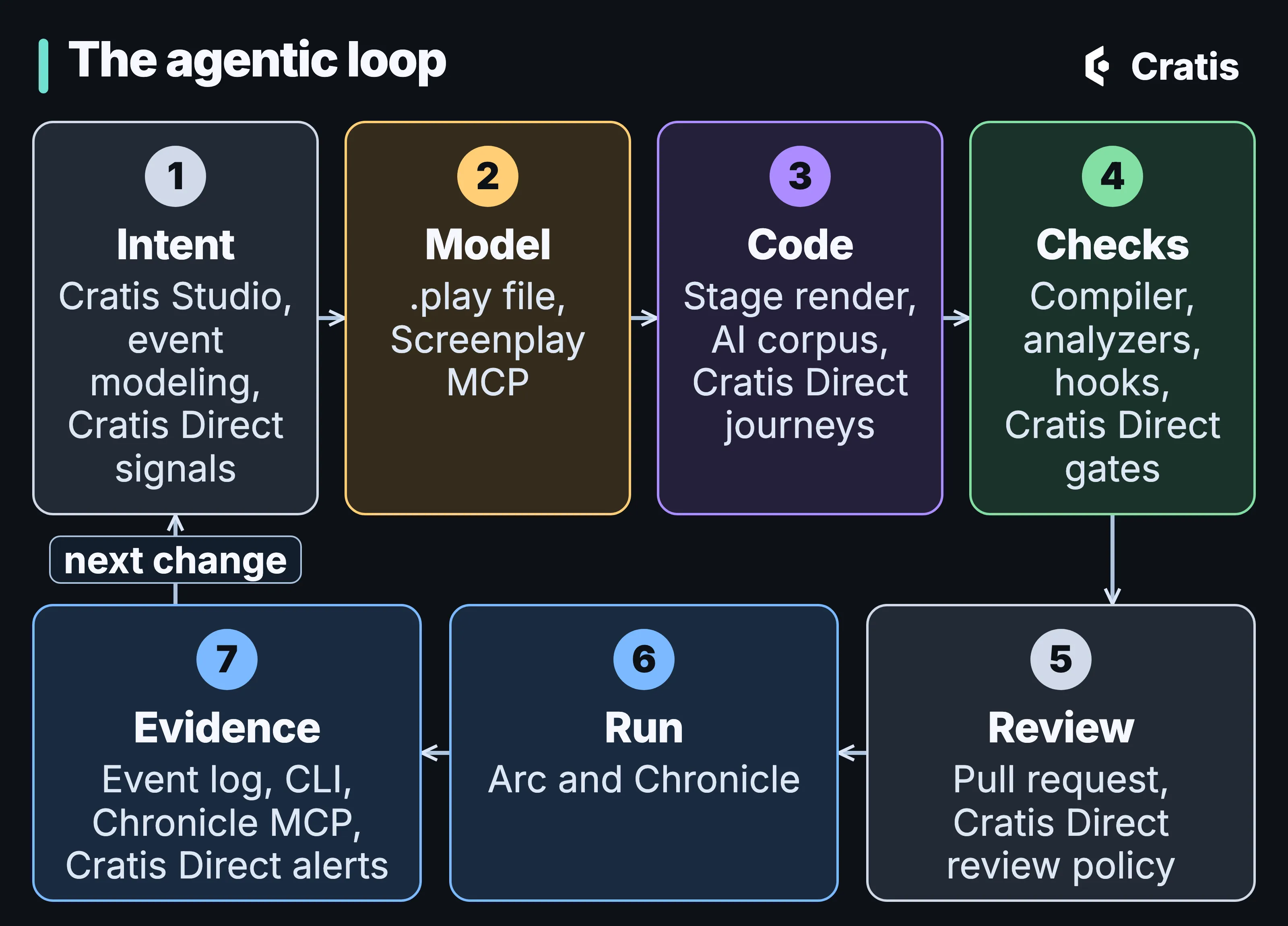
One pass around the loop, and the Cratis piece at each step.
For the saying, the .play file is a spec a compiler reads, and an assistant works on it through the Screenplay MCP server, where only an explicit apply (or workspace recovery) writes files. cratis ai install puts the Cratis AI corpus, a free, MIT-licensed set of rules, skills, agents and prompts that’s still in preview, into your repository for the supported assistants you choose. It gives an assistant context and no access to anything, and it doesn’t make its output correct.
For the checking, the compiler and the generated proxies, the Roslyn analyzers in Arc and in Chronicle’s .NET client, cratis screenplay validate and the corpus hooks check the work whether or not the rules were read. In Claude Code a quality gate runs when the assistant tries to finish. In Pi it’s a tool called at a verification checkpoint. The hooks are wired for those two assistants. Chronicle MCP lets an assistant read events, read models and failed partitions from a running Chronicle. Chronicle MCP can read personal data and isn’t read-only, so scope what you connect it to, and treat what it reads as data, not instructions. With the public pieces, whether a pull request merges is a person’s decision. We also haven’t measured whether agents working this loop ship faster or with fewer defects.
Cratis Direct: the control plane for agentic work
Section titled “Cratis Direct: the control plane for agentic work”Once agents can write code, the hard part moves. It becomes deciding what they work on, proving what they did, and noticing when the world changed underneath them. That was our problem. Agents could investigate an issue, write the change and open a pull request, across many repositories, faster than anyone could decide what they should be doing or check what they had done. So we built the system around them.
Cratis Direct is a control plane for agentic engineering. It turns repository signals into one prioritized queue of bounded AI work, checks each stage against recorded evidence, and brings the results back as pull requests. The agents do the work. Cratis Direct owns what they’re allowed to start, how far each piece of work may go, what counts as done, and the evidence of what happened.
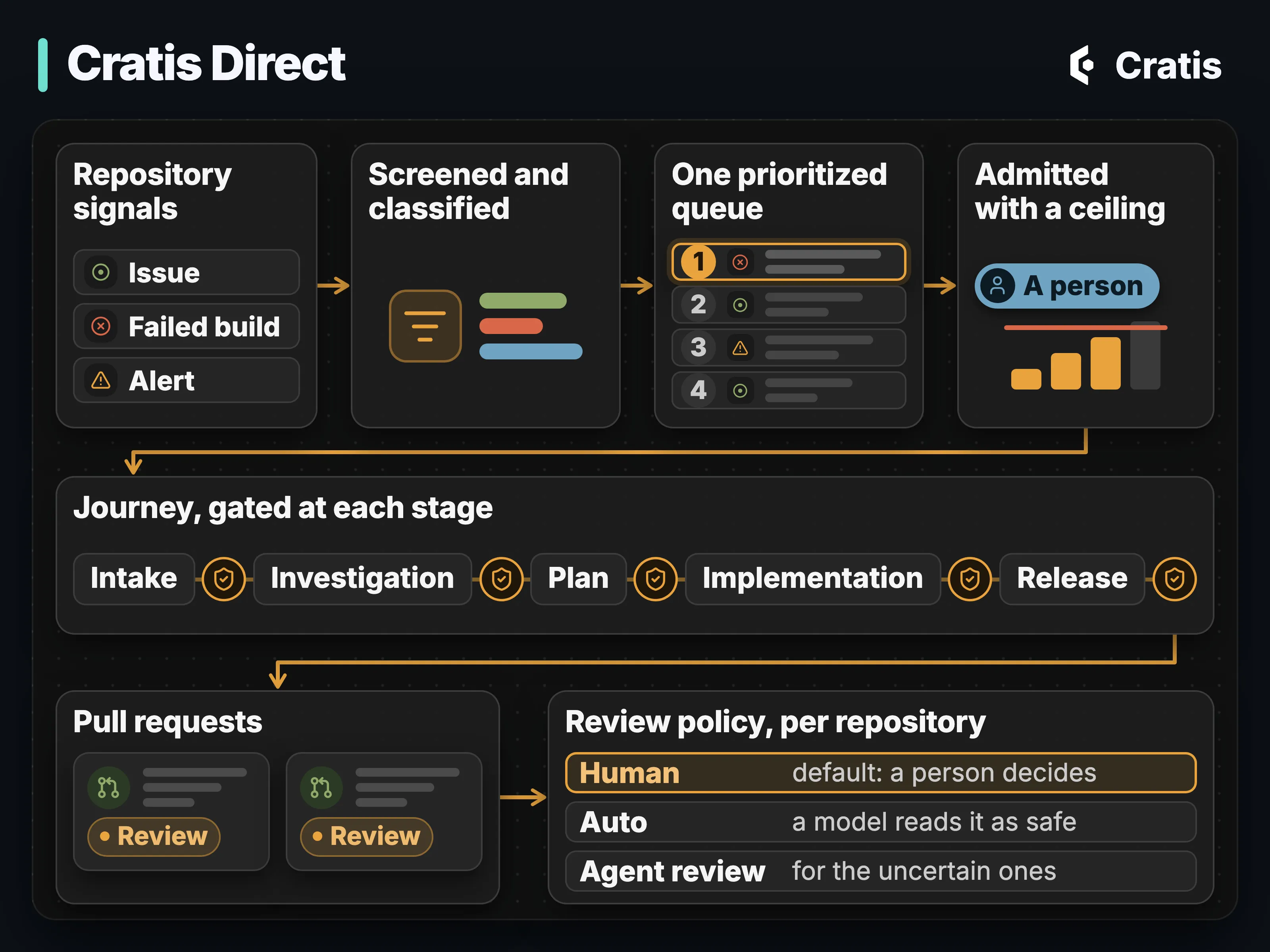
From a signal to a pull request, with a person’s admission and a gate at each step.
No issue work starts until a person admits it and sets a ceiling on how far it may go, and every stage ends at a gate that keeps its verdict, the evidence it read and the rule version. Unknown is never a pass, and an LLM rule in a gate is judgment, not proof. Who merges is a per-repository setting, a person by default. Cratis Direct can deduplicate an alert from a running system, have an agent investigate it, and hand a person the findings or turn the alert into a tracked issue. Turning an alert into a full journey isn’t built yet. It works only with GitHub.
Since the Cratis Direct GitHub app was created on 26 August 2026, it has opened 320 pull requests across 20 Cratis repositories, 238 of them merged, and filed 412 issues (as of 29 September 2026). Those are counts of what the app opened and filed. They’re activity, not outcomes: they don’t show how many went through a full journey, and we don’t have cost, defect or time-saved numbers to share. The work itself is ordinary engineering: bug fixes, dependency alignment across repositories, fixes for flaky integration tests, and, through its content journeys, blog posts and a weekly digest.
We run our own engineering on it today. For everyone else it’s coming soon: access opens in stages at cratis.direct, and the login there admits only accounts we’ve enabled.
When not to use it
Section titled “When not to use it”The strongest argument against all of this is that you can assemble every piece from well-known parts: an identity provider at the edge, a web framework, a database, OpenAPI generation for the frontend, a test runner and a diagram tool. Each part is widely understood, and you avoid tying the application to one vendor’s set of products. If your team already has those seams under control and your data’s history carries little business meaning, that’s a reasonable choice. Our answer is narrower. Adopt the boundary you need, together with its dependencies, and leave the rest of the ecosystem alone.
Some systems don’t need the event history at all. For a small current-state form where nobody needs the story of changes, use a database and keep the extra model, migrations and replay machinery out of the way. Arc works without Chronicle. Chronicle’s docs have a page on when to use event sourcing, and Screenplay is the wrong tool for a slice that’s mostly custom code.
Cratis Studio and Cratis Direct are optional in the same way. Nothing in the stack needs either, and for one repository and one assistant, the corpus, the checks above and your CI may well be enough.
Keeping facts also comes with a bill. Someone owns the old event schemas, the lag between write and read, the identity that makes side effects safe to repeat, the replay decisions and matching restore sets.
Where each piece stands
Section titled “Where each piece stands”Each product ships on its own, with its own package, releases, license and support, so you can take one without the rest. Chronicle and its bundled Workbench are MIT-licensed and self-hosted, and you can buy support from Cratis separately. For the other products, check the license in each repository.
- Released: Arc, Components, Chronicle and Workbench, the Cratis CLI, AuthProxy, Ante, Arc for Kotlin, Fundamentals, Specifications, Synopsis and Chronicle MCP.
- Live and in beta: Cratis Studio. Open signup is coming soon at cratis.studio, with a 14-day free trial. Some of its features are still preview or experimental, and its AI features stay off until your organization configures a model provider.
- Running our own engineering today, coming soon for others: Cratis Direct. Access opens in stages at cratis.direct, the login admits only accounts we’ve enabled, and it works only with GitHub.
- Experimental: Stage, Scene and Prologue, including Prologue inside Cratis Studio, and Narrator and Prompter. Syntax and behavior can still change.
- Early preview, available as source only, not on npm: Arc for TypeScript, whose Chronicle integration is experimental.
- Preview: the Cratis AI corpus and its hooks.
- .NET only today: decision reads, and Arc aggregates in the published packages. The Arc for TypeScript source preview has an experimental aggregate root.
For the company side of Cratis, who we are and how we work with teams, see cratis.no.
Try it
Section titled “Try it”Pick the moment you’re in.
- Starting fresh:
cratis new cratis --language csharp -n MyApp -o MyApp(orkotlin, orjava), then follow Build a full app. Keep each feature in one folder. With the .NET 10 SDK,dotnet new install Cratis.Templatesand thendotnet new cratisgets you the same C# skeleton. - With an assistant: run
cratis ai installfor the harnesses, profiles and languages you use, keepcratis screenplay validateand your build in the assistant’s loop, and review its work as a proposal, a model, a spec and the event log.