

From script to stage · Part 21: Stage and Scene: what happens after a model compiles

Cratis: from script to stage, and the long run · Part 21 of 26
A Screenplay model in which one event declares two generations passes cratis screenplay validate. Hand the same model to cratis render, and it reports STAGE-ESM-016, explains it with CLI-RENDER-003, and publishes nothing. The model is valid, and the renderer can’t turn it into code faithfully, so it doesn’t turn it into code at all.
Stage is the experimental part of the Cratis modeling layer that takes a compiled model somewhere. It renders the part of the model it supports into a C# application on Arc and Chronicle, boots a disposable sandbox, and runs the model’s Given/When/Then examples. Scene, also experimental, describes a user interface without describing a platform, and it’s how a screen in the model reaches React. Both are in early development.
Screenplay introduced the slice model using BorrowBook; the author feature follows the same pattern with RegisterAuthor. What happens to that slice next depends on which of Stage’s jobs you ask for, and on whether the slice stays inside what Stage supports.
One input, three jobs
Section titled “One input, three jobs”Stage reads Screenplay source, either one .play file or a folder compiled as one application. Its own JSON contracts are internal seams produced from that compile, and it doesn’t depend on Cratis Studio. Any tool can hand it the same source. It does three things with it:
- The renderer turns the compiled model into a reviewable C# application on Arc and Chronicle. It’s the job Stage puts first.
- The
cratis/stageimage is a disposable sandbox: the Stage host plus an in-memory Chronicle kernel, for poking at the modeled backend behavior Stage understands. - The
cratis/stage-specrunnerjob compiles the model, checks its specifications, writes a results file and exits.
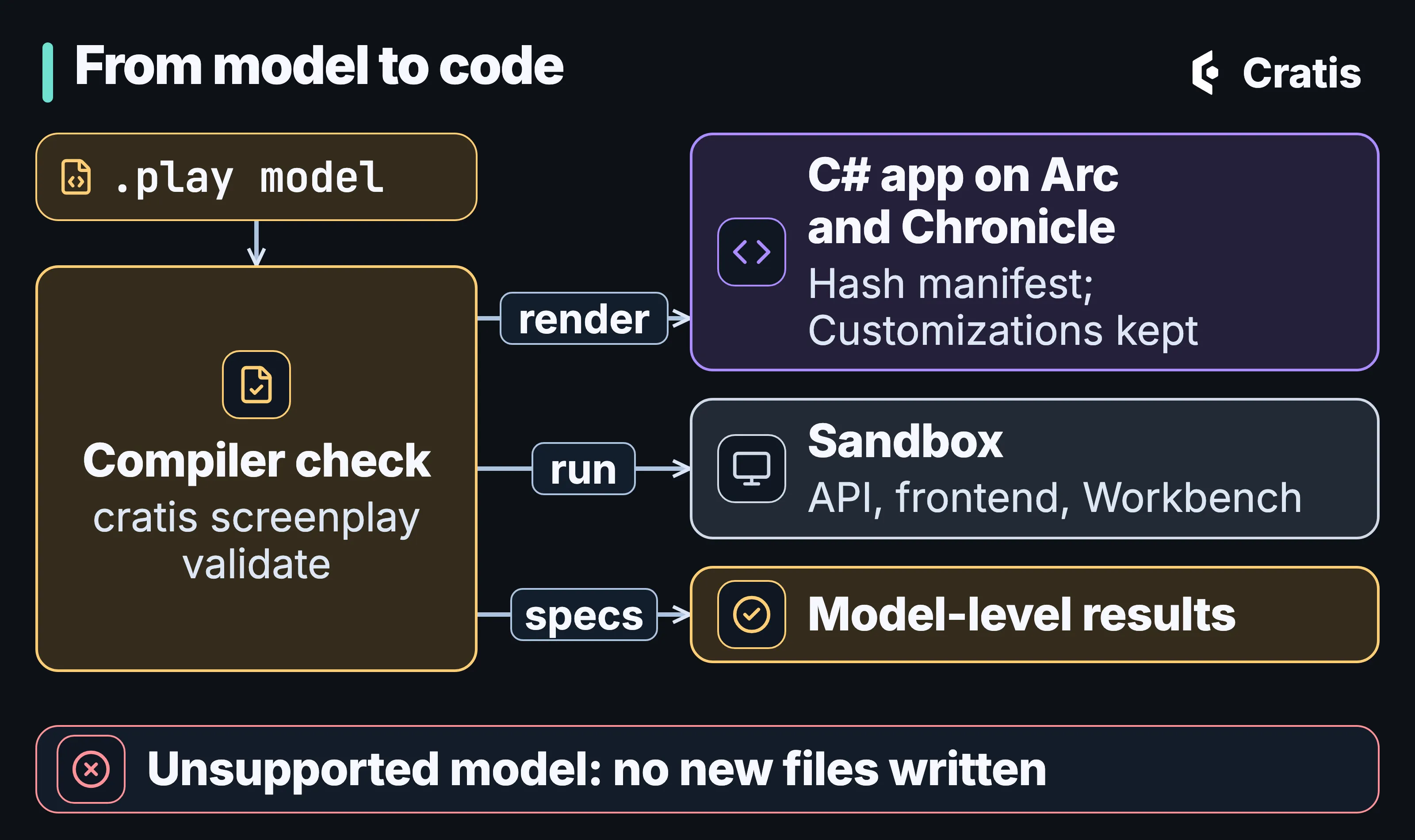
One model, three uses, and a gate that fails closed.
Rendering is planning
Section titled “Rendering is planning”The renderer keeps planning apart from writing. CratisRendering.Plan(...) returns an ArtifactRenderPlan with normalized paths, the exact bytes of every file, a SHA-256 hash for each, and typed diagnostics. Planning reads no file system, process, network, environment, clock or random source. A plan that fails carries its diagnostics and no files, and only a plan whose Success is true is published.
The CLI does the publishing:
cratis render ./plays \ --target cratis \ --destination ./out \ --name MyApplicationcratis render publishes new files only after the model compiles, binds to an executable model, is admitted for execution, plans for the target and passes artifact validation. If an earlier publication was interrupted, it recovers that first. The output is deterministic, down to a manifest that records the model’s semantic revision and the hash of every file. It refuses to overwrite a generated file you’ve edited unless you pass --force, and it never overwrites a file it didn’t generate, with or without --force. It runs no Git command. --name sets the application’s identity, while --project-name and --root-namespace change only how it’s rendered.
cratis is the only target that ships, and the renderer-target guide describes how another one would be built. A plan for a whole application holds the generated C# for concepts, commands, events, projections and specifications, a frontend shell, and eight backend scaffold files. With cli 3.21.0, an author model renders to this, scaffold files marked:
out/├── .frontend/│ ├── index.css│ ├── index.html│ ├── main.tsx│ ├── tsconfig.json│ ├── tsconfig.node.json│ └── vite.config.ts├── Authors/│ └── Registration/│ ├── AuthorList/│ │ └── AuthorList.cs│ └── RegisterAuthor/│ ├── RegisterAuthor.cs│ ├── UniqueAuthorName.cs│ └── when_registering_an_author.cs├── Common/│ ├── AuthorId.cs│ └── AuthorName.cs├── GeneratedPolicies/│ └── Policies.cs├── src/│ └── bindings.ts├── .cratis-render.json├── .gitignore├── appsettings.json # scaffold├── Directory.Build.props # scaffold├── Directory.Build.targets # scaffold├── Directory.Packages.props # scaffold├── docker-compose.yml # scaffold├── GeneratedPolicyRegistration.cs├── MyApplication.csproj # scaffold├── MyApplication.slnx # scaffold├── package.json├── Program.cs # scaffold├── scene.json└── tsconfig.jsonStage 4.22.1 renders for .NET 10 and pins Arc 22.25.0 and Chronicle 19.8.1, with Components 4.14.0, Scene 4.2.0 and Fundamentals 7.19.6 for the frontend. cli 3.21.0 renders with, and cratis run starts, Stage 4.20.0, which has the same pins. The specification runner described below is the 4.22.1 image, which you pull by tag. Those versions belong to those Stage releases, and they say nothing about which other versions work.
The generated code follows the model closely. A command implements ICanProvideEventSourceId from the property the model marks as identifier, its event is appended through the value Handle() returns, and the generated acceptance specs check both the event source ID and the payload.
What the renderer admits
Section titled “What the renderer admits”The cratis target covers a narrow backend vertical. It admits concepts and composite types, one command-to-event production path with not empty validation, the event with its mappings, a one-instance projection, an optional by-key query over a snapshot, and the model’s specifications. Anything reachable outside that is a blocking diagnostic. The renderer doesn’t leave behavior out, and it doesn’t generate TODOs.
The refusals have codes. An event with more than one declared generation gets STAGE-ESM-016. Code validations, named rule predicates and code validations on concepts get STAGE-ESM-005, because Arc doesn’t give a generated validator the received-at time in RuleContext.Occurred. A guarded production gets STAGE-ESM-006. Through cratis render, bodied reducers and opaque policies are refused as well, for now.
The renderer also admits declarative unique constraints, rendered as named Chronicle constraints, and policies whose expression requires a signed-in caller. The author feature’s unique name and its sign-in rule are both inside. A policy that checks only a role or claim, or one written as code, gets STAGE-ESM-015. For that vertical you stop typing the concepts, command, event, constraint, policy, projection, query and specs by hand, and everything outside it is still code somebody writes.
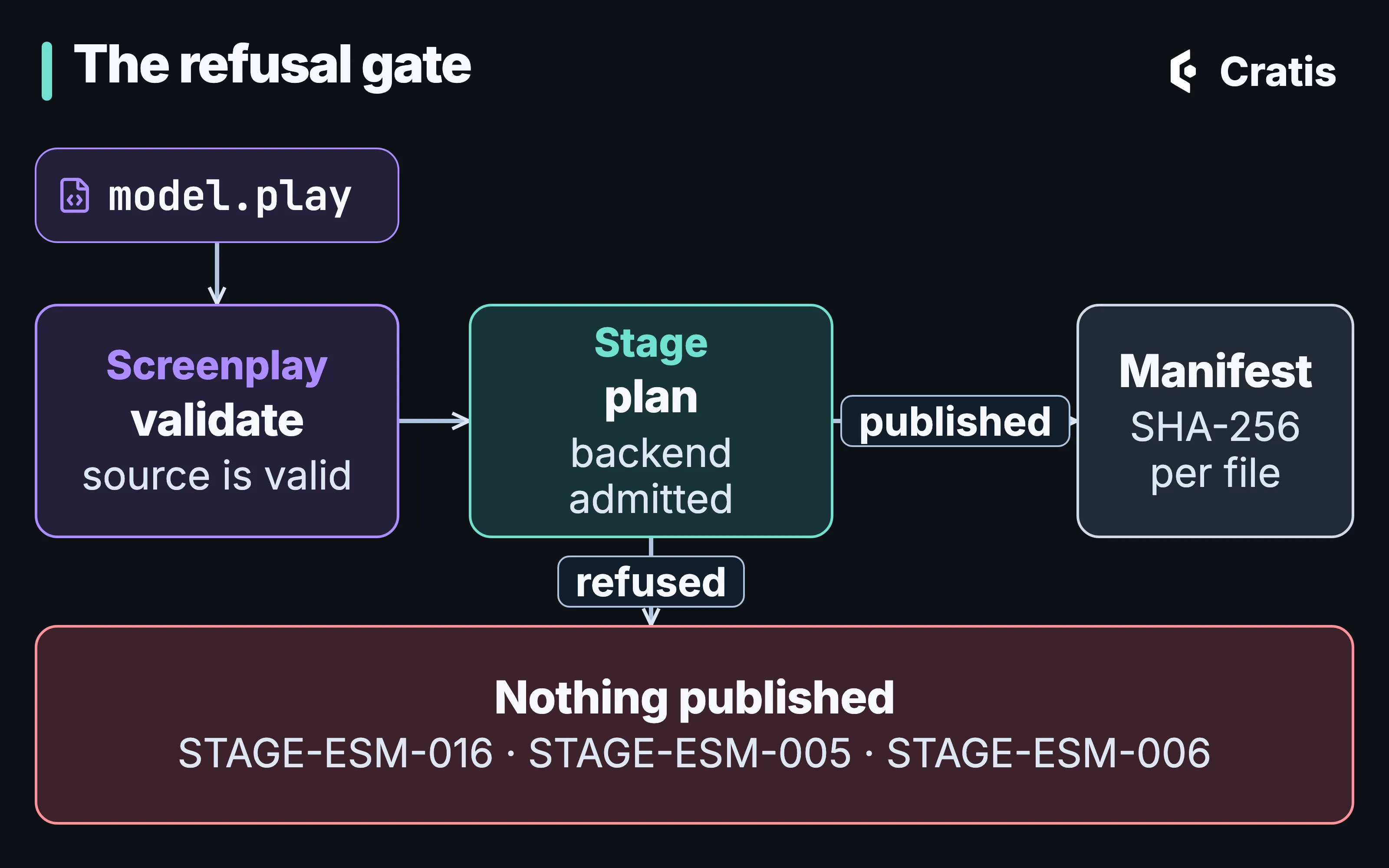
Valid Screenplay is the first gate. The renderer adds its own, and a refusal publishes nothing.
A successful render is a plan that validated. Building and running the generated code is still your step. Taking a second model change through to a running application isn’t proven yet.
Hand-written code goes in Customizations/
Section titled “Hand-written code goes in Customizations/”Every render plans Program.cs, the project file, appsettings.json and the frontend shell again, so an edit to one of them is either lost or blocks the next render. The customization guide gives hand-written code an unmanaged folder at the application root, Customizations/. The generated Program.cs ends like this:
ConfigureServices(builder);
var app = builder.Build();app.UseDefaultFiles();app.UseStaticFiles();app.UseCratis();app.MapHealthChecks("/healthz");app.MapFallbackToFile("/index.html");ConfigureApplication(app);
await app.RunAsync();
// Optional partial methods disappear when Customizations/Program.cs supplies no implementation.public partial class Program{    static partial void ConfigureServices(WebApplicationBuilder builder);    static partial void ConfigureApplication(WebApplication app);}
Customizations/Program.cs supplies either partial method, or both. The generated project imports Customizations/Dependencies.props when it exists, and the frontend loads Customizations/styles.css after its own tokens and styles. No plan contains a path under Customizations/, and the planner never reads one. A model that would generate a file there is rejected with STAGE-CRATIS-005, whatever the capitalization.
That makes the folder a seam for agents too. Code written by hand, by a person or an assistant, goes in Customizations/, and an edit to a generated file shows up as a refused render, unless someone passes --force.
A sandbox to poke at
Section titled “A sandbox to poke at”cratis run starts the model before anyone renders it. It needs Docker, mounts the file or folder read-only, and starts the cratis/stage image, pulled on first use at the Stage version the CLI renders with, 4.20.0 for cli 3.21.0:
cratis run [PATH]
  Stage API           http://localhost:9090  API reference       http://localhost:9090/scalar/v1  Chronicle Workbench https://localhost:35000                      HTTPS only
  Ready - event model 'Invoicing' as event store 'gentle-zephyr'  Press Ctrl+C to stop
The sandbox serves an API, a generated frontend and Chronicle Workbench. The Workbench port only speaks HTTPS, because Kestrel serves gRPC and HTTP/1.1 on it through ALPN, so a plain http:// request gets no reply. The certificate is a self-signed development one. The kernel stores everything in memory, so each run starts empty, and --rm removes the container afterwards. The image is built on the Chronicle kernel image, pinned to the exact development tag the host’s client was built against, because the gRPC contract changes between versions.
Calling a command appends the events its produces block maps to Chronicle and echoes the payload back. A projection translation that could be read more than one way fails at registration, and the sandbox doesn’t pick one. The sandbox doesn’t yet enforce the model’s command validation or authorization, and it doesn’t evaluate query authorization. For the author feature, that means a blank name and an anonymous caller both get through. It isn’t a production host. cratis run publishes both ports on every interface. On a machine other people can reach, run the image yourself with -p 127.0.0.1:9090:9090 -p 127.0.0.1:35000:35000, as Stage’s own Docker examples do.
Running the model’s examples
Section titled “Running the model’s examples”The specification runner is for a build pipeline. It compiles the model, checks its specifications and writes a results file, and it starts no server and needs no event store. Exit code 0 means the run completed and the file was written. A failing specification still completes the run, so a pipeline has to read the outcomes.
The model-first Library model in Cratis Samples has a specification of this kind:
slice StateChange AddBook  command AddBook    bookId     BookId identifier    title      BookTitle    authorName AuthorName
    validate      title not empty       message "A title is required"      authorName not empty  message "An author name is required"
    produces BookAddedToCatalog      title      = title      authorName = authorName
  event BookAddedToCatalog    title      BookTitle    authorName AuthorName
  specification RejectingABookWithoutATitle    when AddBook      bookId     = "69064f39-6a76-458a-8a34-088eb4752650"      title      = ""      authorName = "Mara North"    then error "A title is required"
There are two engines. The default one is structural, and it works on the model: it checks that the events and commands a specification names resolve to its slice and that the rules and expected errors agree. Each result is Passed, Failed or Inconclusive (when that kind of slice can’t be verified yet), with a note saying what was and wasn’t checked. The structural engine is deprecated, stays the default for existing users, and goes away in the next major version.
The semantic engine is opt-in with --engine semantic. It executes admitted commands through Arc’s in-memory command pipeline, with a fresh in-memory Chronicle event log for each specification. It handles Given events with an explicit source, direct when append, unconditional production, event assertions, and command authorization checked before dispatch with given caller and then denied. It also checks command rules, and unique-value and unique-event constraints before the append, which is where the author feature’s “same name twice” example belongs. Flat and event-source-keyed projections and snapshot queries by identifier are covered too.
Each semantic result is Passed, Failed, Unsupported or Cancelled. Given read models, conditional production, implicit identity allocation and external effects come back as Unsupported, with the kind, the construct and the reason, and an unsupported case never counts as a pass. It all runs in memory. Nothing in a released Stage runs a .play specification against the generated application on a live Chronicle.
Scene: a screen that isn’t React
Section titled “Scene: a screen that isn’t React”Scene separates what a screen is from how it’s drawn. It has three layers, and a blueprint around them:
Scene.Modelholds screens, layouts, forms, contribution points, UI profiles and themes (NuGetCratis.Scene.Model, npm@cratis/scene.model).Scene.Enginewalks that graph and resolves its data, action, form and navigation bindings, and drives whichever renderer is plugged in (@cratis/scene.engine).Scene.Reactis one renderer (@cratis/scene.react).- A blueprint supplies the application around the screens, meaning layouts, screen and dialog templates, shell components and themes, built from declared packages, and an application selects one.
Each layer knows only the one above it. The model has no URL, CSS class, React type or HTTP verb in it. The engine imports no UI framework and never touches window, so “entering this screen runs that query once” can be a unit test instead of a browser test. The renderer is the only place a URL is built, and the model only says “navigate to” a screen. Only Stage knows what an Arc endpoint is. React is the only renderer today. Native and desktop renderers are reserved positions, and vendor component packages are adapters to the renderer contract.
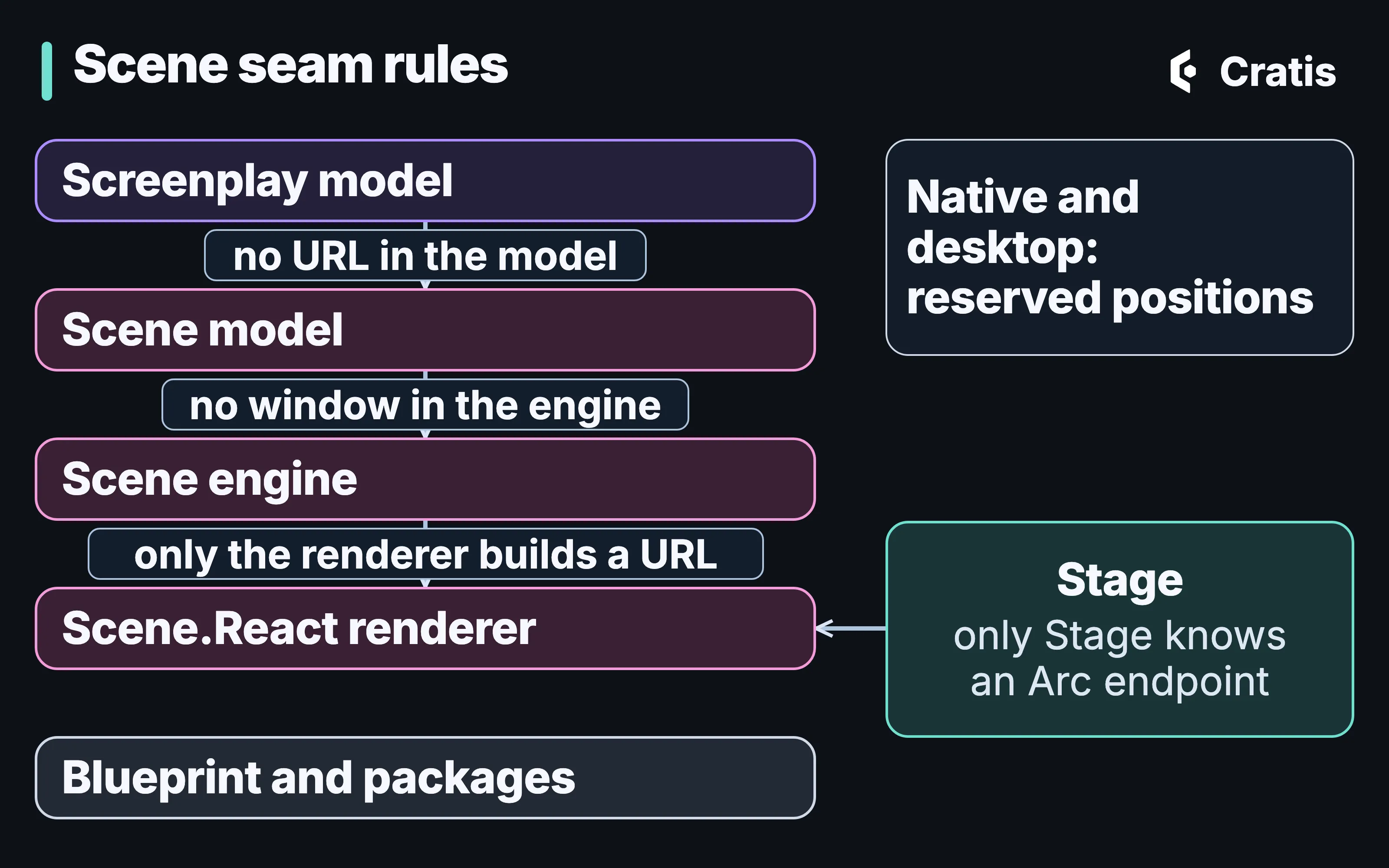
Each layer knows only the one above it.
In a .play file, a screen lives in a StateView slice. The lending example from Screenplay declares its screen at the level of intent, with the data and the query it comes from:
screen OnLoan data OnLoanReadModel[] via query BooksOnLoanA screen can add named sections, tables and summaries that fill a screen template’s slots, or drop down to a template with inline code. It never names the layout. A UI profile picks the shell once per build, which keeps the screen portable between targets.
Stage resolves a render plan for each target from the UI profile, using Scene.Engine’s own rules, so the plan and the running application can’t disagree about what a screen resolves to. When a target doesn’t fully resolve, the plan says so with IsComplete set to false.
In the sandbox, the host serves a browser bundle at /, fetches the Scene translation from /stage/scene (produced from the same compile as the runtime model) and draws it with @cratis/scene.react. A model without screens gets query views and command forms built from the Arc routes. Commands with string or GUID values get inputs named after the proxy’s properties and a submit action, and a combination the sandbox can’t handle shows a diagnostic instead of a partial form. Screens you’ve written take precedence. Layout and template composition, data from queries and command forms are all still growing.
The model is checked for the wire shape of its screens. Nothing verifies that every component and binding resolves, and a native build doesn’t prove that a browser can submit a command and read the result back. Live UIs covers the React side you write by hand today.
Stage inside Cratis Studio
Section titled “Stage inside Cratis Studio”Cratis Studio, live and in beta, uses Stage in two places. Play runs the model in a disposable Stage session, which is for exploring and not for hosting. When a slice is assigned to an AI agent, Cratis Studio can render it through Stage into C# for Arc and Chronicle in a connected Git repository, commit the result, and optionally let the agent refine it. Code generation is opt-in for each application. It goes one slice at a time, through Stage’s older direct-write path instead of the planned render cratis render uses. Cratis Studio goes through both.
Stage’s vertical covers the author feature’s basic command with its validation and sign-in policy, event, unique-name constraint, projection and by-key query. The executable model refuses compliance-marked concepts (PLAY0268), so the name’s personal-data handling stays outside that vertical and its [PII] marking is still yours to write. The C# for anything Stage refuses still goes in Customizations/ or beside it, written by a person or an agent.