

From script to stage · Part 14: Year two

Cratis: from script to stage, and the long run · Part 14 of 26
When a Chronicle client appends an event in the old shape of its type, the kernel stores the new shape next to it. Append the new shape and the kernel stores the old one as well, translated back. Two services written a year apart can share an event type, each reading the generation it was built against, and nobody runs a migration script over the store.
That’s one of four kinds of change a system meets after launch. Take a made-up but ordinary year for the author feature and the book catalog beside it. The catalog team wants each book’s subtitle in a field of its own. Someone wants a new list of authors on a screen that didn’t exist at launch. Support finds one author registered with a misspelled name. And the reactor that sends welcome mail has stopped on one author and stays stopped.
Four kinds of change
Section titled “Four kinds of change”A year in, four kinds of change show up that look alike: a new shape for an event, a new view over old events, a correction to something recorded, and a processor that stopped. Chronicle has a separate mechanism for each, so each is an operation you choose instead of a script you write against the store.
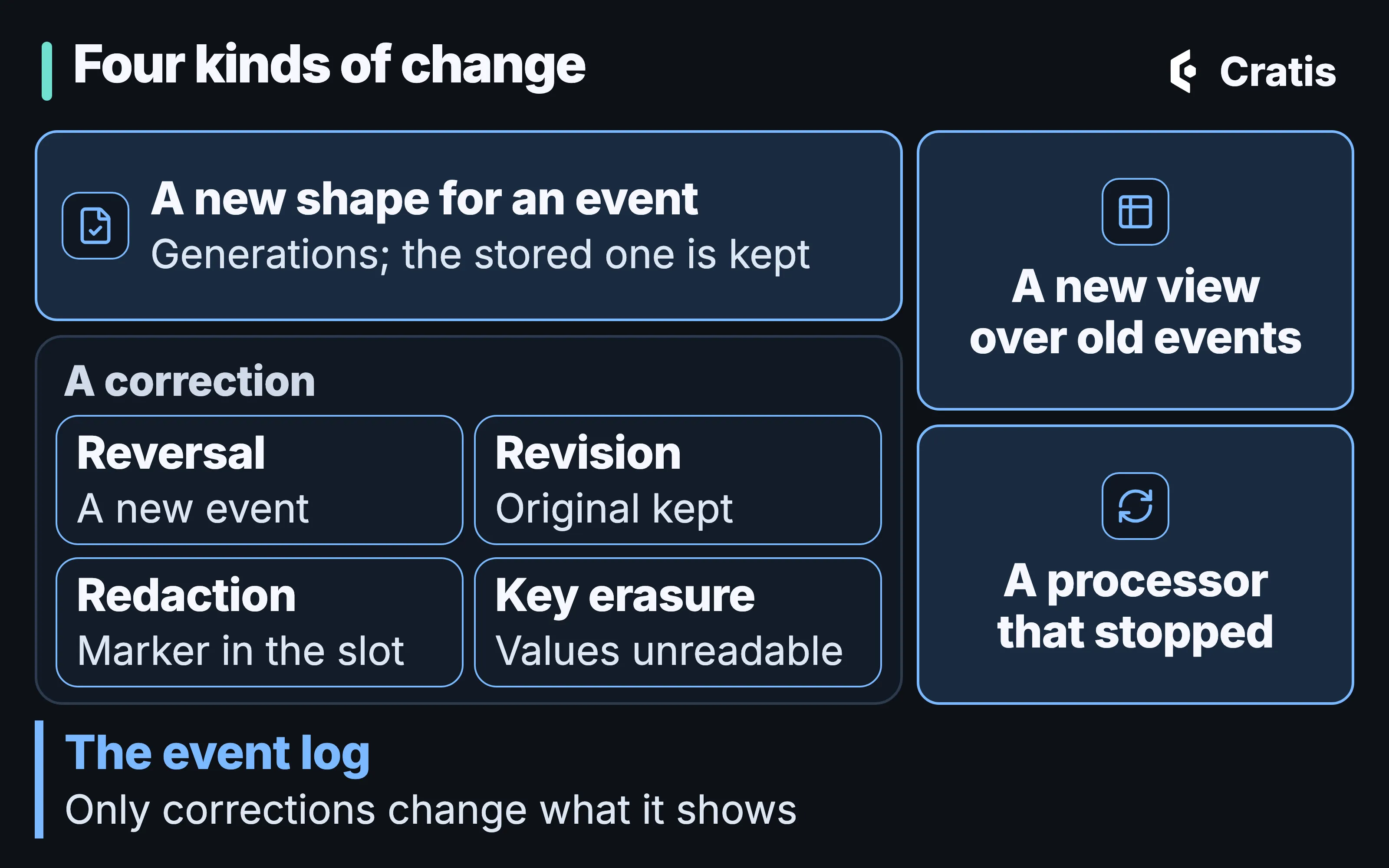
Four kinds of change, and which one touches the log.
A new generation changes how an event is represented and leaves the stored fact as it was. A new view only touches derived data. A correction is the one change that alters what the log shows. That can reach one event, an event source or a subject, depending on the operation. A stopped processor is about how far an observer has got in the log, and nothing stored is wrong at all. Treat the misspelled name like a new view and you end up replaying projections that were fine. Treat the stuck reactor like a correction and you touch the log to fix a mail server.
A new shape for an event
Section titled “A new shape for an event”Chronicle keeps generations of an event type side by side. An event type is identified by a stable id, and a new shape is a new generation of that same id. In the .NET client, the current generation carries the id and its generation number, and the previous generation points at the current one:
using Cratis.Chronicle.Events;
// Generation 2 (current) — the subtitle has a property of its own[EventType("book-cataloged", generation: 2)]public record BookCataloged(BookTitle Title, BookSubtitle Subtitle);
// Generation 1 (original) — marked as a previous generation of the current record above,// instead of carrying its own [EventType][EventTypeGenerationFor<BookCataloged>(1)]public record BookCatalogedV1(BookTitle Title);
The Kotlin client repeats the explicit id on every generation.
import io.cratis.chronicle.events.EventType
// Generation 2 (current) - the subtitle has a property of its own@EventType(id = "book-cataloged", generation = 2)data class BookCataloged(val title: BookTitle, val subtitle: BookSubtitle)
// Generation 1 (original) - same explicit id as the current generation, only the generation differs@EventType(id = "book-cataloged", generation = 1)data class BookCatalogedV1(val title: BookTitle)
The Java client repeats the explicit id on every generation.
import io.cratis.chronicle.events.EventType;
// Generation 2 (current) - the subtitle has a property of its own@EventType(id = "book-cataloged", generation = 2)record BookCataloged(BookTitle title, BookSubtitle subtitle) {}
// Generation 1 (original) - same explicit id as the current generation, only the generation differs@EventType(id = "book-cataloged", generation = 1)record BookCatalogedV1(BookTitle title) {}
The TypeScript client repeats the explicit id on every generation.
import { eventType } from '@cratis/chronicle';import { field } from '@cratis/fundamentals';
// Generation 2 (current) — the subtitle has a property of its own@eventType('book-cataloged', 2)class BookCataloged {    @field(BookTitle) readonly title: BookTitle;    @field(BookSubtitle) readonly subtitle: BookSubtitle;
    constructor(title: BookTitle, subtitle: BookSubtitle) {        this.title = title;        this.subtitle = subtitle;    }}
// Generation 1 (original) — same id, generation 1, kept only so the migration below can// upcast from it. It is not the "current" shape of the event any more.@eventType('book-cataloged', 1)class BookCatalogedV1 {    @field(BookTitle) readonly title: BookTitle;
    constructor(title: BookTitle) {        this.title = title;    }}
The Elixir client repeats the explicit id on every generation.
defmodule MyApp.Events.BookCataloged do  use Chronicle.Events.EventType, id: "book-cataloged", generation: 2
  defstruct title: %MyApp.BookTitle{}, subtitle: %MyApp.BookSubtitle{}end
defmodule MyApp.Events.BookCatalogedV1 do  use Chronicle.Events.EventType, id: "book-cataloged", generation: 1
  defstruct title: %MyApp.BookTitle{}end
In the .NET client, the older record has no id of its own, and that’s deliberate. Its event type id is resolved from the current type. A previous generation that simply leaves the id out would fall back to its CLR name and quietly become a different event type, which is the trap this shape closes. The older style, with the same explicit id string on every generation and a different generation: value, still works, and it’s the style the other clients use. The naming rule behind that trap is covered in Events are facts.
You declare a migration between adjacent generations. Upcast describes how the old shape becomes the new one, and Downcast describes the way back:
public class BookCatalogedMigration : EventTypeMigration<BookCataloged, BookCatalogedV1>{    public override void Upcast(IEventMigrationBuilder<BookCataloged, BookCatalogedV1> builder) =>        builder.Properties(pb => pb            .Split(m => m.Title, e => e.Title, ": ", SplitPartIndex.First)            .Split(m => m.Subtitle, e => e.Title, ": ", SplitPartIndex.Second));
    public override void Downcast(IEventMigrationBuilder<BookCatalogedV1, BookCataloged> builder) =>        builder.Properties(pb => pb            .Combine(m => m.Title, ": ", e => e.Title, e => e.Subtitle));}
The Kotlin client takes property references and records their names as written.
class BookCatalogedMigration :    EventTypeMigration<BookCataloged, BookCatalogedV1>(        BookCataloged::class,        BookCatalogedV1::class    ) {    override fun upcast(builder: EventTypeMigrationBuilder<BookCataloged, BookCatalogedV1>) {        builder            .split(BookCataloged::title, BookCatalogedV1::title, ": ", 0)            .split(BookCataloged::subtitle, BookCatalogedV1::title, ": ", 1)    }
    override fun downcast(builder: EventTypeMigrationBuilder<BookCatalogedV1, BookCataloged>) {        builder.combine(            BookCatalogedV1::title,            ": ",            BookCataloged::title,            BookCataloged::subtitle        )    }}
The Java client takes property names as strings and records them as written.
class BookCatalogedMigration        extends EventTypeMigration<BookCataloged,                                   BookCatalogedV1> {    BookCatalogedMigration() {        super(BookCataloged.class, BookCatalogedV1.class);    }
    @Override    public void upcast(EventTypeMigrationBuilder<BookCataloged,                                                 BookCatalogedV1> builder) {        builder            .split("title", "title", ": ", 0)            .split("subtitle", "title", ": ", 1);    }
    @Override    public void downcast(EventTypeMigrationBuilder<BookCatalogedV1,                                                   BookCataloged> builder) {        builder.combine("title", ": ", "title", "subtitle");    }}
The TypeScript client takes property names as strings, typed as keys of the event class.
@eventTypeMigration(BookCataloged, BookCatalogedV1)class BookCatalogedMigration implements IEventTypeMigration<BookCataloged, BookCatalogedV1> {    upcast(builder: IEventMigrationBuilder<BookCataloged, BookCatalogedV1>): void {        builder.properties(propertyBuilder => propertyBuilder            .split('title', 'title', ': ', 0)            .split('subtitle', 'title', ': ', 1));    }
    downcast(builder: IEventMigrationBuilder<BookCatalogedV1, BookCataloged>): void {        builder.properties(propertyBuilder => propertyBuilder            .combine('title', ': ', 'title', 'subtitle'));    }}
The Elixir client takes property names as atoms or strings and writes a snake_case name in camelCase. Migrations need cratis_chronicle 3.8.1 or later when the event modules compile separately; on an earlier version, require both event modules at the top of the migration.
defmodule MyApp.Migrations.BookCatalogedMigration do  use Chronicle.Events.Migration,    from: {MyApp.Events.BookCatalogedV1, generation: 1},    to: {MyApp.Events.BookCataloged, generation: 2}
  alias Chronicle.Events.MigrationBuilder
  @impl true  def upcast(builder) do    builder    |> MigrationBuilder.split_property(:title, :title, ": ", 0)    |> MigrationBuilder.split_property(:title, :subtitle, ": ", 1)  end
  @impl true  def downcast(builder) do    MigrationBuilder.combine_properties(builder, [:title, :subtitle], :title, ": ")  endend
The builder has a small vocabulary. Split and Combine handle the title, RenamedFrom covers a renamed property and DefaultValue fills a new one. MapValues translates values, applies the map forward and inverts it on the way back. Values the map doesn’t mention pass through. If two old values collapse onto one new value, the way back takes the first pair you declared, so a map like that forces you to choose what the reverse means. MapValues exists in the C# client only. Migrations run on the content after Chronicle has encrypted personal data, so a migration that splits, combines or maps a value marked [PII] works on its ciphertext (Cratis/Chronicle#4456).
In the .NET client, the property expressions are typed, and they resolve to the JSON names Chronicle stores, [JsonPropertyName] first and then the client’s naming policy. An expression that points at nothing is rejected at registration with InvalidMigrationPropertyForEventType. The other clients don’t check the names at registration. Adding or removing an optional property still needs a migration class, with no operations inside, so that the chain from generation 1 to the current one has no holes.
The base class refuses a migration whose two generations don’t share an event type ID, or that skips a generation. It’s a check in the constructor:
protected EventTypeMigration(){    var previousEventType = typeof(TPrevious).GetEventType();    var upgradeEventType = typeof(TUpgrade).GetEventType();
    if (previousEventType.Id != upgradeEventType.Id)    {        throw new MigrationGenerationsMustShareEventTypeId(typeof(TPrevious), typeof(TUpgrade), previousEventType.Id, upgradeEventType.Id);    }
    From = previousEventType.Generation;    To = upgradeEventType.Generation;
    if (To.Value != From.Value + 1)    {        throw new InvalidMigrationGenerationGap(typeof(TPrevious), typeof(TUpgrade), From, To);    }}
The kernel validates the chain again, whichever client registered it. Generation 1 has to exist, generations have to be sequential, and every consecutive pair needs a migrator. A chain that breaks one of those rules fails at startup with MissingFirstGenerationForEventType, MissingMigrationForEventTypeGeneration or MissingEventTypeMigrators, and two migrators that claim the same pair throw MultipleMigratorsForSameEventTypeGeneration.
What the kernel does with it
Section titled “What the kernel does with it”At registration the client sends the whole event type to the kernel, every generation and every migration, with the migrations expressed as JmesPath. From then on the kernel applies them on every append. Append generation 1 and Chronicle stores generations 1 and 2. Append generation 2 and it stores generation 2 plus the downcast generation 1. Chains of three or more generations extend the same way. Chronicle produces upcast and downcast representations while keeping the originally stored generation, so old and new code can each read the shape they expect.
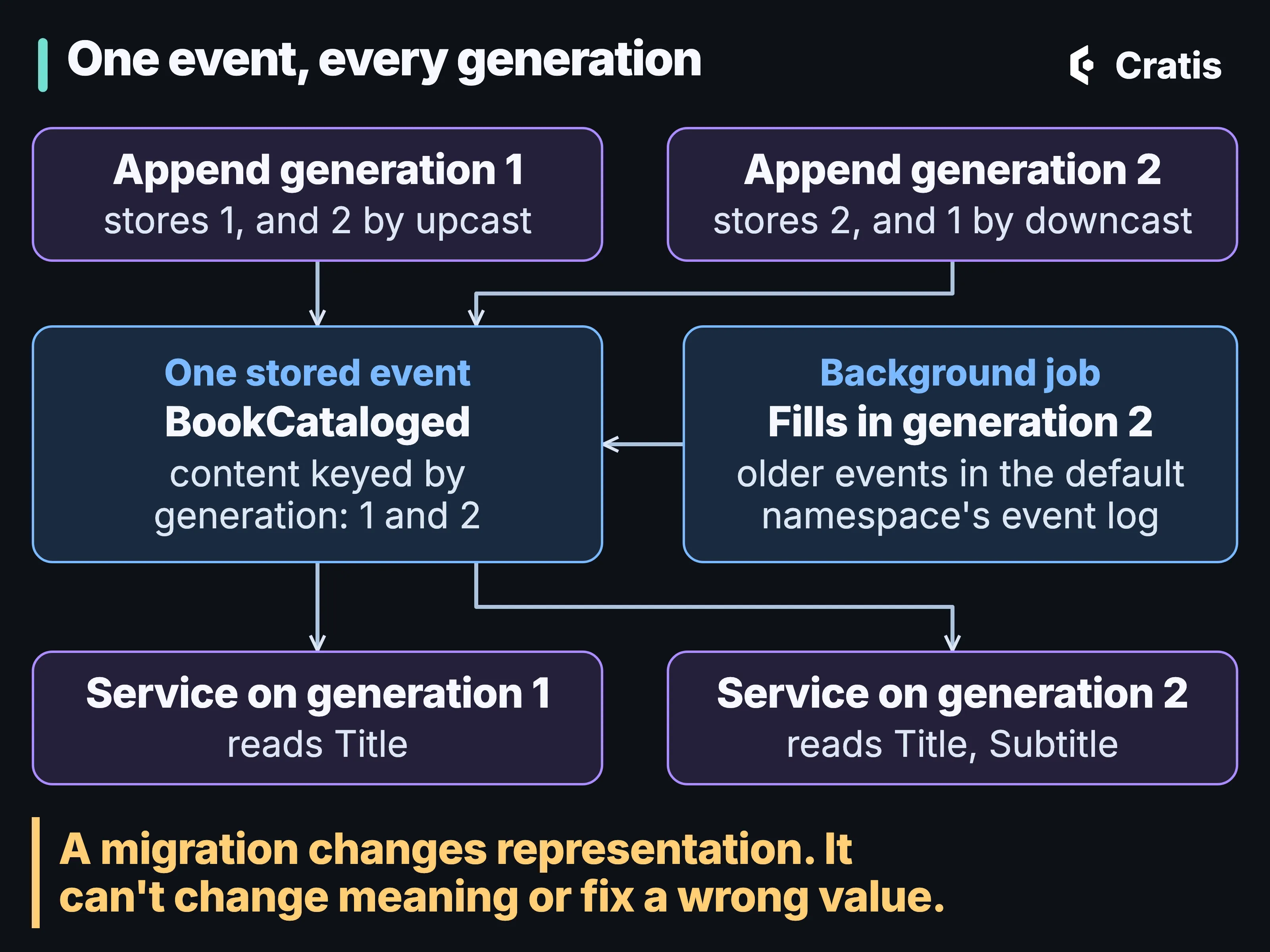
One stored event, readable in every generation of its type.
Events stored before the new generation existed get the same treatment later. Registering a new generation makes the kernel append an EventTypeGenerationAdded event to its system sequence. A built-in reactor observes it and starts a job that walks the default namespace’s event log for events of that type still stored in the older generation, computes every generation for each one and writes the result back into the stored event. The job covers the default namespace’s event log only. The application stays usable while the job runs, and a consumer reading the new generation sees the events migrated so far.
A migration changes representation. It can split a title that was stored as “Persuasion: A Novel” into two fields, and it has no way to know that the colon in some other title was never meant as a separator. If what the event means has changed, that’s a new event, and a migration is the wrong tool. A migration can’t fix a wrong value either. The misspelled author gets a correction, further down.
Upgrading Chronicle itself is a separate matter. A package or server upgrade doesn’t rewrite, reshape or reinterpret stored events, and event schema evolution only happens through the mechanism above. Wire compatibility is checked within a major version, across every released minor of it, and crossing a major is where a protocol change is allowed.
On the application side, nothing in the event mechanism depends on Arc, and Arc needs no change when a generation is added. A command that returns the current generation’s type just writes it. A changed C# command or read model reaches the browser only after the proxy generator has run at build time and the frontend has type-checked against the new files, which Arc: commands and queries without the plumbing follows in detail.
A new view over old events
Section titled “A new view over old events”When a projection is wrong, fix it and rebuild the read model from the retained history. Replay reads the events as they stand now, with any revisions and redaction markers that apply. The distinction between rebuilding state and delivering side effects is covered in From event to read model.
From event to read model covers how Chronicle classifies a changed definition, when it can use a partial replay, and how definitionEvolution chooses between running the work and recommending it. Reactor and webhook definition changes use their separate replay switch, covered in Reacting to facts.
A new projection, such as the list of authors on that new screen, is a different case. Registering it against a store that already holds events starts a catch-up job, and the registration call doesn’t wait for it. Registered and caught up are two different states, and the gap between them shows in Chronicle Workbench’s observer job view, which Workbench walks through. The client retries a registration with exponential backoff, so a busy kernel doesn’t fail the host. A kernel that keeps refusing still fails it once the attempts are spent, and a definition the kernel rejects fails on its own while the others still land.
When you do want a replay by hand, cratis chronicle observers replay <observer-id> starts one from the CLI. The CLI marks the command as destructive in its own effect metadata and asks for confirmation unless you pass --yes. Replays, catch-ups and event migrations run as jobs you can inspect, stop and resume, with a setting that caps how many steps run in parallel. A replay takes time in proportion to the history behind the observer, and Jobs, scale and performance covers what that means on a large store.
When a replay reaches a reactor
Section titled “When a replay reaches a reactor”Before replaying the welcome mailer, apply the replay markers and delivery-identity limits from Reacting to facts; replay and recovery need different treatment.
Personal data puts one more limit on replay. A replay that covers an erased subject is refused for that subject’s partition, and a rebuild doesn’t clear ciphertext that’s already stored. Personal data in an event log explains why, and what to do before such a rebuild.
A correction to something recorded
Section titled “A correction to something recorded”Choose a compensation, revision, redaction or key erasure by what needs correcting and what must remain, using the boundaries in Personal data in an event log.
The misspelled author is a revision. The revised content has to use the same event type id as the original, consumers see the latest revision, and the original stays in the event’s history.
Neither revision nor redaction is free for observers. Both rewind the affected event source’s partition for every replayable observer of that event type, so the read models built from that one author are rebuilt from that author’s events. The rest of each observer stays where it was. A reactor on that event type replays that author’s events too, unless it’s marked [OnceOnly], which is the case the marker exists for.
A processor that stopped
Section titled “A processor that stopped”The fourth change doesn’t touch anything stored. The welcome mailer threw on one author, and Chronicle has been holding that author’s events ever since.
The failed partition pauses without skipping the event while every other partition keeps going. Inside Chronicle covers the failure kinds, retry defaults and the quarantine that stops automatic attempts.
A timeout ends the kernel’s wait and nothing else. The subscriber keeps processing the batch it was handed while the kernel has already written it off. The events are delivered again on retry, so observers have to be idempotent.
Once the cause is fixed, someone asks for another attempt. The kernel decides whether it can start one, and it has four answers:
public async Task<PartitionRecoveryOutcome> TryStartRecoverJobForFailedPartition(Key partition){    if (State.RunningState == ObserverRunningState.Quarantined)    {        return PartitionRecoveryOutcome.ObserverQuarantined;    }
    if (!Failures.TryGet(partition, out var failure))    {        return PartitionRecoveryOutcome.PartitionNotFound;    }
    if (failure.IsQuarantined)    {        return PartitionRecoveryOutcome.PartitionQuarantined;    }
    await StartRecoverJobForFailedPartition(failure);    return PartitionRecoveryOutcome.Started;}
A quarantined observer has to be cleared with clear-quarantine before any of its partitions can be retried. A partition that isn’t failing has nothing to retry, and a quarantined partition refuses an ordinary retry.
The CLI passes those answers on without softening them. cratis chronicle observers retry-partition turns the response into an exit code:
if (response.Outcome == PartitionRecoveryOutcome.Started){    OutputFormatter.WriteMessage(format, $"Retry started for partition '{settings.Partition}' of observer '{settings.ObserverId}'. Use 'cratis chronicle observers show {settings.ObserverId}' to check progress.");    return ExitCodes.Success;}
var (message, suggestion) = DescribeRefusal(response.Outcome, settings);OutputFormatter.WriteError(format, message, suggestion, ExitCodes.ValidationErrorCode);return ExitCodes.ValidationError;
Only Started exits successfully, and even that message says the retry started. Every refusal becomes a validation error with a suggested next step. A script that runs the retry gets a nonzero exit code when nothing happened, and a human gets told to check progress. A started retry says nothing yet about whether the partition recovered, so look at the partition again afterwards. A retry also gives no exactly-once guarantee for a reactor’s side effects, and the welcome mail may go out twice if the handler sent it before it threw.
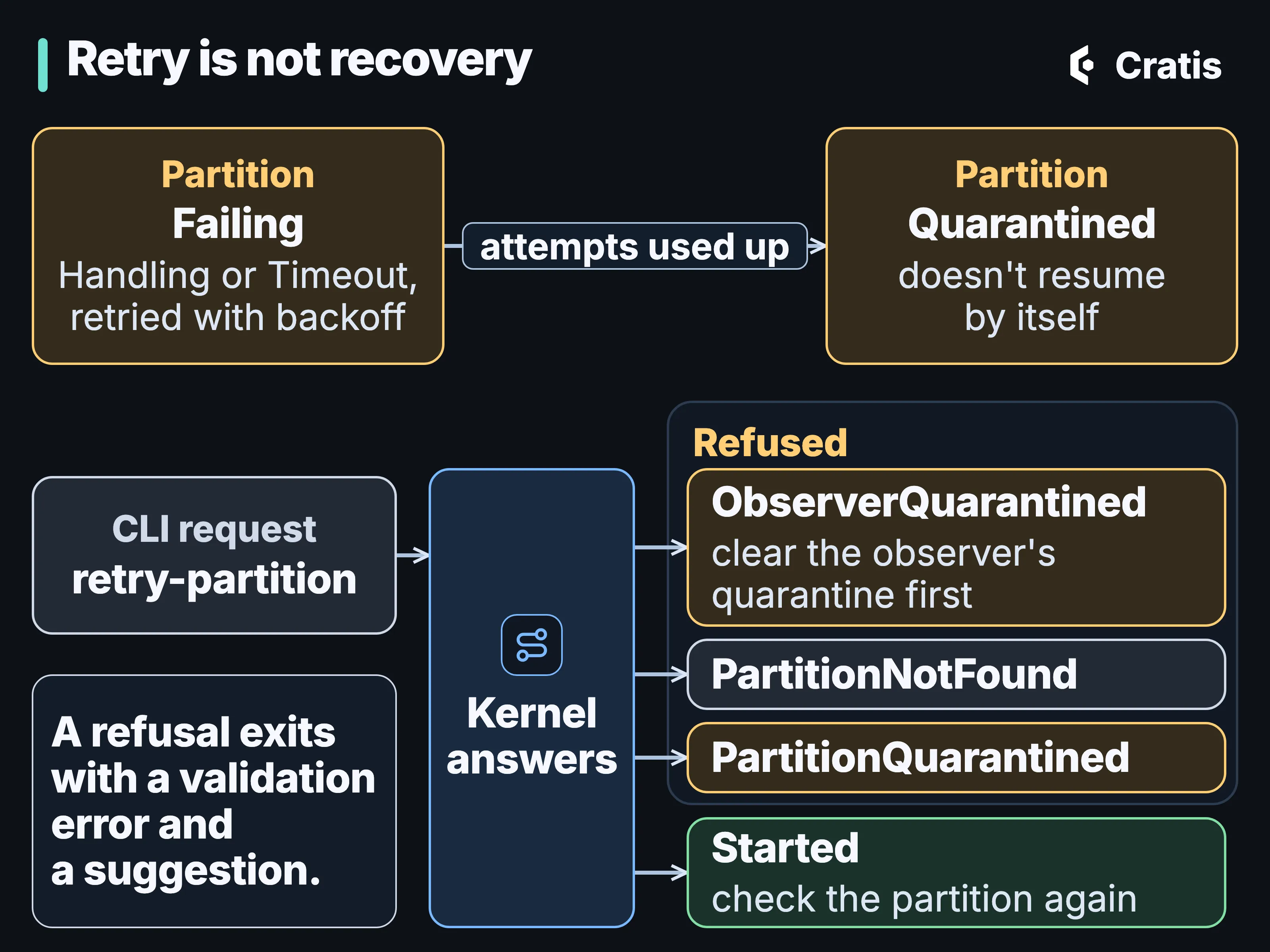
A retry the kernel can’t start is reported as a refusal. One it starts still has to be checked.
A retry isn’t a replay. retry-partition asks for one more attempt from where the partition failed. replay-partition replays the partition from the start, for when its derived state is wrong. A typed reactor can also list its own failed partitions and retry one from application code. The troubleshooting guide walks the loop end to end, and The Cratis CLI follows it from diagnose onwards.
The four changes
Section titled “The four changes”Back to the made-up year. The subtitle is a second generation of BookCataloged and one migrator, and books already cataloged in the default namespace’s event log get their second generation from a background job. The new screen is a new projection that catches up from the log. The misspelled name is a revision, which rewinds that one author’s partition in the observers that care. The stuck welcome mailer is a failed partition, a fixed mail configuration and one retry, followed by a look at whether the partition is current.
Chronicle checks the chain of generations, translates on every append and classifies a changed projection before it replays anything. It also refuses a retry it can’t start, and says so.
Some decisions stay with whoever runs the system. A migration can’t tell that a field changed meaning, so that call is a modeling one. The definition-evolution setting decides whether a full replay runs straight away or waits as a recommendation. Picking between a reversal, a revision, a redaction and a key erasure is a judgment about what the mistake was. And a retry that started is only a request until someone has checked that the partition caught up.