

From script to stage · Part 23: Cratis Studio: one event model for the whole team

Cratis: from script to stage, and the long run · Part 23 of 26
An event-modeling workshop usually ends as a photo of sticky notes. In Cratis Studio it ends as a model the whole team edited, with the AI agents working on the same one.
Cratis Studio is a collaborative workspace where people and AI agents design, visualize and edit the same event model. It runs in the browser, and it’s built on Chronicle and Arc. Cratis Studio is live and in beta. Open signup is coming soon at cratis.studio, with a 14-day free trial.
In Cratis Studio, a slice a team sketched together can be assigned to an AI agent, rendered into C# for Arc and Chronicle and committed to your connected Git repository, with the event model beside it as Screenplay text. Code generation is opt-in for each application. It works on one slice at a time, and it only goes from the model to the code.
In Studio, the author feature starts as a handful of sticky notes and can end as a commit.
The wall ends up as a photo
Section titled “The wall ends up as a photo”Event modeling happens in a room, or on a call, with a product owner, someone who knows the domain and a couple of developers arguing about what actually happens in the business. Someone photographs the wall of sticky notes that comes out of it and retypes part of it into a tool, and by the time the first slice is built, the model, the conversation and the code have started to drift apart.
The author feature shows where it goes wrong. Someone at the wall asks whether two organizations can each have an author with the same name. The answer, that names are unique within an organization, is the rule the whole feature turns on, and on the wall it’s a yellow note with a question mark. It’s hard to read in the photo and easy to lose in the retyping, and it tends to come back later as a bug report.
Coding agents widen the gap. An assistant can write the RegisterAuthor command, its projection and its spec in a few minutes, and the reviewer then compares that code with what they remember of a workshop.
Studio moves the conversation onto the model itself, where people and AI agents edit the same thing, and what the team agrees on can be exported as text you commit.
Who it’s for
Section titled “Who it’s for”Studio is for the people who have to agree on what a system should do: developers, domain experts and product owners, in one room or in a remote workshop. We also build it for whoever runs the workshop, and for whoever has to turn the result into a system afterwards.
Each of them uses a different part of it. A domain expert starts on the board and names what happens in the business in its own words, such as AuthorRegistered and AuthorRenamed. A product owner can follow the model after the workshop ends, because every slice can be assigned to a teammate or an AI agent, and the project’s progress board shows where each one is. A developer gets the model as Screenplay to review as a diff and, where the application has code generation switched on, a slice’s code in the repository. Someone who joins the team half a year later can ask Studio to explain a feature at the level they need.
In a remote workshop everyone’s cursor is on the same board, so the facilitator isn’t the only person who can point at a note.
Why we built it
Section titled “Why we built it”We think the model and the code belong together. A model nothing is generated from goes stale, and code nobody can trace back to a model is hard to review, whether a person or an agent wrote it. Studio keeps the two coupled. The team works on one model, the model is text you can diff, and the code for a slice is generated from it into your repository.
The commands, events and read models on the canvas are the concepts Arc and Chronicle run. The text form is Screenplay, the event-modeling language covered in Screenplay, and Play and code generation go through Stage, which Stage and Scene takes apart. Studio is where those pieces meet for a whole team.
The author feature, from board to commit
Section titled “The author feature, from board to commit”On a shared board
Section titled “On a shared board”Open a brainstorming board, and everyone adds events and sticky notes at once: AuthorRegistered, AuthorRenamed, and a note asking “same name in two organizations?”. Group them by theme, and transfer the events that hold up into the event model.
Everyone sees who else is on the board and where their cursor is while they work, so a remote session doesn’t depend on one person’s shared screen. The events are what you transfer. The yellow note stays on the board as the question the slice will have to answer.
On the canvas

Section titled “On the canvas”On the event-modeling canvas, the author feature becomes a module, a feature and a slice on a timeline with swimlanes, with the RegisterAuthor command, the AuthorRegistered event and a read model as color-coded cards. Assign the slice to a teammate or to an AI agent, and follow it on the project’s progress board.
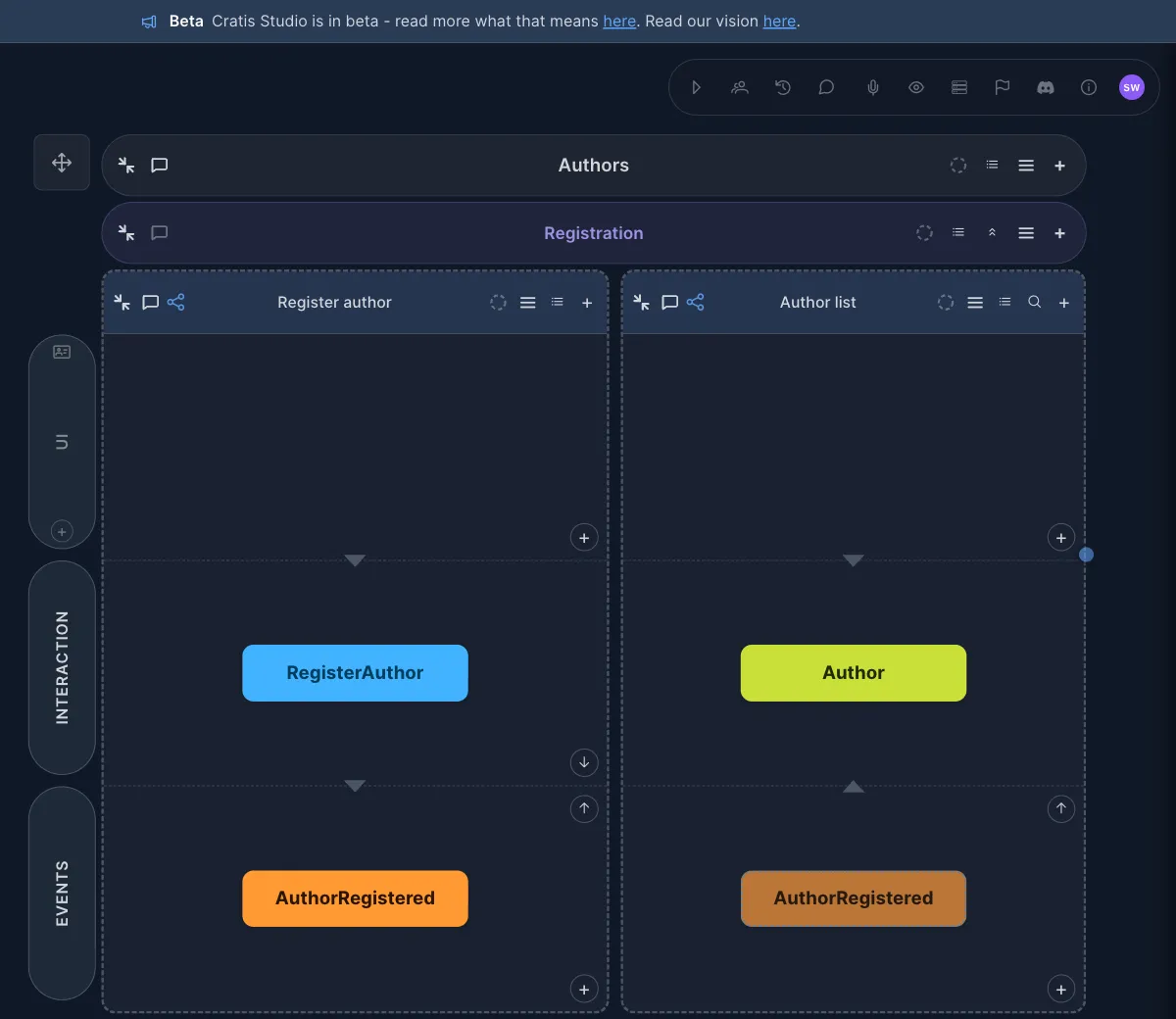
The author feature on the canvas: two slices, with a command, an event and a read model.
The answer to the yellow note belongs to this slice. Registering a name that’s already taken in the organization is rejected, and that’s the behavior the specification on the slice writes down.
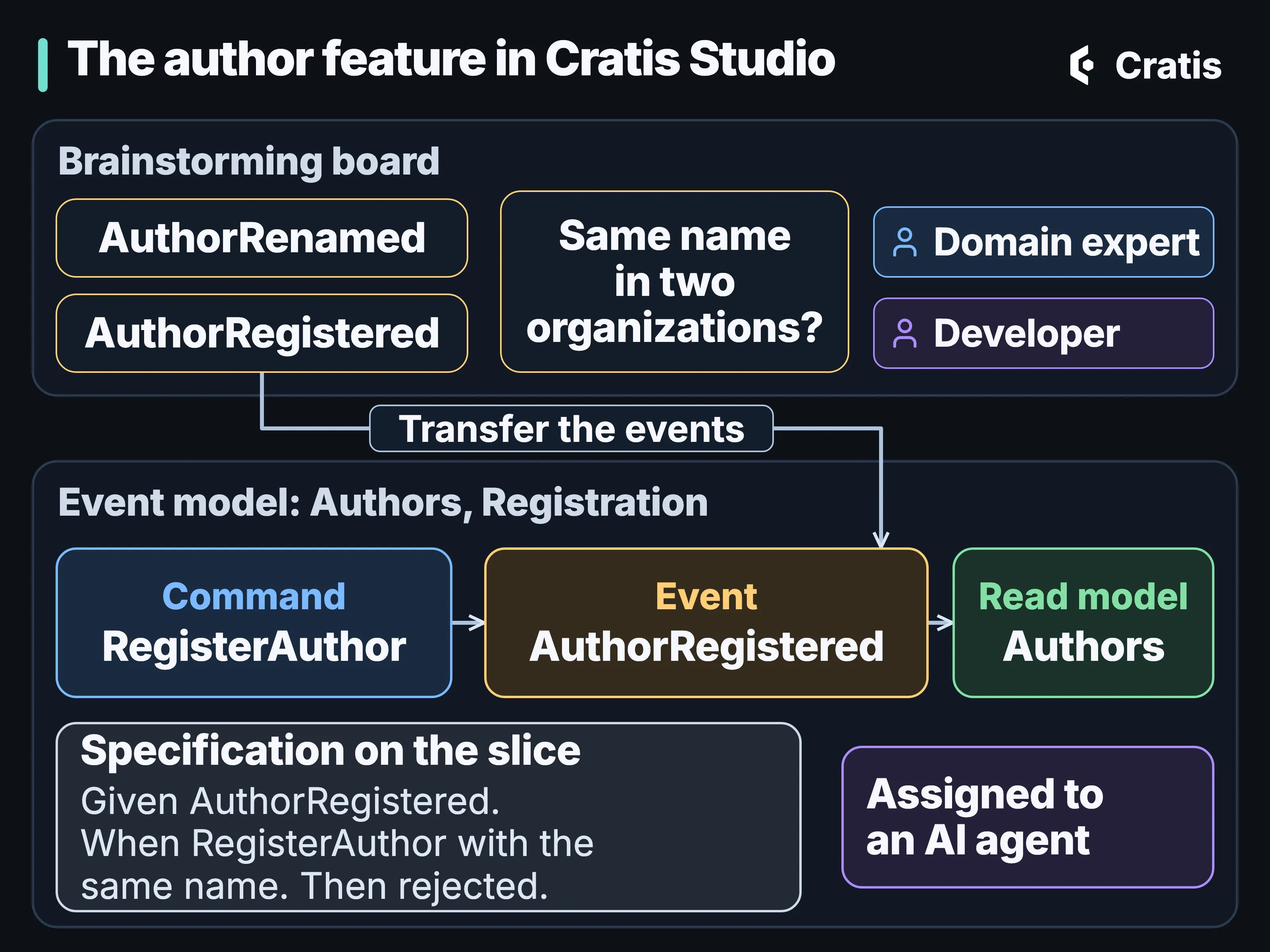
The same feature on the board and on the canvas. Events transfer; the question stays on the board.
A specification on the slice
Section titled “A specification on the slice”Add a given/when/then specification to the slice, such as “registering the same name twice is rejected”. It’s an example against the model, and not against a running system, like the ones the Stage specification runner in Stage and Scene checks.
This is where the question from the board ends up, as an example with a given, a when and a then that a domain expert can read as easily as a developer.
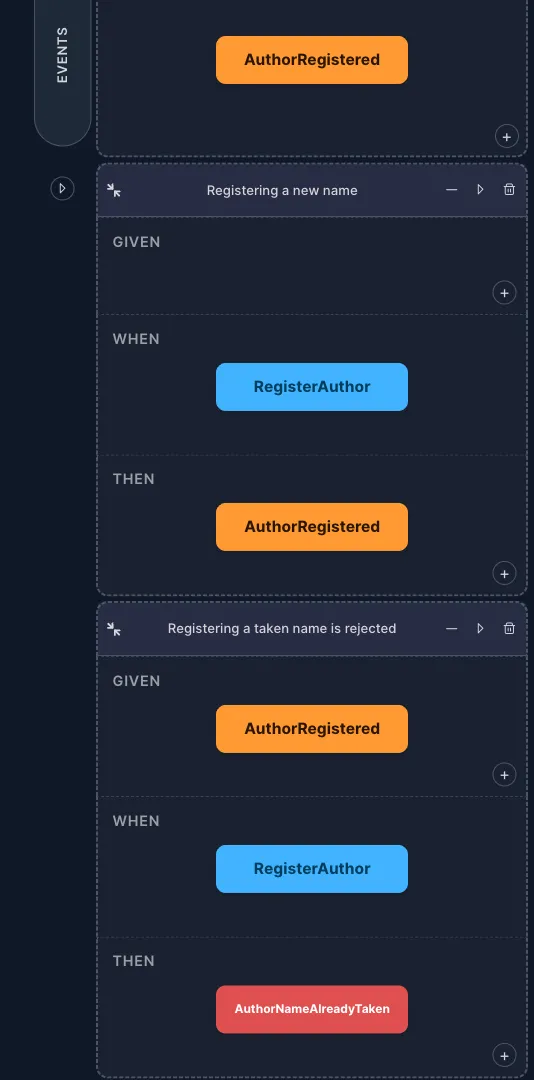
Two specifications on the Register author slice. The second is the duplicate-name rule, written as an example.
AI agents on the same model
Section titled “AI agents on the same model”Cratis Studio’s AI agents can generate modules, features and slices from a prompt, explain a domain, feature or module, and answer in chat on the model. They run on a model provider your organization configures, and AI stays off until one is set up.
For the author feature, ask Studio to generate the missing slices of a feature from a prompt, such as renaming an author, and they appear on the canvas as cards the team reviews like any other change to the model. Ask it to explain the feature to someone new, at the level they need, and read aloud if they want. Dictate instead of typing, let predictive modeling suggest the next cards, or mention an agent in a slice’s chat and let it answer there.
Studio doesn’t ship a language model. Every AI feature runs on a provider your organization configures, such as OpenAI, Azure OpenAI or Anthropic, and until one is configured the AI features stay switched off and say why. The choice of provider, and the terms that come with it, stay yours.
Press Play, and Studio starts a disposable Stage session for the model, so you can try the application it describes before anyone has written it. The session is for exploring the model. Don’t host the application there.
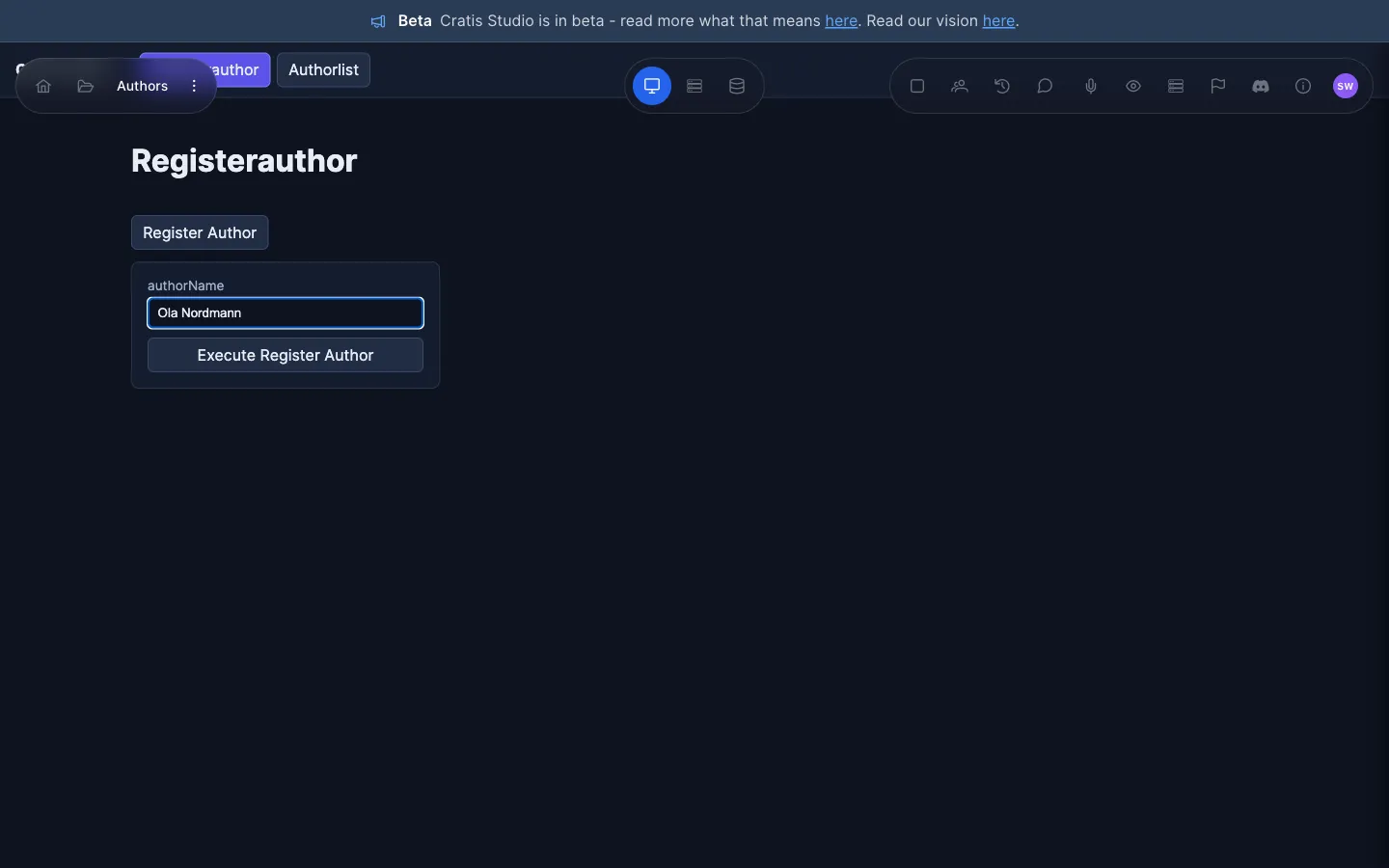
A Play session: the register form generated from the model.
From the canvas to a Play session. The wait for the session to start is shortened.
Screenplay out, and back in
Section titled “Screenplay out, and back in”Export the model as Screenplay, as one .play document or a folder of them, or as Mermaid or JSON. Commit the Screenplay next to the code and review it as a diff. Importing it back shows a preview of what will change and warns about anything it can’t bring in.
Screenplay reads well as a diff. This one, written by hand as an illustration and not exported from Studio, adds a rule to the RegisterAuthor slice of the author feature:
slice StateChange RegisterAuthor command RegisterAuthor authorId AuthorId identifier name AuthorName authorize IsSignedIn validate name not empty message "A name is required" produces AuthorRegistered for authorId name = nameThe rule sits beside the command it guards, so a change to the author feature can be reviewed in a pull request before anyone writes code for it, and the reviewer reads the intent in a few changed lines.
Code for one slice
Section titled “Code for one slice”When a slice is assigned to an AI agent, Cratis Studio can render it through Stage into C# for Arc and Chronicle in a connected Git repository, commit the result, and optionally let the agent refine it. Code generation is opt-in for each application.
In practice, generation starts when the author slice, assigned to an AI agent, is marked ready for implementation. Studio renders it through Stage’s Cratis renderer into a working copy of your connected Git repository, commits the code and the .play files separately, lets the agent refine the result if the application is set up for that, and pushes. What arrives is a change in your repository, and it goes through the same review as any other.
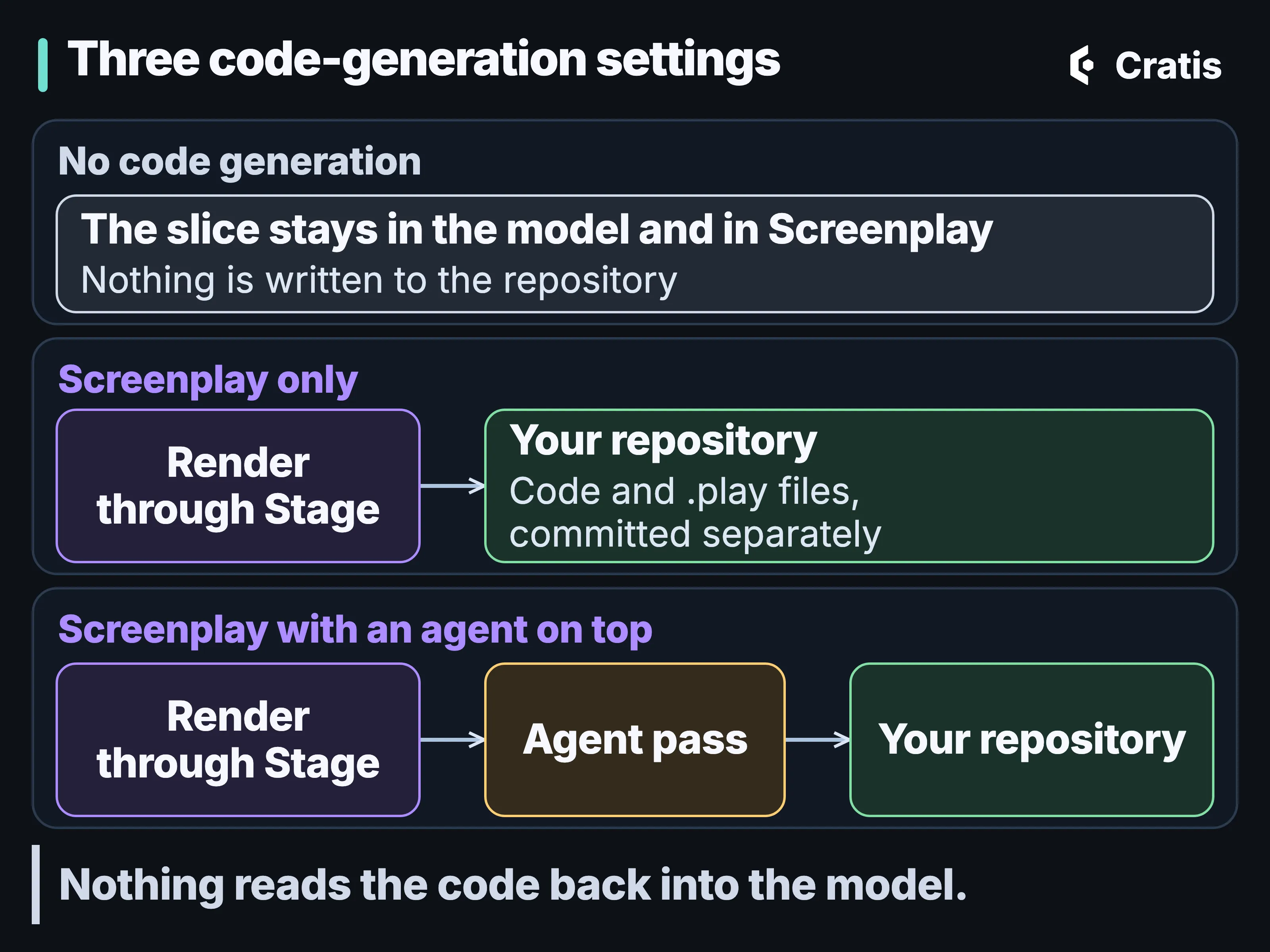
Code generation is a setting on each application, and every path runs from the model to the repository.
Everyone on the same model
Section titled “Everyone on the same model”Collaboration is live. You see who else is on the board and where their cursor is, and a change one person makes shows up on everyone’s screen. Comments and chat sit on features and slices, and agents take part in them as well as people.
A project holds several applications, so each bounded context keeps its own model, and each organization has its own projects. For the author feature, that means the registration context can have its own model without sharing a canvas with, say, billing.
Where code generation stops
Section titled “Where code generation stops”Code generation is opt-in for each application, with three settings: no code generation, Screenplay only, or Screenplay with an agent on top. It goes through Stage’s Cratis renderer, but through its older direct-write path, and not the planned render that cratis render uses in Stage and Scene. The output is C# on Arc and Chronicle, and not every construct becomes rendered code. What the renderer can’t express is marked with a TODO and a diagnostic instead of being refused, and the refusal and Customizations/ guarantees of cratis render don’t apply here. What the renderer leaves out is for the agent pass, or a person, to write.
Coupled doesn’t mean synchronized. Generation goes one way, one slice at a time. Nothing reads the code back into the model, and Studio doesn’t detect when code and model have drifted apart. What the coupling gives you is code that starts from the model, in the model’s own vocabulary, with the model sitting in the repository as Screenplay beside it. Review what comes out like any other change.
The Screenplay round trip has the same kind of limit. It’s tested for the constructs Studio models, and the import warns where it can’t carry something, so it isn’t lossless in every case. It’s the rule from Screenplay: expose what you can’t represent instead of dropping it.
Assistants outside Studio
Section titled “Assistants outside Studio”Cratis Studio has an MCP server that lets external AI agents read and change an organization’s event models and brainstorming boards. That’s the route for an assistant in your editor or terminal to work on the author feature’s model without anyone copying it out of Studio first.
Scope it like any tool that can write. AI across the stack puts it next to the other places an assistant meets Cratis.
How it fits with the rest of Cratis
Section titled “How it fits with the rest of Cratis”Studio isn’t in a request’s path. It works on the model and generates code into your repository. It uses the pieces the rest of this series describes. Its text form is Screenplay, Play and code generation run through Stage, and the generated code runs on Arc and Chronicle. You don’t need Studio to use any of them, and modeling in Studio doesn’t require adopting the rest of the stack. Stage is experimental, and some features inside Studio are labeled preview or experimental.
Prologue, which drafts a model from a running system, has a place in Studio too for systems that already exist, and it’s experimental there as well. Prologue covers what it does and what it can’t know.
When signup opens, the author feature makes a good first board: brainstorm it with the people who know the domain, transfer the events that hold up into the event model, add the example about duplicate names, and export it as Screenplay.