

From script to stage · Part 18: Running Chronicle and a Cratis application in production

Cratis: from script to stage, and the long run · Part 18 of 26
A Compose file that runs Chronicle happily on cratis/chronicle:latest-development stops at startup when you change the tag to latest. The development images generate their own TLS certificate and fall back to throwaway keys for the built-in OAuth authority, and latest-development bundles a database as well. The production image does none of that, and no environment variable changes it back, because the production code paths are chosen by a compile-time symbol that only the development builds define.
On a laptop, the author feature ran on one development container. In production it runs on a kernel that someone configures and keeps running, next to an application that has to trust the right server and report what it does.
What the production image won’t start without
Section titled “What the production image won’t start without”The production guide names three settings the production path needs, and a missing certificate stops it at startup. Every setting can come from /app/chronicle.json or from an environment variable with the Cratis__Chronicle__ prefix, and the environment variable wins when both are set:
docker run -d \ --name chronicle \ -p 35000:35000 \ -v /path/to/chronicle.json:/app/chronicle.json:ro \ -v /path/to/certs:/certs:ro \ -e Cratis__Chronicle__Storage__ConnectionDetails='mongodb://mongodb:27017/?directConnection=true' \ -e Cratis__Chronicle__Tls__CertificatePath=/certs/chronicle.pfx \ -e Cratis__Chronicle__Tls__CertificatePassword="$CHRONICLE_CERTIFICATE_PASSWORD" \ -e Cratis__Chronicle__EncryptionCertificate__CertificatePath=/certs/encryption-cert.pfx \ -e Cratis__Chronicle__EncryptionCertificate__CertificatePassword="$ENCRYPTION_CERTIFICATE_PASSWORD" \ cratis/chronicle:19.23.1The storage connection defaults to an empty string, so there’s nothing to fall back to. An unset storage type means MongoDB. The TLS certificate is for port 35000, where gRPC for the clients and HTTP/1.1 for the REST API, the Workbench, OAuth and the health endpoint share one TLS port. The encryption certificate protects the signing and encryption keys of the internal OAuth authority. You can do without it only when that authority isn’t in use, either because you’ve pointed Chronicle at an external authority or turned the oAuthAuthority feature off, and encrypting a value later still needs a certificate. A certificate path that points at a missing file stops startup with EncryptionCertificateFileNotFound, so a typo can’t leave you running without one.
Pin the version, as above. latest floats, and so does the image Aspire picks for you. In publish mode, AddCratisChronicle() selects the production image whatever else you configure, so it needs WithTlsCertificate and WithEncryptionCertificate before it’ll start, and WithImageTag to stop two deployments of the same AppHost from landing on different versions.
The production image is built on a chiseled .NET base with no shell, curl or wget. A Docker HEALTHCHECK runs inside the container, so it fails every time and reports a healthy Chronicle as unhealthy. Probe /health from your orchestrator instead. If the prober can’t handle the TLS certificate, Cratis__Chronicle__Health__Port=8080 and Cratis__Chronicle__Health__Tls=false give it a plain HTTP health port. That port serves the other HTTP/1.1 endpoints as well unless you set health.exclusive, so keep it internal.
Choosing where the events live
Section titled “Choosing where the events live”Chronicle has pluggable storage providers: MongoDB, which is the default, PostgreSQL, SQL Server and SQLite. The kernel creates and migrates its own tables on the SQL databases, so there’s no schema for you to run. What changes with the choice:
| Storage type | What to know |
|---|---|
MongoDB |
Must run as a replica set, a single-node one included, because appends use transactions. Read models are documents. The only storage that multi-node clustering keeps its membership in. |
PostgreSql |
Read models become tables, one per read model type, with a typed column per scalar property and a jsonb column for each collection or nested object. |
MsSql |
The same table layout, with nvarchar(max) for the JSON columns. |
Sqlite |
Separate database files for stores and namespaces, with read models in their own files. Each uses WAL mode with a 30-second busy timeout because many grains write to it at once. The JSON columns are TEXT. |
InMemory |
Not durable, and scoped to one process. For tests and throwaway environments. |
The MongoDB in the production guide’s Compose file has no authentication and is published on loopback only. Authentication and TLS for the database, or a managed replica set, are yours to add.
On the SQL databases, the SQL sink creates each read model’s table on first use and updates only the columns that changed. It doesn’t create the indexes a read model declares with [Index]. Only the MongoDB sink does that today, so an [Index] on the Author read model isn’t created on PostgreSQL, and you add that index to the table yourself.
The sink is chosen by the client, separately from the kernel’s storage, and every Chronicle client registers read models against the MongoDB sink unless you tell it otherwise. With the kernel on PostgreSQL, SQL Server or SQLite, set the default sink to SQL in the application as well:
using Cratis.Chronicle.Sinks;
builder.AddCratisChronicle(configureOptions: options =>{    options.DefaultSinkTypeId = WellKnownSinkTypes.SQL;});
import io.cratis.chronicle.ChronicleOptionsimport io.cratis.chronicle.connection.ChronicleConnectionStringimport io.cratis.chronicle.sinks.WellKnownSinkTypes
fun optionsWithSqlSink(): ChronicleOptions = ChronicleOptions( connectionString = ChronicleConnectionString.parse("chronicle://my-server:35000"), defaultSinkTypeId = WellKnownSinkTypes.SQL)import io.cratis.chronicle.ChronicleOptions;import io.cratis.chronicle.connection.ChronicleConnectionString;import io.cratis.chronicle.sinks.WellKnownSinkTypes;
class ChronicleSqlSinkOptions { ChronicleOptions create() { return new ChronicleOptions(ChronicleConnectionString.Companion.parse("chronicle://my-server:35000"), "Unknown", WellKnownSinkTypes.SQL); }}import { ChronicleOptions, WellKnownSinks } from '@cratis/chronicle';
function createChronicleOptionsSqlSink(): ChronicleOptions { return ChronicleOptions.fromConnectionString('chronicle://my-server:35000', { defaultSinkTypeId: WellKnownSinks.SQL });}defmodule MyApp.ChronicleSqlSink do @moduledoc false
def start_link do children = [ {Chronicle.Client, connection_string: "chronicle://my-server:35000", default_sink_type_id: :sql} ]
Supervisor.start_link(children, strategy: :one_for_one) endendThe storage choice also decides whether you can add a second node. The clustering types are Localhost, the default, and MongoDB, which keeps cluster membership in MongoDB storage. PostgreSQL, SQL Server and SQLite have no clustering type of their own, so a cluster of more than one node needs MongoDB storage. The default has a trap of its own, two servers pointed at one database forming two clusters without an error, and Chronicle jobs, scale and performance walks through it.
We’d pick MongoDB, since both a second node and declared indexes need it, unless your organization already runs one of the SQL databases and doesn’t run MongoDB. SQLite fits one kernel on one machine.
Who gets to connect
Section titled “Who gets to connect”Authentication is on by default, served by Chronicle’s built-in OAuth authority unless you configure an external one. The production image creates the administrator without a password and lets the first person to open the Workbench set it. Keep port 35000 unreachable until that’s done, or supply the password from your secret store through the Cratis__Chronicle__Authentication__AdminUser__* settings.
Services connect as applications, which are OAuth clients with a client ID and secret. You can create them in the Workbench, with cratis chronicle applications add, or declare them in the clients section of the configuration, where the secret is hashed when it loads. A declared application whose client ID already exists is skipped, so changing its secret in the configuration doesn’t change the one Chronicle holds. Removing it in the Workbench or with the CLI lasts until the next restart, when the kernel creates it again from the configuration, so to revoke a declared application, take it out of the configuration as well.
The application puts its own credentials in the connection string, chronicle://author-service:<secret>@chronicle.internal:35000. Leave them out and the .NET, Java, Kotlin and TypeScript clients fill in the well-known development credentials, chronicle-dev-client and chronicle-dev-secret. The development images create an application with those credentials in storage at startup and the production image doesn’t, so a production kernel refuses them, unless its storage was used by a development image before and still holds that application. If it does, remove chronicle-dev-client from the production store. In the Workbench it’s on the Applications page under System, and from a terminal you pass its ID from cratis chronicle applications list to cratis chronicle applications remove. If the clients section of the configuration declares it, take it out there too, or the kernel creates it again at the next restart. The Elixir client fills nothing in and connects without authentication, and a kernel with authentication on accepts that connection but never lets the client finish registering.
Chronicle has no operator roles. The kernel’s authorization asks one question, whether the caller is authenticated, so every user and every application you create can do everything the API and the Workbench allow. Create a user for each person and an application for each service, so you can revoke one without touching the rest.
The client side has a default to change too. Every Chronicle client uses TLS unless told otherwise, and by default it accepts any server certificate, which is what lets a development client talk to the self-signed certificate of the development image. Against a production kernel, turn validation on with skipTlsValidation=false:
using Cratis.Chronicle;
public static class ChronicleTlsOptions{    public static ChronicleOptions Create() =>        ChronicleOptions.FromConnectionString(            "chronicle://my-server:35000?skipTlsValidation=false");}
import io.cratis.chronicle.ChronicleOptions
fun optionsWithTlsValidationEnabled(): ChronicleOptions = ChronicleOptions.fromConnectionString("chronicle://my-server:35000?skipTlsValidation=false")import io.cratis.chronicle.ChronicleOptions;
class ChronicleTlsOptions { ChronicleOptions create() { return ChronicleOptions.fromConnectionString("chronicle://my-server:35000?skipTlsValidation=false"); }}import { ChronicleOptions } from '@cratis/chronicle';
function createOptionsWithTlsValidation(): ChronicleOptions { return ChronicleOptions.fromConnectionString('chronicle://my-server:35000?skipTlsValidation=false');}defmodule MyApp.TlsValidationEnabled do @moduledoc false
def connection_string do Chronicle.Connections.ConnectionString.parse( "chronicle://my-server:35000?skipTlsValidation=false" ) endendTwo settings look like shortcuts and aren’t meant for a network. auth=none in a .NET connection string only works against a server with authentication turned off, and a server like that answers every call from anyone who can reach its port, with every event and every read model. It exists for a kernel embedded next to its own client in one throwaway process. TLS on the server can be switched off only for a private backend behind an HTTPS proxy that forwards everything as cleartext HTTP/2, and that setup needs an external authority, because the internal one doesn’t serve its token endpoint over cleartext. The .NET client’s client-credentials mode can’t use an external authority, so it doesn’t work behind such a proxy.
Values in events that are secret without being personal, such as a partner’s API key, get [Encrypted], which encrypts them at rest under keys that no erasure can reach. Security explains how it differs from [PII], and Personal data in an event log covers the personal side.
What you can watch
Section titled “What you can watch”The kernel is instrumented whether or not anything collects it. Set OTEL_EXPORTER_OTLP_ENDPOINT and it exports OpenTelemetry metrics, traces and logs over OTLP, with OTEL_EXPORTER_OTLP_PROTOCOL, OTEL_EXPORTER_OTLP_HEADERS and OTEL_SERVICE_NAME (default Chronicle) for the rest. Without the endpoint, nothing leaves the process.
The metrics come from four meters: Cratis.Chronicle, Microsoft.Orleans, Grpc.AspNetCore.Server and the .NET runtime. The server also records further internal counters that the configuration reference doesn’t list.
The application has telemetry of its own. In .NET, Arc publishes command, query and identity spans under the Cratis.Arc source, and the Chronicle client publishes its append, unit-of-work, reactor and reducer spans under Cratis.Chronicle.Client. Neither reaches an exporter until the application subscribes to it. The Chronicle client’s ASP.NET Core package, Cratis.Chronicle.AspNetCore, has one helper for this, AddCratisChronicleInstrumentation(), which registers the client’s source on the tracer. Arc has no counterpart and no single call sets up both, so the application names Cratis.Arc itself. One that registers only Cratis.Arc never exports a client append span:
using Cratis.Chronicle.AspNetCore.OpenTelemetry;using OpenTelemetry;using OpenTelemetry.Trace;
builder.Services.AddOpenTelemetry()    .WithTracing(tracing => tracing        .AddSource("Cratis.Arc")        .AddCratisChronicleInstrumentation()        .AddAspNetCoreInstrumentation())    .UseOtlpExporter();
Arc for Kotlin and Java reports through Micrometer once you add its observability starter. The Chronicle client for the JVM reports spans under the io.cratis.chronicle scope through whatever OpenTelemetry the application registered globally, with no setup of its own.
dependencies { implementation("io.cratis:arc-observability-spring-boot-starter:7.7.0")}Arc for Kotlin and Java reports through Micrometer once you add its observability starter. The Chronicle client for the JVM reports spans under the io.cratis.chronicle scope through whatever OpenTelemetry the application registered globally, with no setup of its own.
dependencies { implementation("io.cratis:arc-observability-spring-boot-starter:7.7.0")}The Chronicle TypeScript client reports spans and metrics under @cratis/chronicle through the OpenTelemetry API, so starting the Node SDK before the client is enough.
import { NodeSDK } from '@opentelemetry/sdk-node';import { OTLPTraceExporter } from '@opentelemetry/exporter-trace-otlp-http';
const sdk = new NodeSDK({ traceExporter: new OTLPTraceExporter() });sdk.start();
The Elixir client doesn’t emit traces or metrics of its own.
Arc’s pipelines in .NET emit spans and no counters, so command and query rates come from the spans. Its Cratis.Arc meter records MongoDB client metrics.
Where a trace stops
Section titled “Where a trace stops”Follow a RegisterAuthor command through a trace in .NET and it stops at the append. The HTTP request, Arc’s cratis.arc.command.execute span and the client’s client.event_sequence.append span nest in one trace, and the kernel receives the append through ASP.NET Core, which reads the trace context the call carries. From there the event is stored, and nothing that carries it on to observers carries the trace with it. The kernel’s cratis.chronicle.observer.handle span runs in a separate trace, and client.reactor.handle and client.reducer.handle start with no parent and no link back to the command. The correlation ID travels with the event, but it’s an ID, and a tracing backend can’t join spans on it. The JVM client’s tracing guide says the same of its own spans. The gap is Cratis/Chronicle#4416.
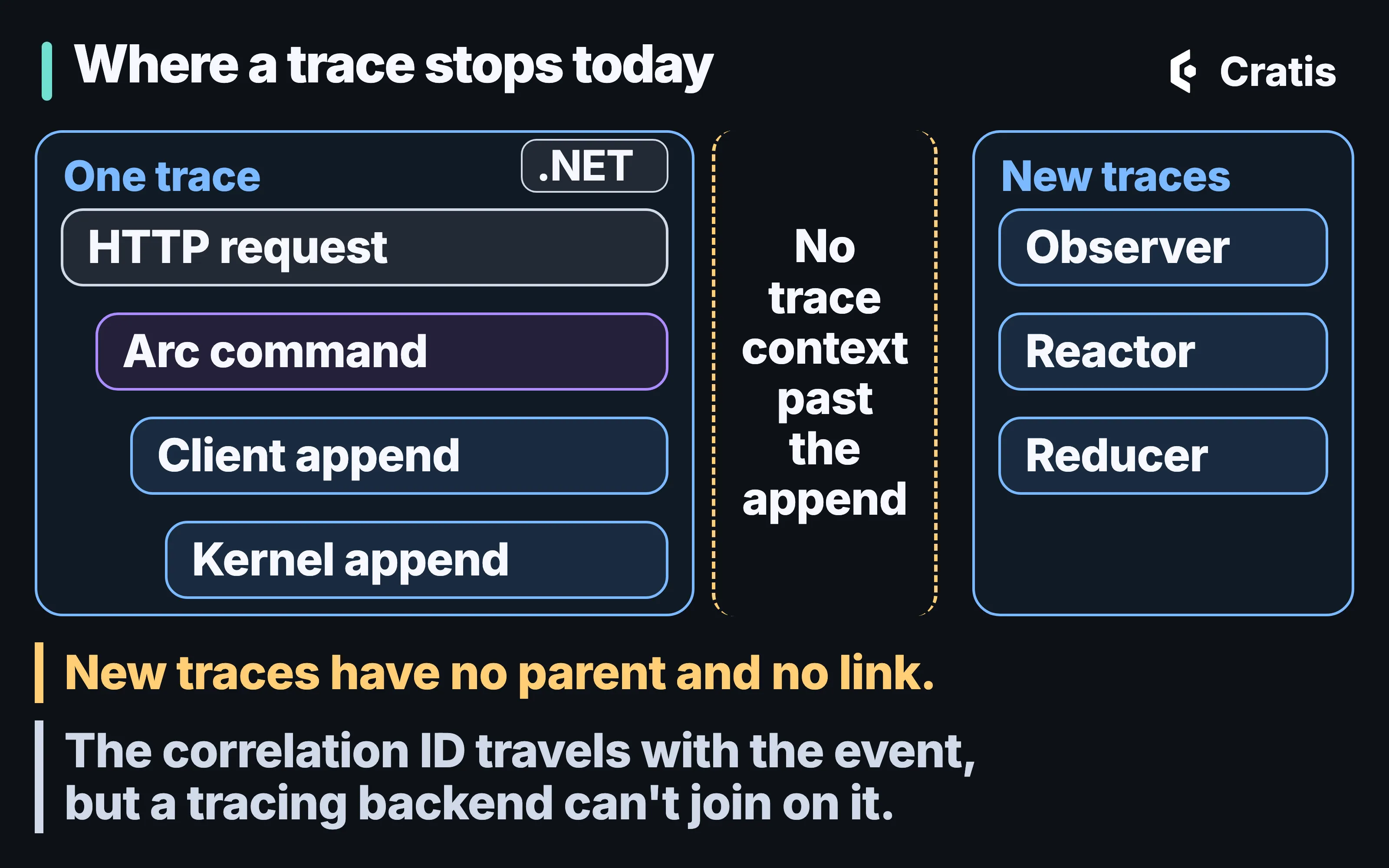
In .NET, the command, the client append and the kernel append share a trace; observers start new ones.
For the author feature, that means a slow registration shows up in a trace up to the append, and the projection that updates the Author list shows up on its own. The design discussion about carrying the trace past the append, and about a one-line setup and domain-named spans, is open in Cratis/Chronicle#4417, Cratis/Arc#2914 and Cratis/Arc#2915. None of it has shipped.
Backups that can be restored
Section titled “Backups that can be restored”A Chronicle deployment can’t be restored from a database backup alone. The database carries the event store’s data, the Data Protection key ring, webhook definitions with their encrypted credentials, and OAuth applications and tokens. It can’t carry the certificates that decrypt the key ring, and those have to be the ones that were in use when the backup was taken.
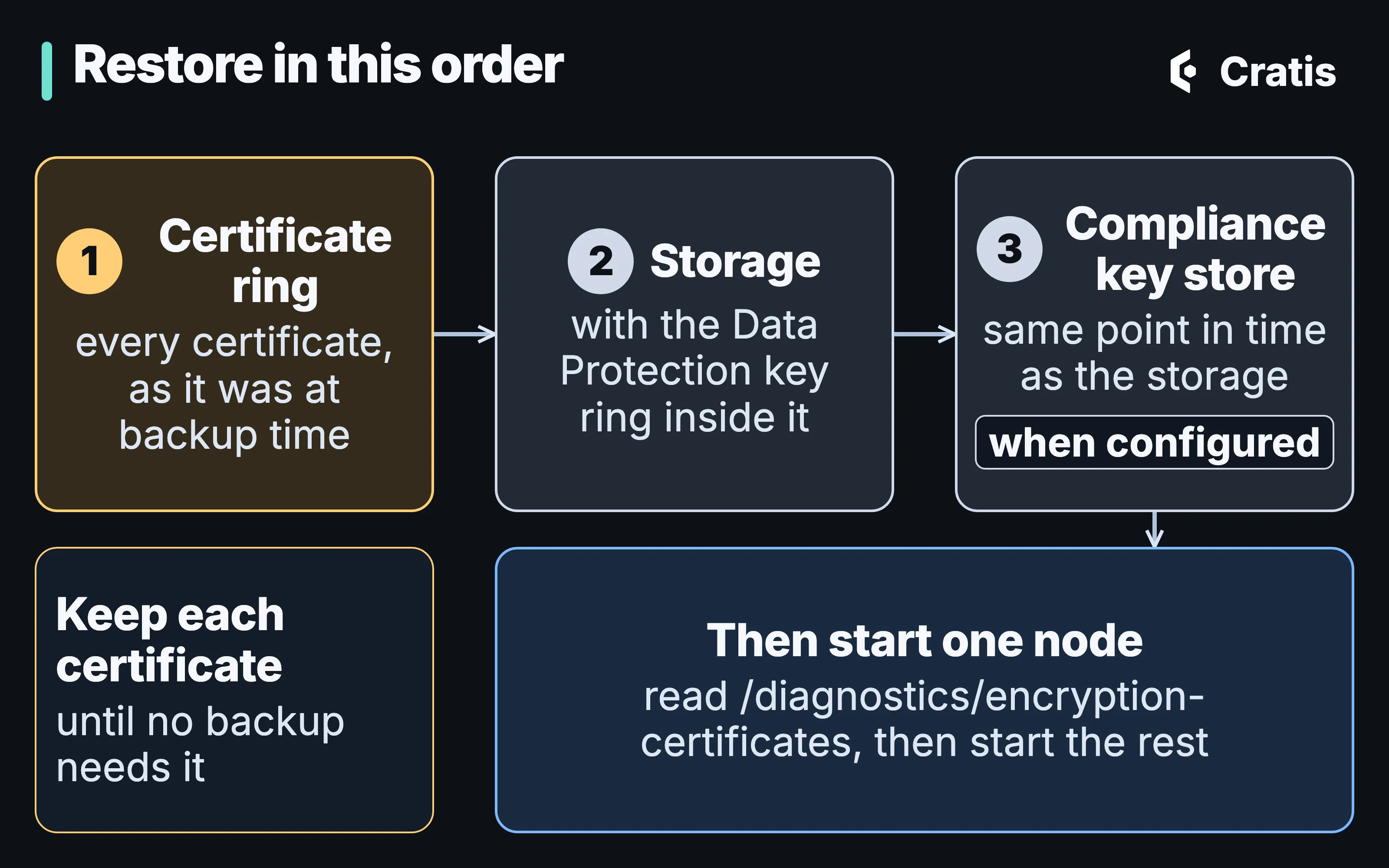
A database backup is the second of three things to restore.
Restore the certificate ring first, in the shape it had at backup time, including every previous certificate that was live then. Restore the storage second. The compliance key store comes third, when one is configured, restored to the storage’s point in time and never to an earlier one. The fence that records an erasure is kept in the key store beside the keys, so a key store restored from earlier than the storage still holds the key of anyone erased in between, with no fence to refuse it. Their personal data reads again, and an erasure already reported as complete is undone. The same key store is missing the keys of subjects created since its backup, and their personal data reads back as empty strings, the same as a completed erasure. Restored from later than the storage, it keeps the deletions and fences of the erasures made in between, and those erasures hold. Personal data in an event log covers the key store itself. Then start one node and read GET /diagnostics/encryption-certificates. A key reported with the role Retired means the ring is missing a certificate the restored data needs.
Nothing about a wrong order reports itself at restore time. The data is there, and nothing can read it. So a certificate stays in the backup set for as long as the oldest backup you’d still restore, which is longer than it stays in the ring. Losing the certificates can’t be recovered from.
Rotating the certificate is forward only. You make the new certificate active, list the old one under previous, restart every node with the same ring, and remove the old entry once the diagnostic shows nothing depends on it. Overwriting the file at the certificate path with a new key pair isn’t a rotation, and it makes everything the old one protected unreadable.
Upgrades
Section titled “Upgrades”Chronicle raises its major version for a breaking change to any published surface, whether the wire contract, a .NET API or observable behavior, and Every major version lists what each boundary changed. Most boundaries are compile-time changes you fix once. Three concerned data already written, 6 to 7, 10 to 11 and 13 to 14, and skipping past one doesn’t skip its consequence. Before crossing one, take a backup of a kind you’ve already restored from once, and rehearse the upgrade on a copy. Two releases are there to step over, 14.0.0 and 17.0.0, where the .0.1 is the real start of the major.
Within a major, each build is checked against every released minor of that major, so a .NET client and a kernel that differ only in minor are expected to work together. The Java, Kotlin, TypeScript and Elixir clients have version numbers of their own. Across a major, upgrade the kernel and the clients together. The .NET, Java, Kotlin and TypeScript clients check at connect that their wire contract and the server’s are compatible, and a mismatch fails the connection. The Elixir client runs the check before it sends an append, and a mismatch fails the append. In .NET, skipCompatibilityCheck=true turns the check off, as a temporary escape hatch that trades a clear failure at connect for a less obvious one later.
The kernel upgrades its own stored state with patches it applies at startup, in version order, and only forward. Starting an older kernel against patched storage doesn’t undo them, so rolling back means restoring the backup you took before the upgrade. Upgrading doesn’t rewrite the events you’ve already appended.
Two operations don’t mix with a rolling upgrade. Finish the upgrade before you rotate the encryption certificate or change webhook credentials, because a credential written by an upgraded node can’t be read by one that isn’t. And while an erasure of personal data is in force, upgrade every node together, since a node from before the erasure fence can provision a key over it.
The author feature’s first day
Section titled “The author feature’s first day”Acme registers Jane Austen in the morning. Contoso registers her too, and both succeed, because the uniqueness constraint holds per event sequence and namespace, and each organization has its own namespace, as Tenancy and identity end to end sets up. When a second Acme librarian tries the same name, the kernel refuses the append.
The number to watch is failed partitions. If the projection behind the Author list throws for one author, that author’s partition stops and is retried, and every other author keeps updating. From a terminal, for Acme:
cratis chronicle diagnose -n acmecratis chronicle failed-partitions list -n acmeLeave out -n and these commands look at the active context’s namespace, or Default when the context doesn’t set one, and Acme’s authors aren’t in Default. The Cratis CLI, from diagnose to llm-context follows a failed partition from diagnose to the retry, and Chronicle Workbench, screen by screen shows the same partition in the Workbench, labelled with the author’s ID.
The operator can’t go from that failed partition to the trace of the command that registered the author, because that trace stopped at the append.