

From script to stage · Part 26: Getting started with Cratis, and the tools around it

Cratis: from script to stage, and the long run · Part 26 of 26
dotnet new cratis -n MyStore writes a command that registers a name, a projection that lists the names, a reactor that logs each one and a React page for all of it, before you’ve written a line of your own. Three more commands start Chronicle, the backend and the frontend. The name you register on that page is an event you can open in the Workbench.
The first hour
Section titled “The first hour”The C# path needs the .NET 10 SDK, because every .NET template targets net10.0 and nothing else. It also needs Docker with the Compose plugin, and Node.js ^20.19.0 or >=22.12.0 with yarn, pnpm or npm. The Kotlin and Java variants build with JDK 17 instead of the .NET SDK. The getting started guide goes from an empty folder to the first event:
dotnet new install Cratis.Templatesdotnet new cratis -n MyStorecd MyStoredocker compose up -ddotnet runyarn devdotnet run and yarn dev each want a terminal of their own.
Creating the project runs post-creation actions that add the Cratis NuGet packages at their current release and install the frontend dependencies. The template source leaves its package versions open on purpose, and the generated .csproj records the versions it resolved, so two projects scaffolded a week apart can differ. dotnet new asks before it runs the frontend install. In a script or a dev container nobody is there to answer, and Cratis.Templates 1.7.2 keeps re-prompting instead of moving on, so pass --allow-scripts yes. Add --packageManager none as well to pin the packages and skip the install.
--Database picks MongoDB, the default, or PostgreSQL, SQL Server or SQLite. Any choice other than MongoDB swaps Arc’s MongoDB package for its Entity Framework Core one and points Chronicle’s sink at SQL.
docker compose up -d starts the Chronicle development image, which bundles MongoDB, and an Aspire dashboard. The compose file is for development. It publishes its ports on every network interface and the Chronicle image uses well-known development credentials, so keep it on a machine you trust. With the default MongoDB setup, events and read models live inside the Chronicle container. docker compose stop keeps them and docker compose down deletes them.
The backend listens on http://localhost:5000, with Swagger at /swagger. Vite serves the frontend on http://localhost:9000 and forwards /api, /.cratis and /swagger to the backend. Port 5000 has to be free because the Vite proxy is fixed to it, and so does 27017, because the Chronicle image advertises its MongoDB replica-set member as localhost:27017. Register a name on the Demo page and three things happen. The backend logs Registered: <name> from the sample reactor, the name appears in the list, and the event shows up in the Chronicle Workbench at https://localhost:35000, once you’ve accepted the self-signed development certificate and signed in with the development account.

A registered name, opened as an event in the Workbench.
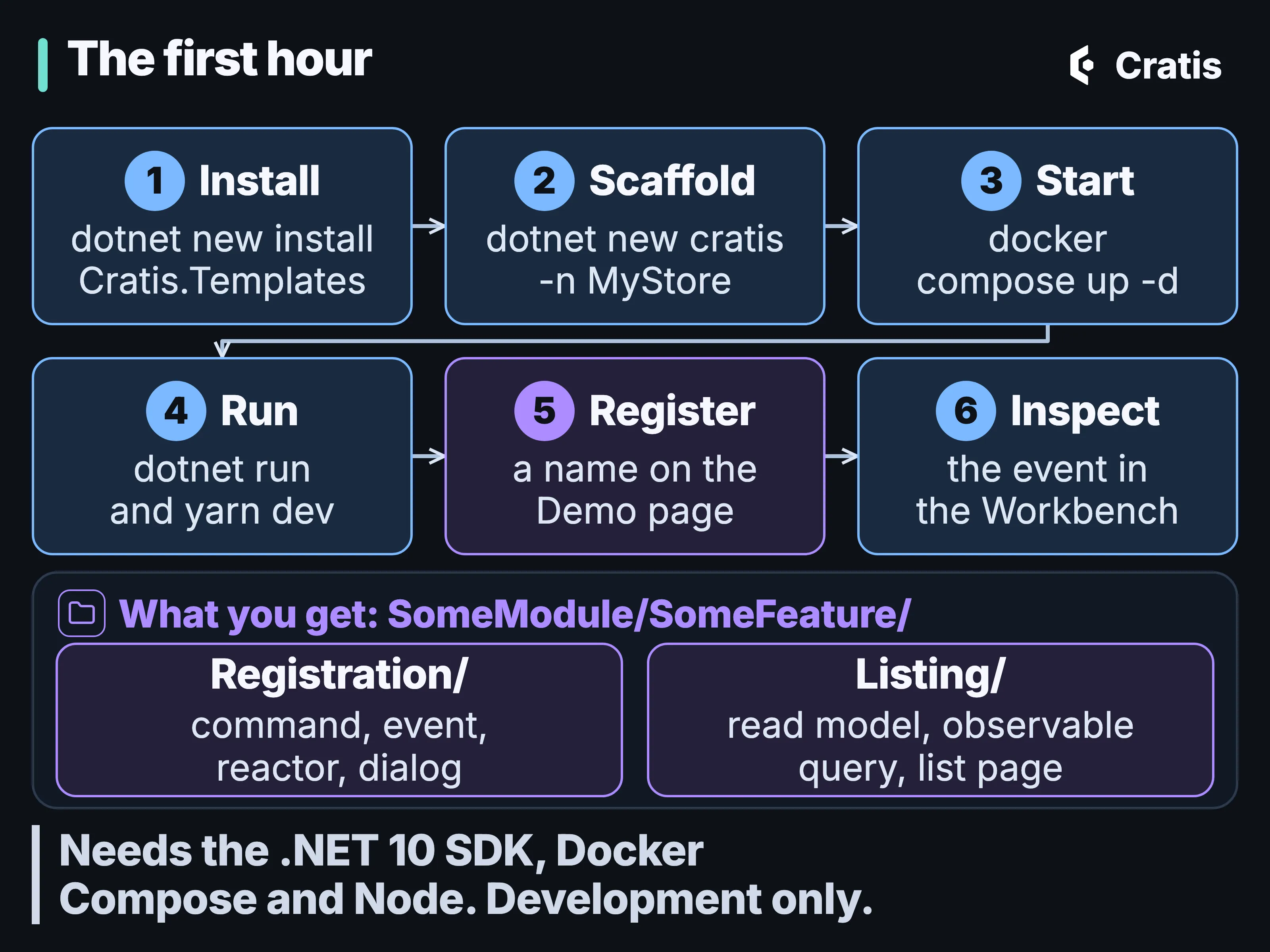
From an empty folder to an event you can open.
What the template writes
Section titled “What the template writes”The cratis template puts its sample under SomeModule/SomeFeature/, in two vertical slices.
SomeModule/SomeFeature/├── Listing/│ ├── index.ts│ ├── Listing.cs│ ├── Listing.ts│ └── ListingPage.tsx├── Registration/│ ├── index.ts│ ├── RegisterDialog.tsx│ ├── Registration.cs│ └── Registration.ts├── index.ts├── SomeFeature.tsx├── SomeId.cs└── SomeName.cssrc/main/kotlin/com/example/somemodule/somefeature/├── listing/│ └── Listing.kt├── registration/│ └── Registration.kt├── SomeId.kt└── SomeName.kt
SomeModule/SomeFeature/├── Listing/│ ├── index.ts│ └── ListingPage.tsx├── Registration/│ ├── index.ts│ └── RegisterDialog.tsx├── index.ts└── SomeFeature.tsxsrc/main/java/com/example/somemodule/somefeature/├── listing/│ ├── Listing.java│ └── ListingReducer.java├── registration/│ ├── Register.java│ ├── Registered.java│ └── RegistrationReactor.java├── SomeId.java└── SomeName.java
SomeModule/SomeFeature/├── Listing/│ ├── index.ts│ └── ListingPage.tsx├── Registration/│ ├── index.ts│ └── RegisterDialog.tsx├── index.ts└── SomeFeature.tsxNo TypeScript template: --language takes csharp, kotlin or java.
No Elixir template: --language takes csharp, kotlin or java.
Registration/ holds a [Command] record, a Registered event, a reactor and a dialog, and Listing/ a read model built from that event, a query and a list page. C# projects the read model with [FromEvent<Registered>] behind an observable query. Kotlin and Java use a reducer and a plain query, and keep the backend under src/main, apart from the frontend. The command is short:
[Command]public record Register(SomeName Name){    public (SomeId, Registered) Handle()    {        var eventSourceId = SomeId.New();
return (eventSourceId, new(Name)); }}@Command@AllowAnonymousdata class Register( @CommandKey val id: SomeId, val name: SomeName) { fun handle(): Registered = Registered(name)}@Command@AllowAnonymouspublic record Register(@CommandKey SomeId id, SomeName name) { public CompletionStage<Registered> handle() { return CompletableFuture.completedFuture(new Registered(name())); }}There is no TypeScript template. This is the equivalent command in the source-only Arc for TypeScript preview, not generated template output.
@command()export class Register {    @field(SomeName) name!: SomeName;
    handle() {        const someId = SomeId.create();
        return tuple(            eventSourceIdResponse(someId.value.toString()),            new Registered(this.name));    }}
Arc for Elixir doesn’t exist; use the Chronicle Elixir client directly.
In C# and TypeScript, Handle() returns the identity it chose and the event to append, and Arc appends it. The Kotlin and Java templates take the identity as the command’s @CommandKey, return only the event, and Arc appends it to that key. The project has no controller and registers no route. Arc derives the route from the namespace, and the build generates the TypeScript proxy the dialog calls, next to its C# source. The route settings live in appsettings.json and have matching CratisProxies* properties in the .csproj, and the two have to change together. Arc gotchas: where a convention decides for you shows what happens when they don’t, and why a project laid out like this one should leave CratisProxiesSkipOutputDeletion at true.
For the author feature, Register becomes RegisterAuthor, SomeName becomes a concept for the author’s name, and the listing becomes the list of authors. RegisterAuthor takes the author’s id from the caller, as the Kotlin and Java templates do, instead of creating it in Handle(). Uniqueness within the organization is the part the template leaves out. That’s a Chronicle constraint, covered in Rules that hold when you write, and the tenant comes from the edge, as Tenancy and identity end to end explains.
cratis new: the same templates from the CLI
Section titled “cratis new: the same templates from the CLI”cratis new creates the same full-stack skeleton from the Cratis templates, in C# or on Spring Boot with Kotlin or Java, for the database you pick, with proxy generation configured:
cratis newcratis new listcratis new cratis --language csharp -n MyStore -o MyStoreThe first line starts a wizard that asks for the project, the language and the database. The second lists what’s available, and the third scaffolds directly. The CLI carries its own template engine, which reads the format dotnet new uses, so scaffolding doesn’t need a .NET SDK installed. Building the generated C# still does, and the CLI restores packages only when it finds a build toolchain.
A few differences from dotnet new matter on the first run. --language (csharp, kotlin or java) is required when you scaffold directly. -o is the output directory here, while everywhere else in the CLI it selects the output format. --allow-scripts defaults to no, so pass yes to get the frontend install. An unknown option is an error that names the valid set, --dry-run reports what it would create and writes nothing, and --force lets it write into a folder that isn’t empty. --database takes mongodb, postgresql, mssql or sqlite.
When it’s done, cratis new synchronizes the project’s AI configuration, the same work cratis ai update does. Every template ships a .cratis/ai.json that selects the Cratis AI profiles, languages and assistant integrations, so after dotnet new you run cratis ai update yourself, and after cratis new there’s nothing left to run. AI across the Cratis stack goes into what that installs, and The Cratis CLI, from diagnose to llm-context covers the rest of the CLI.
The package holds four .NET templates. cratis is the web application above, and cratis-aspire is the same application orchestrated with .NET Aspire. A minimal AppHost that runs Chronicle for a project looks like this:
var builder = DistributedApplication.CreateBuilder(args);
var chronicle = builder.AddCratisChronicle();
builder.AddContainer("api", "my-org/my-api")    .WithReference(chronicle);
builder.Build().Run();
No Kotlin equivalent: Aspire hosting for Chronicle is a .NET package.
No Java equivalent: Aspire hosting for Chronicle is a .NET package.
No TypeScript equivalent: Aspire hosting for Chronicle is a .NET package.
No Elixir equivalent: Aspire hosting for Chronicle is a .NET package.
The template’s AppHost also sets Cratis__Chronicle__ConnectionString on the backend, because the client reads Cratis:Chronicle:ConnectionString, not Aspire’s ConnectionStrings. cratis-chronicle-console and cratis-chronicle-web connect a console app and an ASP.NET Core app to Chronicle, for when you want the event store without Arc. The Kotlin and Java variants of cratis generate their proxies through the Arc Gradle plugin, and Beyond .NET covers how they differ from the .NET stack.
One feature, one folder
Section titled “One feature, one folder”Arc recommends a vertical slice, with the command, the read model, the screen and the specs in one feature folder, so one change is one diff. Arc doesn’t enforce it. We still recommend it, because when a feature is spread across five layer folders, reviewing one change means opening all five. The C# template’s Registration/ and Listing/ folders are already laid out that way.
In the author feature, the registration slice keeps the command and its event, with the rule that names are unique, side by side:
[Command]public record RegisterAuthor(AuthorId Id, AuthorName Name){    public AuthorRegistered Handle() => new(Name);}
[EventType]public record AuthorRegistered([property: Unique(name: "UniqueAuthorName")] AuthorName Name);@Commanddata class RegisterAuthor(@CommandKey val id: AuthorId, val name: AuthorName) { fun handle(): AuthorRegistered = AuthorRegistered(name)}
@EventTypedata class AuthorRegistered(@Unique(id = "UniqueAuthorName") val name: AuthorName)Java keeps one public type per file, all in the same folder:
@Commandpublic record RegisterAuthor(@CommandKey AuthorId id, AuthorName name) {    public AuthorRegistered handle() { return new AuthorRegistered(name); }}
// Authors/Registration/AuthorRegistered.java@EventTypepublic record AuthorRegistered(@Unique(id = "UniqueAuthorName") AuthorName name) { }
From Arc for TypeScript, an early source preview whose packages aren’t on npm yet:
@command()export class RegisterAuthor {    @key() @field(AuthorId) id!: AuthorId;    @field(AuthorName) name!: AuthorName;
    handle(): AuthorRegistered { return new AuthorRegistered(this.name); }}
@eventType()export class AuthorRegistered {    @unique('UniqueAuthorName') @field(AuthorName) name: AuthorName;
    constructor(name = new AuthorName('')) {        this.name = name;    }}
Arc for Elixir doesn’t exist; use the Chronicle Elixir client directly.
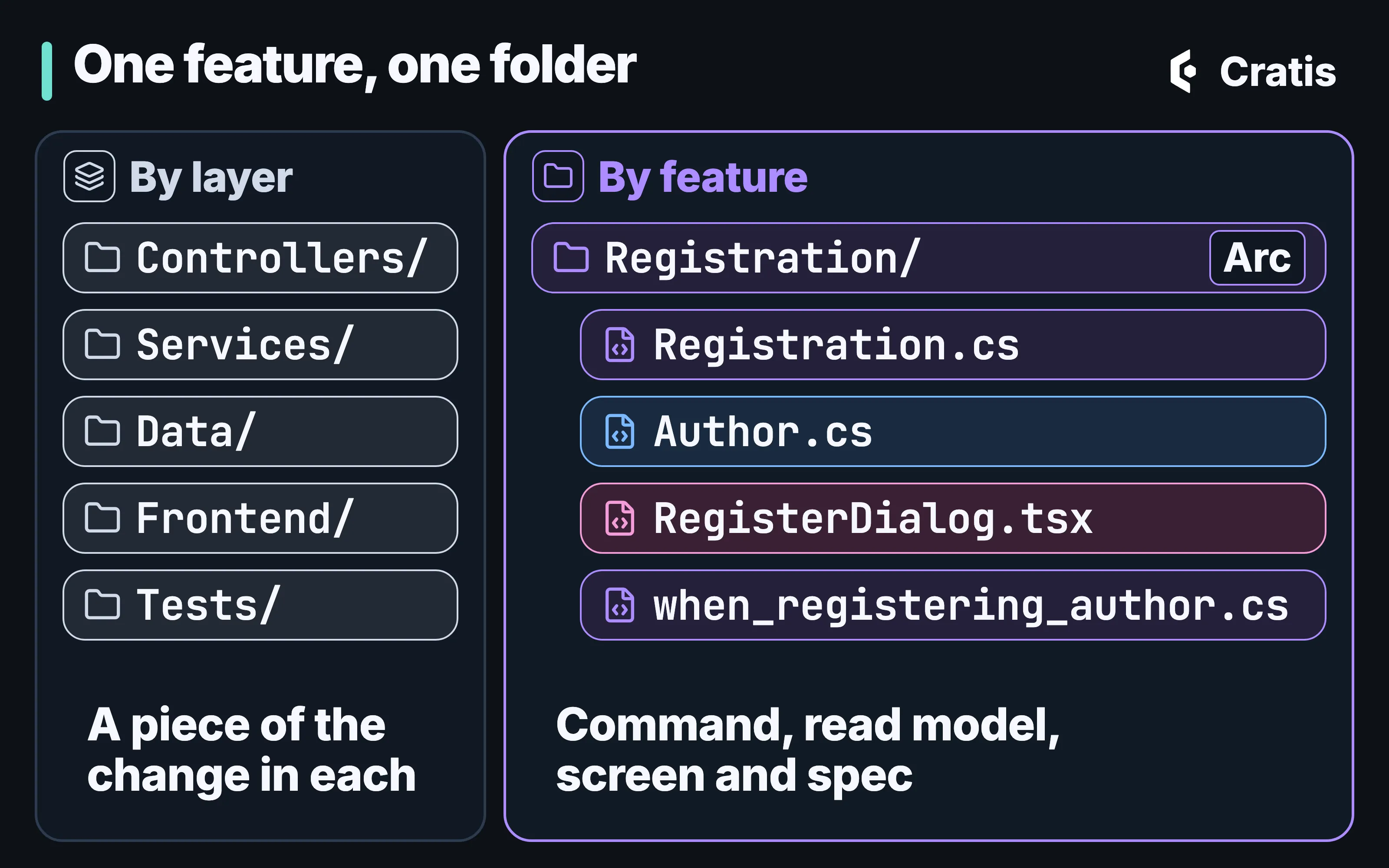
One feature, one folder, one diff.
Samples, and what each one leaves out
Section titled “Samples, and what each one leaves out”The template is a starting point for your own application. The samples are for learning one idea at a time. A catalog file in the Samples repository drives the roster on the site, and each entry lists its level, the products it uses, its prerequisites, the exact commands that verify it and what it doesn’t cover. The tracks run from getting started, event processing and full-stack CQRS to boundaries and isolation, operations, model-first work and full applications.
What a sample leaves out is part of its design. Chronicle Backend appends a fact and reads one event source’s history over HTTP, without projections or a frontend, and its specs run without external infrastructure. Idea Loom shows generated contracts, model-bound commands, an observable query and a CommandDialog on Arc and React, and it deliberately doesn’t use Chronicle, keeping its current state in memory. Chronicle Operations Diagnosis creates one failed partition on purpose, for you to find with the CLI and the Workbench. Model-First Library compiles one .play file and runs its accepted and rejected examples through Stage. It needs locally built Screenplay and Stage checkouts, and it checks the model without running a live Chronicle command. Library is the larger one, with lending and membership. Full-stack author registration is the author feature from the hub as a sample: RegisterAuthor returns AuthorRegistered, a projection keeps an observable author list, and a React screen calls the generated proxies. It covers registration and listing only, so the uniqueness constraint isn’t in it, and it runs on the template’s development credentials.
Neither the samples nor the templates are production templates. The Samples repository has no release tags, so there’s no sample version to match against your packages. If a sample doesn’t build against the version you have installed, report it in the Samples repository. One loop works for any of them: read the README, run the happy path, open the Workbench when Chronicle is involved, and change one thing.
Fundamentals, underneath everything
Section titled “Fundamentals, underneath everything”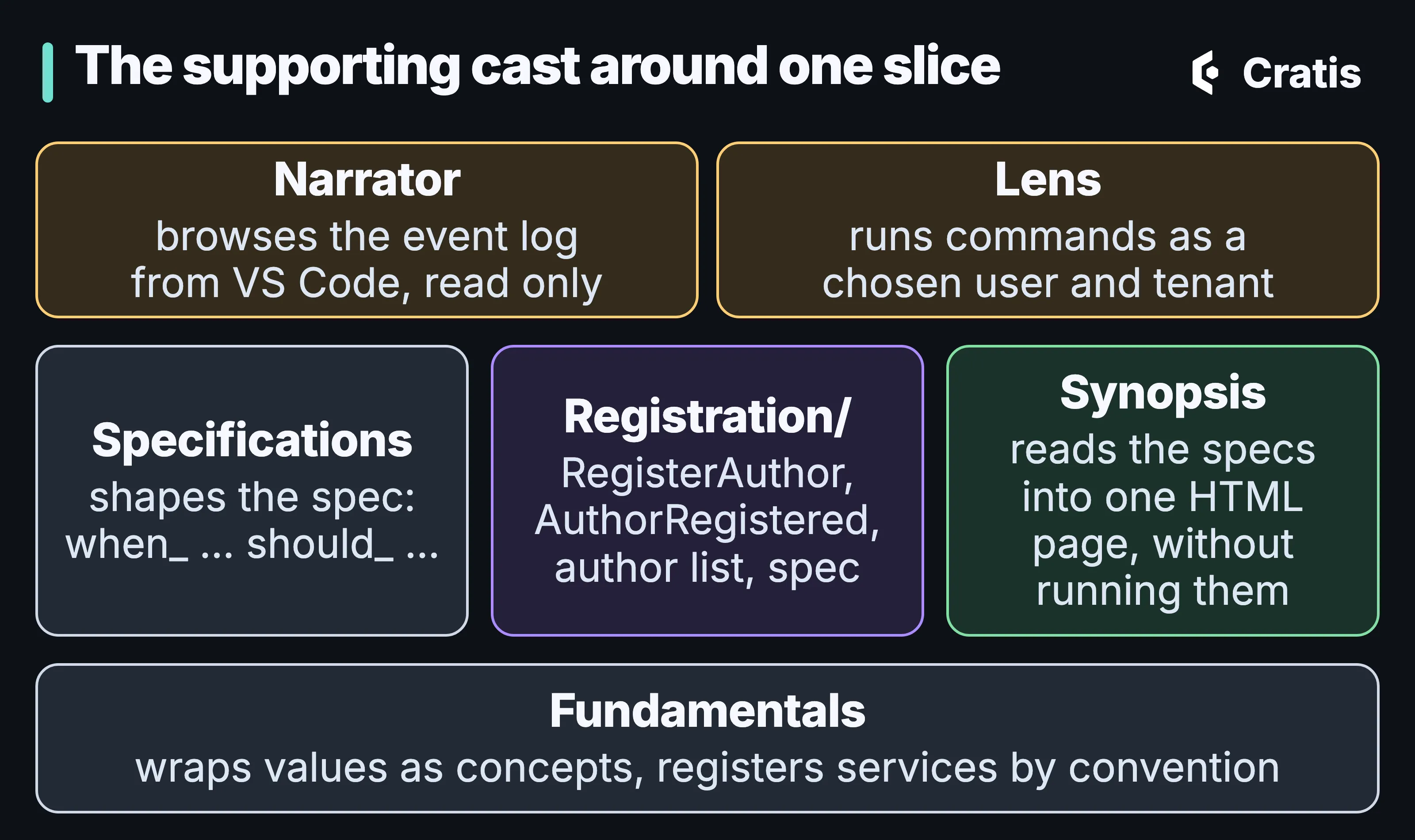
Five smaller tools, each doing one thing around the feature folder.
Fundamentals holds the shared building blocks beneath the Cratis stack. For .NET that means concepts, serialization, convention-based dependency injection and type discovery. For TypeScript it means GUIDs, serialization of derived types, property-path proxies and decorators. Chronicle, Arc and Components build on it, and you can use it on its own. Parity between the two isn’t a goal, because the environments offer different things.
Most people meet it through a concept. ConceptAs<T> wraps a primitive so the compiler stops you passing an author’s ID where a book’s ID belongs, and a personal value such as a social security number also carries Chronicle’s [PII] marker. In .NET, services are registered by convention:
[PII]public record SocialSecurityNumber(string Value) : ConceptAs<string>(Value);@Piidata class SocialSecurityNumber(private val rawValue: String) : ArcConceptAs<String>, ChronicleConceptAs<String> { override fun value(): String = rawValue override val value: String get() = rawValue}@Piipublic record SocialSecurityNumber(String value) implements ConceptAs<String>, io.cratis.chronicle.concepts.ConceptAs<String> { @Override public String getValue() { return value; }}@pii()export class SocialSecurityNumber extends ConceptAs<string> { static readonly valueType = String;}defmodule MyApp.SocialSecurityNumber do use Chronicle.Concept, type: :string pii()endservices.AddBindingsByConvention();
public interface IUserDirectory { }public class UserDirectory : IUserDirectory { } // Registered as TransientNo Kotlin equivalent: Arc for Kotlin runs on Spring Boot, which registers the services.
No Java equivalent: Arc for Kotlin runs on Spring Boot, which registers the services.
Arc for TypeScript registers services explicitly:
export class UserDirectory { }
const builder = ArcApplication.createBuilder();builder.services.addTransient(UserDirectory);
No Elixir equivalent.
A concept wraps exactly one value. The serializers and converters Fundamentals provides unwrap it to the primitive, so a property you add to a concept is ignored and lost. C# gives you an implicit conversion from the concept to the primitive but not back, so you add that one yourself. AddBindingsByConvention() pairs IUserDirectory with UserDirectory only when both sit in the same namespace and the interface has one implementation. Registrations are transient unless the class says [Singleton], and [IgnoreConvention] opts a type out. Arc: commands and queries without the plumbing shows what Arc does with concepts, from validation to the TypeScript types.
The shape every spec takes
Section titled “The shape every spec takes”Specifications brings specification by example to xUnit and NUnit, in the style of Machine.Specifications. Establish() is the given, Because() the when, each [Fact] or [Test] method a then, and Destroy() the cleanup. The lifecycle methods are found by convention, take no arguments, can return void or Task, and run across the inheritance chain, so a context you reuse lives in a given/ folder.
The folder and class names carry the meaning. A for_<unit> folder, a when_<behavior> class and should_<fact> methods read as a sentence, and a spec at for_RegisterAuthor/when_registering/and_the_name_is_taken.cs says what it checks before you open it. The specs run on the standard test runners, so IDE, editor and CI tooling work unchanged. The packages are Cratis.Specifications, Cratis.Specifications.XUnit and Cratis.Specifications.NUnit, and the naming style triggers compiler warnings you switch off in the test projects. How the shape combines with Arc’s command scenarios and Chronicle’s in-memory tests is in Testing with Arc and Chronicle.
Reading the specs back with Synopsis
Section titled “Reading the specs back with Synopsis”Synopsis reads the executable examples a repository already has and writes them out as one searchable HTML page, organized by module and feature, with every statement linked back to the code it came from. It turns recognized specification shapes in C#, JavaScript, TypeScript, Gherkin and Screenplay into that page. On the C# side that covers Cratis Specifications and six other frameworks, xUnit, NUnit and MSTest among them, and on the JavaScript side runners from Vitest and Jest to Playwright.
A spec written with Cratis Specifications:
public class when_borrowing_an_available_book : given.a_registered_member{    void Because() => _receipt = _checkout.Borrow(_book, _member);
    [Fact] void should_confirm_the_loan() => _receipt.Confirmed.ShouldBeTrue();}
No Kotlin equivalent: Cratis Specifications runs on xUnit and NUnit.
No Java equivalent: Cratis Specifications runs on xUnit and NUnit.
No TypeScript equivalent: Cratis Specifications runs on xUnit and NUnit.
No Elixir equivalent: Cratis Specifications runs on xUnit and NUnit.
becomes a card on the page:
FOR Checkout Backend - C# Borrowing an available bookGIVEN A registered memberWHEN Borrowing an available bookTHEN Confirm the loanIt works from static analysis. C# goes through Roslyn syntax trees without a semantic compilation, JavaScript and TypeScript through a scanner, and it never loads or runs code from the repository it reads, so there’s no restore and no test run. That also sets its limit. The page says what the specs describe, not whether they pass, and it doesn’t judge whether they’re good specs. Install it with dotnet tool install --global Cratis.Synopsis.Tool and run synopsis . --open. The output is one file with full-text search and no server or external assets, and --format both writes a JSON model beside it. Module and feature names come from folder conventions, and a synopsis.json handles other layouts.
Synopsis is a standalone tool and library today. There’s no cratis synopsis command and no Studio view of it yet. Its README is the documentation.
Narrator and Lens: two windows onto a running system
Section titled “Narrator and Lens: two windows onto a running system”Workbench ships with Chronicle, and the same running system is also visible from a terminal with cratis chronicle workbench and from VS Code with Narrator, which we still treat as experimental.
Narrator is a VS Code extension for browsing Chronicle artifacts and event history. From the activity bar you browse event stores and namespaces down to event types, read models, observers and projections, and page through the event sequence with each event’s sequence number, type, event source, time and payload. You can open an event type’s or a read model’s schema, or a projection’s declaration, and switch between servers. It reads the same ~/.cratis/config.json the CLI uses and picks up changes to it:
{ "activeContext": "default", "contexts": { "default": { "server": "chronicle://localhost:35000" } }}It reads the log and the schemas and changes nothing in the store. That config file can hold client credentials and an access token in plain text, so treat it like any other file with a secret in it. Chronicle Workbench, screen by screen covers the browser tool.
Lens is a browser extension for the Arc side, and its current release is 0.0.1. It detects a running Arc application in the current tab, lists its commands and queries by namespace, runs them from a form built from their schema and shows diagnostics for observable queries. It also switches the active user and tenant, which it adds as request headers when the application calls its backend. That makes it a development tool for exercising an Arc application as different users and tenants. It needs an Arc application it can detect, and it doesn’t replace testing your authorization.
cratis.io, and where each page comes from
Section titled “cratis.io, and where each page comes from”cratis.io is a Starlight site built from many repositories. Most pages are written in the owning product’s repository, in its Documentation/ folder, and the site build copies them in. The edit link on a page therefore points at the product, where a fix belongs. Site-level pages, such as the front page, the scenarios, the AI section, the samples and the tools, live in the Documentation repository. A few tools, Synopsis among them, have no page on the site yet.
A newcomer usually wants one of a handful of pages. The Cratis stack shows how the products fit, Build a full app is a guided journey through Arc, Chronicle, generated contracts and React, and learning paths order the rest. What’s new and compatibility matter once you’ve picked versions. Parts of the model-first layer are experimental and in early development.
For an assistant, the site publishes llms.txt, llms-full.txt and an llms.txt for each product. The bulk archives aren’t the best default context for one question.
Where to start
Section titled “Where to start”The whole life cycle, by the moment you’re in:
| When | What you reach for | What you stop writing |
|---|---|---|
| Model it | Cratis Studio, event modeling, Screenplay, Screenplay MCP | A design document that drifts from the code |
| Start it | cratis new or dotnet new cratis, cratis ai install |
Project wiring and proxy setup |
| Build it | AuthProxy, Ante, Arc for .NET, JVM or TypeScript, Components, Chronicle | Controllers, DTOs, fetch wrappers, uniqueness lookups before the write |
| Test it | Cratis Specifications, Arc’s CommandScenario, Chronicle’s in-memory scenarios, Stage’s specification runner |
A fake event log, and a running server for every spec |
| Protect it | [PII], [NotAudited], [Encrypted] |
Per-field encryption code |
| Run it | A namespace per tenant, outbox and inbox subscriptions | Tenant filters in every event query, relays between stores |
| Debug it | cratis chronicle, the terminal workbench, Workbench, Narrator |
Ad-hoc queries against the storage |
| Evolve it | Generations, replay, revision, redaction | One-off scripts that rewrite the store |
| Automate it | Cratis Direct, the AI corpus and its hooks, the CLI’s command catalog, Chronicle MCP, Screenplay MCP | Your conventions, retyped into every assistant |
Ante, in the Build it row, is the separate invitation and onboarding lobby for users who have signed in but belong to no tenant yet, from Tenancy and identity end to end.
Not everything in that table is at the same stage. Stage, Scene and Prologue are experimental, and so are Narrator and Prompter, which answers questions about the docs in Discord, so their syntax and behavior can still change. Arc for TypeScript is an early preview, available as source only. The Cratis AI corpus and its hooks are in preview. Cratis Studio is live and in beta. Cratis Direct is a control plane for agentic engineering. We run our own engineering on it today. For everyone else it’s coming soon at cratis.direct.
Starting fresh, scaffold with cratis new or dotnet new cratis, then follow Build a full app.
To learn by example, start with Full-stack author registration, or pick one of the samples that matches what you want to understand, and read what it leaves out first.
For the event history on its own, follow Get started with Chronicle, append a few events and open the Workbench. To operate it, brew tap cratis/cratis && brew install cratis, then run cratis chronicle diagnose, and keep retry-partition ahead of replay in your runbook.
To model first, sketch one slice with event modeling, write it as a .play file and run cratis screenplay validate on the folder. At the edge, put AuthProxy in front of an Arc app and set Arc’s tenant header to Tenant-ID. For personal data, mark one value’s type [PII], then read The log remembers.
With an assistant, run cratis ai install for the harnesses, profiles and languages you use, keep cratis screenplay validate and your build in the assistant’s loop, and review its work as a proposal, a model, a spec and the event log.
Earlier posts on the blog go deeper on single decisions. Choosing an event sourcing stack for .NET is about whether event sourcing fits your stack, and Event sourcing in any language about how the clients share one kernel. Event sourcing in .NET with Chronicle builds a runnable first slice, and From zero to first projection with an AI assistant has an assistant do the same.
The series
Section titled “The series”- Events are facts. A message is gone once it’s sent, and a recorded fact can still feed next year’s view.
- Inside Chronicle. What the kernel does during an append, and why no projection has run yet when the call returns.
- From event to read model. One attribute turns
AuthorRegisteredinto a read model, and a reducer takes over when attributes can’t say it. - Reacting to facts. Reactors, webhooks and outbox-to-inbox subscriptions, each of which has to cope with running twice.
- Rules that hold when you write. Constraints, concurrency scopes, decision reads and aggregates, and which one we’d reach for first.
- Arc: commands and queries without the plumbing. Arc gives a record with a
Handlemethod its route, validation, authorization and the TypeScript your frontend compiles against. - Validation all the way down. Every place a rule can live, from the rules copied into the browser to Chronicle’s append, what each layer can’t guarantee, and which rejections find their way back to a form field.
- Live UIs. Queries that push updates to React, and forms that keep their button disabled until the backend’s shared rules pass.
- Cratis Components, the React layer. The author list and the register dialog built with Components 4, how a field binds to a generated command, how a taken name gets back to the Name field, and where the library stops.
- Tenancy and identity end to end. A tenant picked at AuthProxy travels as a header Arc reads, and Arc’s Chronicle integration turns it into a Chronicle namespace. Membership is still yours to check.
- Testing with Arc and Chronicle. The ladder from a direct method call to a real Chronicle, and the ways a green spec proves nothing.
- Beyond .NET. Arc and Chronicle in other languages, four storage providers, and where each still differs from .NET.
- Personal data in an event log. Making a person’s data unreadable in an append-only log, and exactly where that stops.
- Year two. Why a new event shape, a new view, a correction and a stopped processor are four kinds of change, none of them a script against the store.
- Arc gotchas: where a convention decides for you. Validation that runs in two places, a proxy folder that gets cleared, and names that do the mapping for you until they don’t.
- Chronicle Workbench, screen by screen. The browser tool that ships with Chronicle.
- The Cratis CLI, from diagnose to llm-context. From
diagnoseto a full-screen terminal workbench, and a command catalog that tells an agent which commands change the server. - Running Chronicle and a Cratis application in production. What the production image won’t start without, what a client trusts until you tell it otherwise, where a trace stops today, and the order a restore has to follow.
- Chronicle jobs, scale and performance. Replays you can stop and resume, and the clustering default that, with two servers, quietly gives you two clusters.
- Screenplay: an event model you can compile. An event model written as text that a compiler can check in CI before the application has ever started.
- Stage and Scene: what happens after a model compiles. A model rendered into an Arc and Chronicle application by a renderer that refuses what it can’t express.
- Prologue: a first model of the system you already have. A first model drafted from a running system that nobody ever modeled.
- Cratis Studio: one event model for the whole team. A team and its AI agents on one event model, and a slice’s code generated into your repository.
- Cratis Direct and our agentic development life cycle. How a person admits agent work, what each gate records and who merges.
- AI across the Cratis stack. The AI corpus, its hooks and the MCP servers, what each lets an assistant read or change, and the checks that run whether it listened or not.
- Getting started with Cratis, and the tools around it.
cratis new, the samples, and the supporting pieces, from Fundamentals and Specifications to Synopsis and Narrator.
The hub, Cratis: from script to stage, and the long run, follows the author feature through all of them once, briefly.
- Previous: Part 25 — AI across the Cratis stack
- Next: back to the start of the series, Cratis: from script to stage, and the long run