

From script to stage · Part 20: Screenplay: an event model you can compile

Cratis: from script to stage, and the long run · Part 20 of 26
cratis screenplay validate compiles an event model on a machine where the application has never started. It reads a folder of .play files, merges them into one application, and reports each problem with a code that stays the same from one release to the next. Screenplay is the language those files are written in.
In a model, the author feature is a RegisterAuthor command, the AuthorRegistered event it produces, and a list of authors built from those events. The code below uses the library example from the Screenplay docs, where a member borrows a book. It has the same shape, with one command, one event and one list.
Write the intent down first
Section titled “Write the intent down first”Event modeling draws a feature as a timeline of screens, commands, events, read models and automations. For the author feature that timeline is short. A librarian fills in a form, the system records that an author was registered, and a list shows the authors. Drawing it first lets the people involved argue about cause and information flow while changing their minds is still cheap.
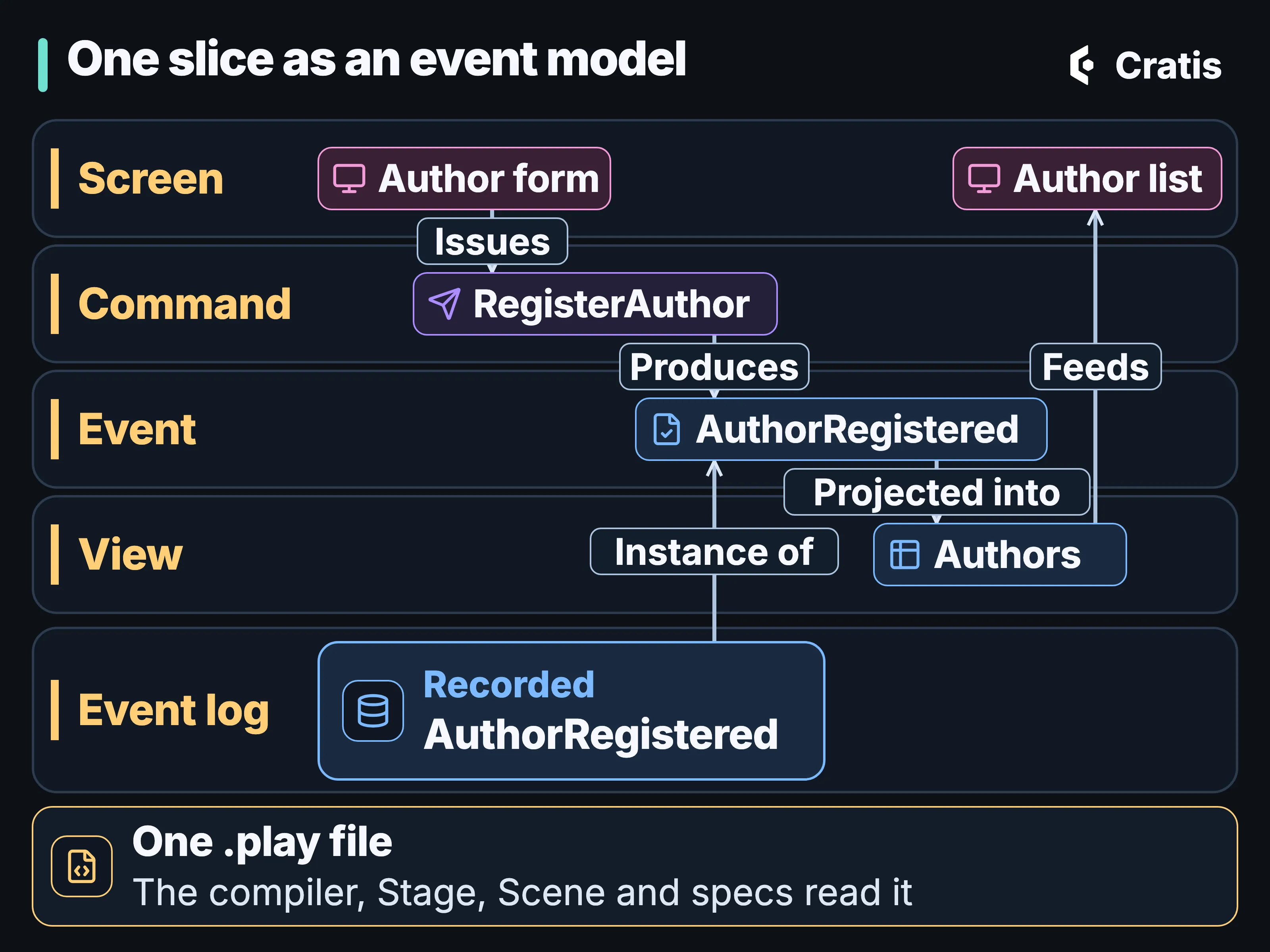
One slice as an event model, and the file that holds it.
An event model on a whiteboard stops matching the code soon after the code exists. Screenplay writes the model down as a versioned .play file next to the code it describes, so a change to the model turns up in the same pull request as the change to the code. The language reaches from the concepts a value is made of to the policy that decides who may run a command. It doesn’t make any one runtime the authority on what those mean, which is why several tools can read the same file.
The slice is the unit
Section titled “The slice is the unit”A .play file is indented like Python and has no braces. Nesting is decided by spaces, so a tab gets a warning (PLAY0006), and comments start with //. A file declares a domain, the concepts and policies it needs, and then a module that holds features and slices. Features nest as deep as the domain needs them to.
The slice is the smallest thing a model is made of, and its four types follow event modeling:
| Slice type | What it models |
|---|---|
StateChange |
a command that produces events |
StateView |
a query, its projection and a screen |
Automation |
a reaction or a reducer that runs when something happens |
Translate |
external data captured as events |
The author feature is one StateChange slice and one StateView slice. In a lending version adapted from Getting started, a member borrows a book:
    slice StateChange BorrowBook      command BorrowBook        bookId     BookId identifier        borrowedBy MemberId        authorize  IsMember        validate          bookId not empty  message "A book is required"        produces BookBorrowed          for bookId          borrowedBy   = borrowedBy
      event BookBorrowed        borrowedBy MemberId
A reviewer sees the whole write in one diff. authorize IsMember names the policy that decides who may run the command. The validate block holds the rules, each with the message a user gets back. identifier makes the book the command’s event source, produces appends the event to it with for bookId and maps the command’s values onto the event. An event never carries its event source ID, so bookId isn’t on BookBorrowed, and marking one of an event’s properties as the identifier is a compile error (PLAY0019). When it happened travels in the event’s context.
For the author feature, RegisterAuthor sits where BorrowBook is. The rule that names are unique goes in a constraint, another construct a slice can hold:
constraint UniqueAuthorName unique name on AuthorRegistered message "An author with this name is already registered."A constraint covers one event sequence in one namespace, and a namespace per tenant makes that one organization. A declared event is a statement of intent. AuthorRegistered in the model says the system is meant to be able to record it, and only the event log says it did.
An event can also declare a generation. Generations have to be in range and contiguous within a slice (PLAY0446 to PLAY0448), and Year two goes through what they’re for.
The read side in the same file
Section titled “The read side in the same file”The same page adds the read side of lending to the file:
    slice StateView OnLoan      query BooksOnLoan => OnLoanReadModel[]
      projection OnLoan => OnLoanReadModel        from BookBorrowed          borrowedBy = borrowedBy          borrowedAt = $eventContext.occurred
      screen OnLoan        data OnLoanReadModel[] via query BooksOnLoan
BooksOnLoan returns a list of OnLoanReadModel. The projection block is written in PDL, the projection language, embedded in the model: for each BookBorrowed, keyed by the book it happened to, copy who borrowed it and when onto the read model. The screen names the data it shows and where that data comes from, and says nothing about how it looks. Stage and Scene picks up from that screen, and From event to read model goes deeper on projections. PDL and CDL, a language for change data capture, are both built in and can be used on their own.
A model means something without any code in it. A few points in the language accept a short inline block in csharp, typescript, react, html or sql, or a file reference to one, and Screenplay treats that as realization metadata. None of it is required. The construct keywords themselves are a closed set. An editor extension can highlight a keyword of its own, and the compiler discards it.
Personal data is declared on the value
Section titled “Personal data is declared on the value”Concepts are the typed values a model is built from, and they’re where personal data is marked:
concept EmailAddress : String @piiconcept NationalIdNumber : String @pii @sensitiveconcept BankAccount : String @pii @sensitive pii reason "Partner payout bank account - financial data. Lawful basis: contract performance / legal obligation." sensitive reason "Fraud-sensitive - a leaked account number enables direct financial harm."EmailAddress is marked @pii once, and every command, event and read model property of that type inherits the mark. In the model, the decision about an email address is made in one place. Nothing released carries it into a running application yet: the executable model behind Stage refuses a concept with compliance attributes (PLAY0268), so in code the [PII] marking is still yours to write. The indented reason lines record why, and a reason for an attribute the concept doesn’t declare is a compile error (PLAY0012). What Chronicle does with personal data, including encryption per subject and erasure, is the subject of Personal data in an event log.
Examples live in the slice
Section titled “Examples live in the slice”A slice can carry specifications, written as Given/When/Then over facts. given sets up earlier events, a read model’s state, or the caller with their roles and claims. when runs a command or appends an event directly. then expects events, a read model, a query result, an error with its message, or denied.
then denied expects the typed unauthorized rejection, which is a different outcome from a failed validation. A scenario for a command with an authorize line has to say who the caller is with given caller, and without it binding fails with PLAY0389. Values in an executable specification are concrete literals, objects and lists. A null in a command or event value is rejected (PLAY0350), because in Chronicle an optional fact is a separate event.
For the author feature, “registering the same name twice is rejected” would have an earlier AuthorRegistered under given, the same name under when, and then error with the message a user sees. The compiler checks that the specification fits the model. Running it is a different job, done by the Stage specification runners in Stage and Scene.
One folder is one application
Section titled “One folder is one application”A folder of .play files compiles as a single application. The files are merged before any name is resolved, so an event declared in one file and produced in another resolves. Compile the same files one at a time and you get false warnings about unknown types, policies and events (PLAY0165 to PLAY0167). Compile the folder and you get none. A folder can hold at most one domain, and two files that each declare one get PLAY0172: “a folder compiles to one application, which can have at most one”. Unrelated applications need separate folders.
Checking the model needs nothing running:
cratis screenplay validate ./plays --warnings-as-errorsThe CLI compiles every .play file under the folder as one application and prints compiler-style errors, so it fits in CI on a machine where the application has never started. By default warnings and information don’t fail the run, and an error does. --warnings-as-errors makes a warning fail it too. In CI that’s usually what you want, since a warning almost always means an undeclared name. Piped output is JSON, and -o plain or -o table prints something for a person. Validation checks the model only. Whether a renderer can build it is a separate question, and Stage and Scene answers it.
The compiler is also a .NET global tool, Cratis.Screenplay.Tool, which puts a screenplay command on the path, and a NuGet library, Cratis.Screenplay, for tools of your own.
Diagnostics you can match on
Section titled “Diagnostics you can match on”Every problem is a diagnostic with a severity, a code, a message and a line and column. The screenplay tool prints them like a compiler:
nested/broken.play(3,5): error PLAY0028: Unknown slice type 'Wat' - expected StateChange, StateView, Automation or Translate    3 |     slice Wat DoIt      |     ^
2 file(s) compiled - 1 error(s), 0 warning(s)
cratis screenplay validate reports the same code and message, as JSON when piped. Match on the code. A message can be reworded between releases, and a code is never reused or renumbered. New codes are appended at the end whatever area they belong to, so a number tells you when a code was added, and says nothing about where it belongs. Two constructs that hit the same condition share a code. The library declares every code as a named constant in DiagnosticCodes, so a misspelled code in your own tool is a compile error. At Screenplay 4.44.1 the catalogue has 391 codes.
The prefix is PLAY. Arc has a generator that writes a .play file from C# source, and its codes use SP. The two can run one after the other and land in the same build log, so the prefixes share nothing on purpose. An SP code describes what the generator couldn’t express, and a PLAY code what the compiler couldn’t read.
Editors get part of the catalogue. The Monaco language service (@cratis/screenplay-language) and the VS Code extension (cratis.screenplay) check a subset of the conditions and report the compiler’s own code for each, so the squiggle under an unknown type and the CLI both say PLAY0165. A few structural editor checks in captures and projections have no code, because the compiler has no matching diagnostic. The full set runs only in the compiler.
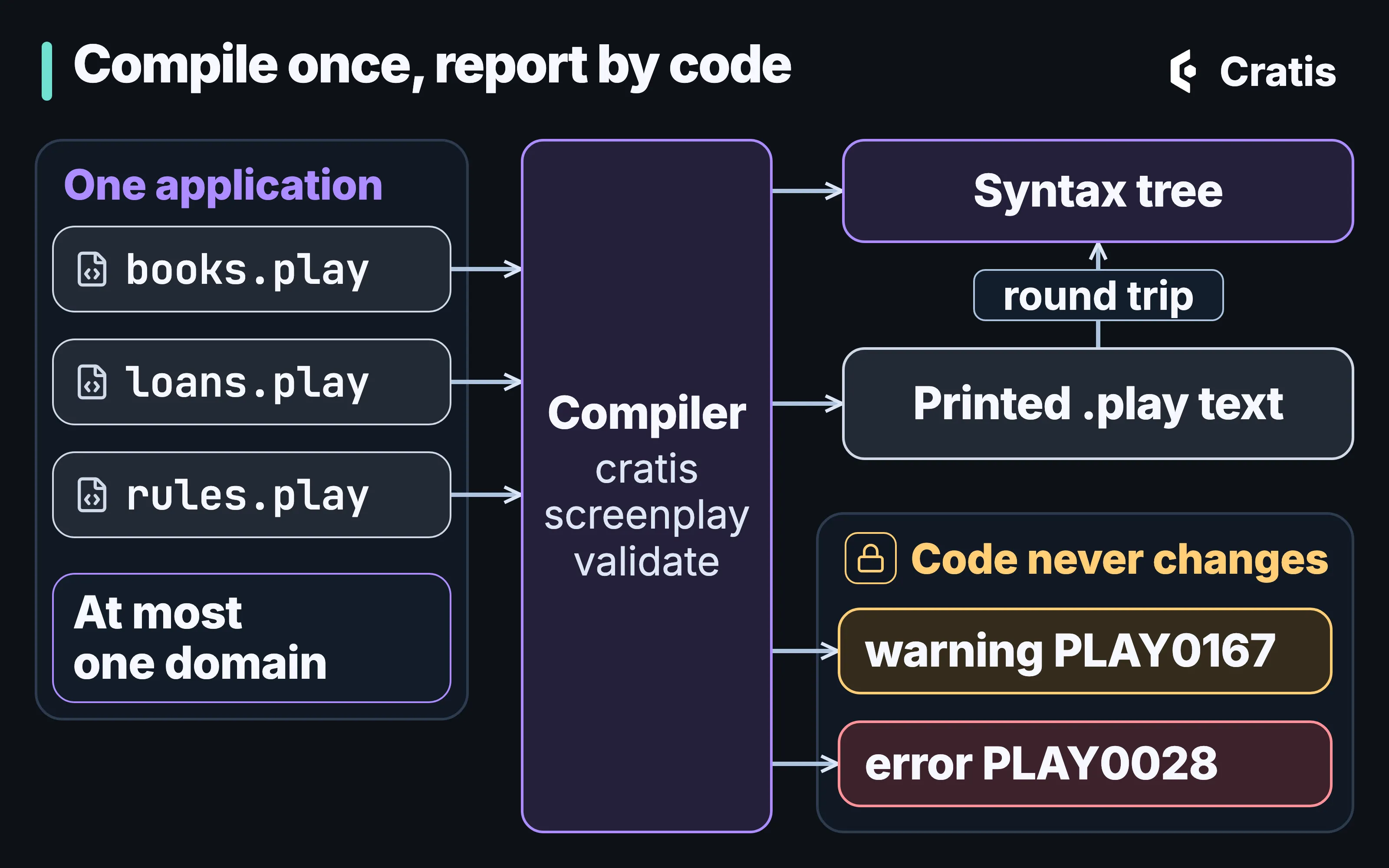
A folder compiles as one application, and every finding carries a code that doesn’t change.
A tree that prints back to the same text
Section titled “A tree that prints back to the same text”As a library, new ScreenplayCompiler().Compile(source) returns a result with Success, the syntax tree in Value, and Diagnostics. PlayFileCompiler compiles a file or a folder. The nodes of the tree are immutable records, and each carries its location in the source. ScreenplaySyntaxWalker is the supported way to traverse the tree, and a new kind of node arrives as a new Visit method whose default keeps walking.
New node kinds can be added, and an unknown form never throws. Enum members keep their numeric values, and public constants, every diagnostic code among them, never change. A node grows by an init-only property, never by a new constructor parameter. The positional parameter list, an exhaustive switch over a base type and the element types of collections are outside those promises, so tools shouldn’t depend on them.
ScreenplayPrinter turns a tree back into .play text, with two spaces per level, escaped strings and numbers that print the same in every culture. Printing a compiled document gives an equivalent tree, and printing that again gives identical text. Comments survive and surrounding whitespace is normalized. That round trip keeps a generated .play file readable as a diff, whichever tool wrote it.
Valid and runnable are two verdicts
Section titled “Valid and runnable are two verdicts”A document that compiles is valid Screenplay. Whether it can execute is decided separately. An executable semantic model is bound from the checked model and versioned on its own, and handler code blocks executable admission (PLAY0268). The reference executor can’t run inline or file-backed code, so anything that depends on it comes back as unsupported. The standalone tool and PlayFileCompiler compile syntax only and don’t read attached files. cratis screenplay validate gives the first verdict. The Stage renderer, its sandbox and its specification runners each give part of the second, for the constructs they support.
An assistant on the model
Section titled “An assistant on the model”The Screenplay MCP server lets an assistant work on the same files a person does. It ships in the .NET tool and in the native CLI as cratis screenplay mcp, which needs no separate .NET install. The CLI embeds its own copy of the server, so it can trail the newest Screenplay release. cli 3.21.0 embeds server 4.43.0, while the newest Screenplay release is 4.44.1. For VS Code, the install guide points the tool at a folder:
{ "servers": { "screenplay": { "type": "stdio", "command": "screenplay", "args": ["mcp", "${workspaceFolder}/specifications"] } }}With the CLI, it’s cratis screenplay mcp .cratis/screenplay. cratis ai install registers that form, with .cratis/screenplay as the default root, when the profile you pick includes Screenplay. Installing creates the root folder if it’s missing and never creates a .play file. Starting the server creates nothing, and a missing root is an error.
At cli 3.21.0 the server lists 27 tools, and most of them read. describe-application, find-references, dependencies and find-assertion-gaps navigate the model, and diagnostics returns the compiler’s findings. On a small library model with two slices, describe-application reports one file, 13 declarations, one module, one feature, two slices and no diagnostics, with a hash of the source revision. find-assertion-gaps lists both slices as having no specifications, and notes that a gap isn’t proof of missing runtime test coverage.
Changes go through proposals. propose-ast takes a typed edit whose shape comes from syntax-schema, propose-rename renames with the whole model in view, and read-proposal shows the exact bytes that would be written. A proposal is tied to the revision it was made against, so one made before somebody else’s edit is rejected when it’s applied. Only two tools write files, apply and recover-workspace, which is where your client’s approval prompt belongs. Keep approval on for both.
One root is one application, and symlinks are rejected. Paging and oversize results fail loudly instead of truncating. Identities live in .screenplay/identities.json, which belongs in source control. An interrupted apply leaves a pending.json that blocks reads and edits until someone inspects it and recovers the workspace explicitly, since rollback isn’t crash-atomic. None of the tools runs specifications, so an assertion being present says nothing about runtime coverage.
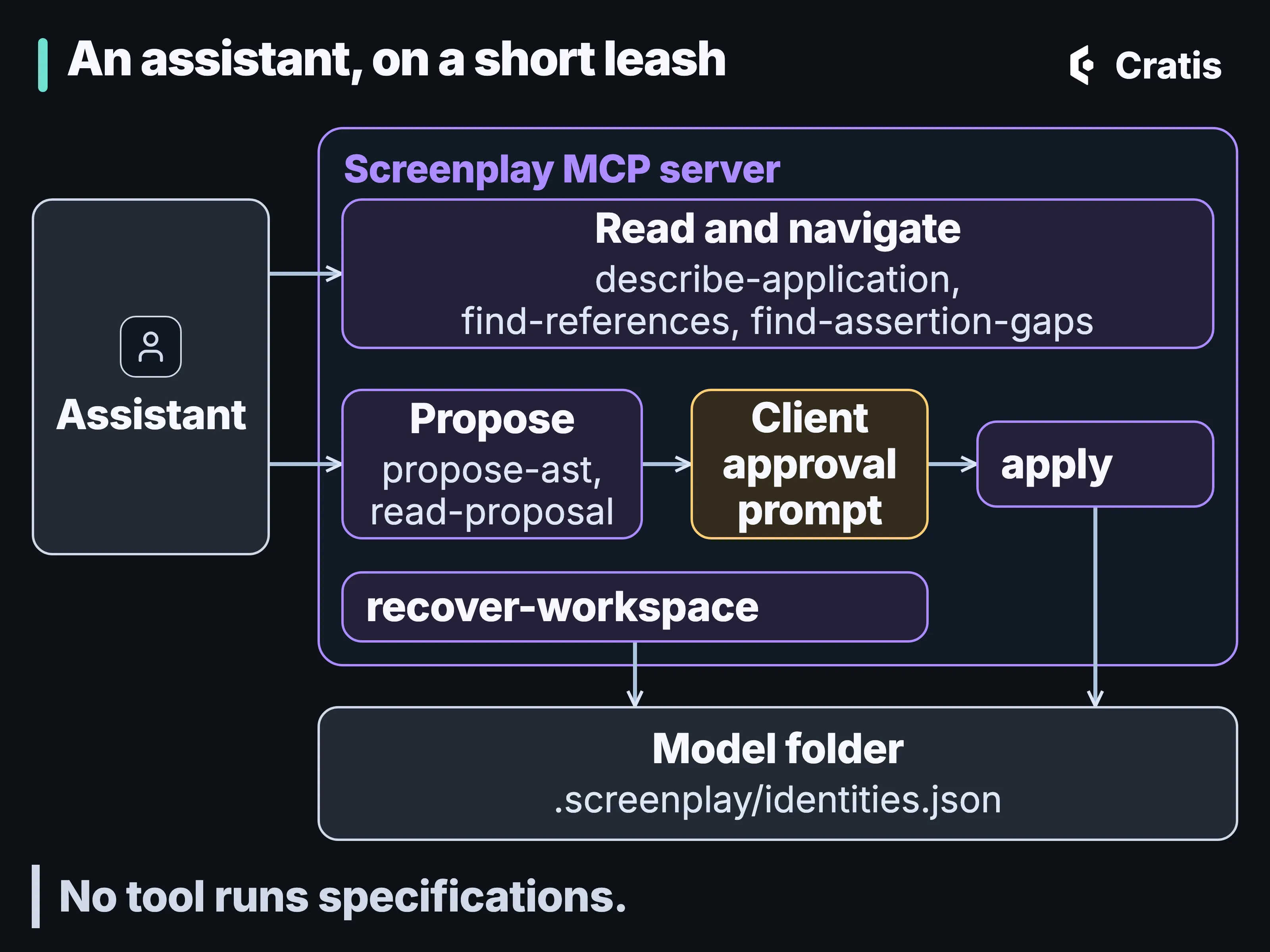
Most tools read. Only apply and recover-workspace write, so that’s where your client’s approval prompt belongs.
The server checks what reaches the files. It doesn’t make an assistant’s model correct. AI across the stack puts it next to Chronicle MCP and the Cratis AI corpus.
What reads a .play file
Section titled “What reads a .play file”A .play file is an input for several tools. cratis render and cratis run hand it to Stage (at cli 3.21.0, Stage 4.20.0), which renders a narrow backend vertical into C# on Arc and Chronicle, starts a disposable sandbox and checks the model’s specifications. A .play file is a good home for a model once someone has written it down. Getting there is usually a conversation between several people. A Cratis Studio event model can be exported as Screenplay text, Mermaid or JSON and imported back from Screenplay with a preview. That round trip isn’t lossless, and Studio is live and in beta. cratis screenplay generate goes from Arc, Marten or Critter Stack source in C# to a .play file, and Prologue drafts one from a running system. Stage and Scene, Prologue and Cratis Studio each take one of those. Everything above works without any of them, because validate only reads files. And outside what Stage renders, nothing checks hand-written code against the model.
There’s one rule in this layer we care about more than any single feature. Producers and consumers of a model have to declare what they can handle and expose what they can’t represent, instead of dropping it silently. A tool that quietly loses part of your model is worse than one that refuses it, so Stage publishes nothing when a model reaches past what it supports, and Studio’s import warns about anything it can’t bring in.