

From script to stage · Part 22: Prologue: a first model of the system you already have

Cratis: from script to stage, and the long run · Part 22 of 26
Prologue can stand beside a running system, watch what it does, and hand back a .play file describing it, without recording a single row value or request body. What it does record is metadata: which endpoint was called, which tables and columns changed, which spans the system emitted. That metadata can still be sensitive, and the model it produces is a draft for a person to correct.
Prologue is an experimental assisted-discovery tool that captures approved metadata signals and proposes a Cratis event model for human correction. Most systems exist long before anyone models them, and those are the ones it’s for. The model it proposes is written in Screenplay, the language from Screenplay, so the first model of an old system starts from a draft instead of a blank page.
Picture the author feature already running in an ASP.NET application with a SQL database and no event model anywhere. Prologue can see a POST reach it and the write to an authors table that follows. Whether that pair of observations is called RegisterAuthor, and that names are unique per organization, is for a person to settle.
Evidence instead of memory
Section titled “Evidence instead of memory”A system that predates any event model has two usual sources for one. The code says what the authors wrote, and the people who remember the system say what they think it does. Why Prologue proposes a third: watch the system run. Prologue observes three things the system already does, without a change to its code. It sees the state-changing HTTP requests that reach it, which tables and columns changed in each database transaction right after a command, and the telemetry it already emits.
The output is an ExtractionResult, a structured tree, and a generated .play file. That file is the way into everything else in the modeling layer. cratis screenplay validate checks it, cratis run starts it in a Stage sandbox, and a person edits it. Prologue itself is self-contained. It needs no Cratis Studio, no Orleans and no Chronicle, and runs as three ordinary containers, the Extractor, the Interpreter and an optional Receiver, with shared contract packages on NuGet.
What the Extractor watches
Section titled “What the Extractor watches”The Extractor runs next to the system and is the only piece that runs all the time, as the cratis/prologue-extractor image or a downloadable binary. It has four capture sources.
For SQL Server it uses change data capture, and it enables CDC itself unless you set enableChangeDataCapture to false. A tables allowlist narrows what it watches, and an empty list means every user table. It records which tables and columns changed in each transaction.
For PostgreSQL it uses logical replication. The Extractor creates its own publication and replication slot. The server has to run with wal_level = logical, and that’s a setting you make, because the Extractor can’t.
For HTTP it runs a YARP reverse proxy in front of the system, on port 8080 by default. Every request passes through unchanged. For POST, PUT and DELETE it records the method, the path, the response status, and the trace ID from a W3C traceparent header when there is one. GET requests pass through and leave nothing in the captures, since reads don’t change state. Traffic that goes around the proxy produces nothing.
For OpenTelemetry it runs an OTLP proxy over HTTP and gRPC. It records the metadata of spans, metrics and logs: the service name, filtered by serviceNames or all services when that’s empty, and the values of the attribute keys you allowlist in attributeKeys. Telemetry is forwarded unchanged to your collector, and with no upstream configured the Extractor is the last stop.
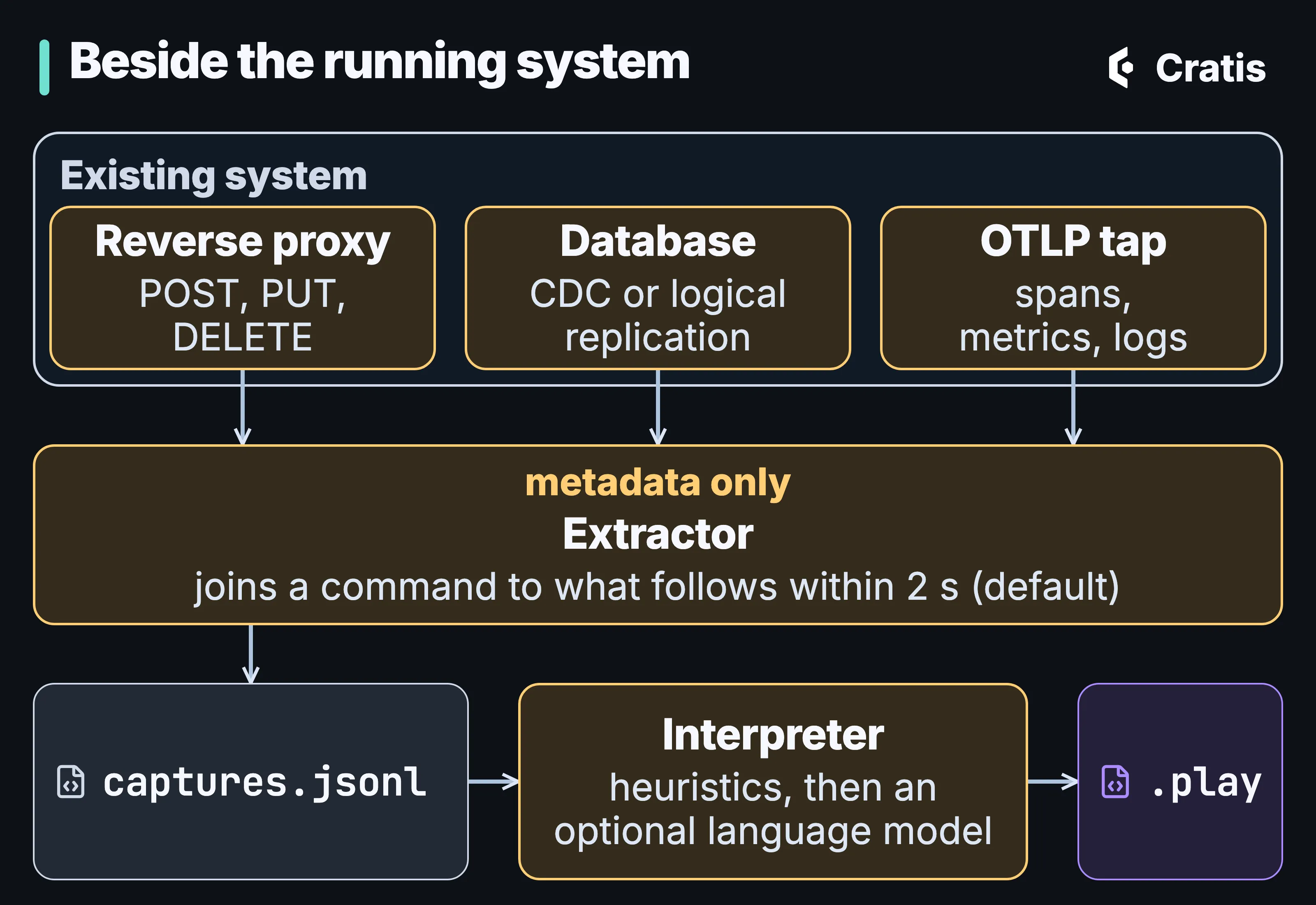
The Extractor watches from the side, and the Interpreter turns what it recorded into a draft.
What it records, and why that still matters
Section titled “What it records, and why that still matters”None of the four sources records the content of what passes through. There are no row values from the database, and no request or response bodies from HTTP. That boundary is deliberate.
Metadata is still information about the system and sometimes about people. An HTTP path can carry an identifier, such as a customer number in /customers/{id}. Table and column names describe the data model. The values of allowlisted telemetry attributes are recorded exactly as sent, so an attribute that holds an email address ends up in a capture file. And captures are written to disk as files, or posted to a Receiver that stores them in MongoDB. Choose the allowlists and the place captures go the way you’d choose them for a log that contains personal data, because it might.
One capture is a command and what it caused
Section titled “One capture is a command and what it caused”A single HTTP call is rarely the whole fact. The call plus the database transactions it caused usually is. Prologue’s correlator groups observations into captures. A capture is an HTTP command plus every database transaction, span or log observed within correlation.windowMilliseconds after it, 2,000 milliseconds by default, or that shares the command’s trace ID.
Telemetry that carries a trace ID but has no command in front of it becomes one capture per trace, which is how background work shows up. Anything else becomes a capture of its own. A schema change, a table or column appearing or disappearing, is recorded but never used as evidence to group other observations. A capture is written only once nothing newer than the window could still join it, so one capture never ends up split across two runs.
This is a heuristic, and it links events by when they happened. Two requests that arrive inside the same window can share database transactions, and one of them can get credit for the other’s writes. Every relationship in the resulting model is provisional, and a person should read it that way.
From captures to a first model
Section titled “From captures to a first model”The Interpreter turns a folder of capture files into a model. By default it runs to completion: it reads every .jsonl file, rebuilds the correlated captures, and writes extraction-result.json and a .play file. It also has a service mode that keeps running as a resumable session backed by MongoDB. The Receiver is an optional HTTP endpoint that stores captures in MongoDB when the Extractor posts them to it instead of writing files.
The first step is deterministic. Each capture becomes one or more provisional slice drafts, the drafts are grouped into modules, features and slices, and drafts that describe the same behavior are merged by name. The merge keeps the first item it finds for each name. Only projections combine their source events, so a property that appears only in a later capture of the same command or event is dropped. The result has the right structure and mechanical names, CRUD placeholders derived from HTTP verbs and database operations.
The extraction result follows the module, feature and slice structure of a Screenplay model. A system has modules, a module has features that can nest, and a feature has slices of type StateChange, StateView, Automation or Translation. A slice holds commands (at most one for a StateChange), events, read models, projections and constraints. For a library system it looks like this, trimmed:
{ "systemName": "Library", "modules": [ { "name": "Catalog", "features": [ { "name": "Books", "slices": [ { "name": "Reservation", "type": "StateChange", "commands": [ { "name": "ReserveBook", "properties": [{ "name": "Isbn", "type": "string", "isRequired": true, "maxLength": 0 }], "validations": [] } ], "events": [ { "name": "BookReserved", "properties": [{ "name": "Isbn", "type": "string", "isRequired": false, "maxLength": 0 }] } ], "readModels": [], "projections": [], "constraints": [] } ] } ] } ]}A command’s validations come from rejected requests, as Required, MaxLength, MinLength or Pattern with an argument and the rejection’s message. Constraints are uniqueness and invariant rules inferred from rejected requests too. For the author feature, that’s where the unique-name rule could show up, if registering a duplicate name produced a distinct rejection while Prologue was watching. A rule the system enforces without a distinguishing HTTP response or database write leaves no evidence, and a person has to add it.
A language model may rename, never restructure
Section titled “A language model may rename, never restructure”The second step is optional. With a language model configured in the llm section of cratis-prologue.json, or in the CLI’s ~/.cratis/config.json via cratis llm use, the Interpreter asks it to refine the draft. Refinement is off until you configure it. In cratis-prologue.json the kinds are Ollama (the default kind, self-hosted, no token), OpenAI, Azure OpenAI (where the model ID is the deployment name), any OpenAI-compatible /v1 endpoint, and Anthropic. cratis llm use offers anthropic, openai and local, an OpenAI-compatible endpoint such as Ollama’s.
The refinement prompt is in the public repository. These three lines set its contract.
The structure of the model is fixed - you never add, remove, or move anything.Commands are imperative and express business intent (for example RegisterAuthor, PlaceOrder, ReserveBook) - name the intent, not the HTTP verb (not CreateAuthor).Events are past-tense facts naming what happened in the domain (for example AuthorRegistered, OrderPlaced, BookReserved) - name the fact, not the database operation (not AuthorCreated).The language model gets to return renames, keyed on the provisional names it was given, a description for each module, feature, slice and command, a system name in PascalCase, and questions. It infers intent from request paths, the tables and columns that changed, span names and the observed schema. The structure it was handed is the structure that comes back. For the author feature, that’s the difference between a placeholder named after the insert and RegisterAuthor.
Questions are meant to be rare. The prompt asks for one only when the model is unsure about a decision that would change the result materially, and zero is the normal case. An interactive run asks them one at a time, with choices and always a free-text answer. A non-interactive run, in CI, with piped output or with -y, never asks and finishes with its best effort. Without a configured model, the Interpreter doesn’t go beyond the heuristics.
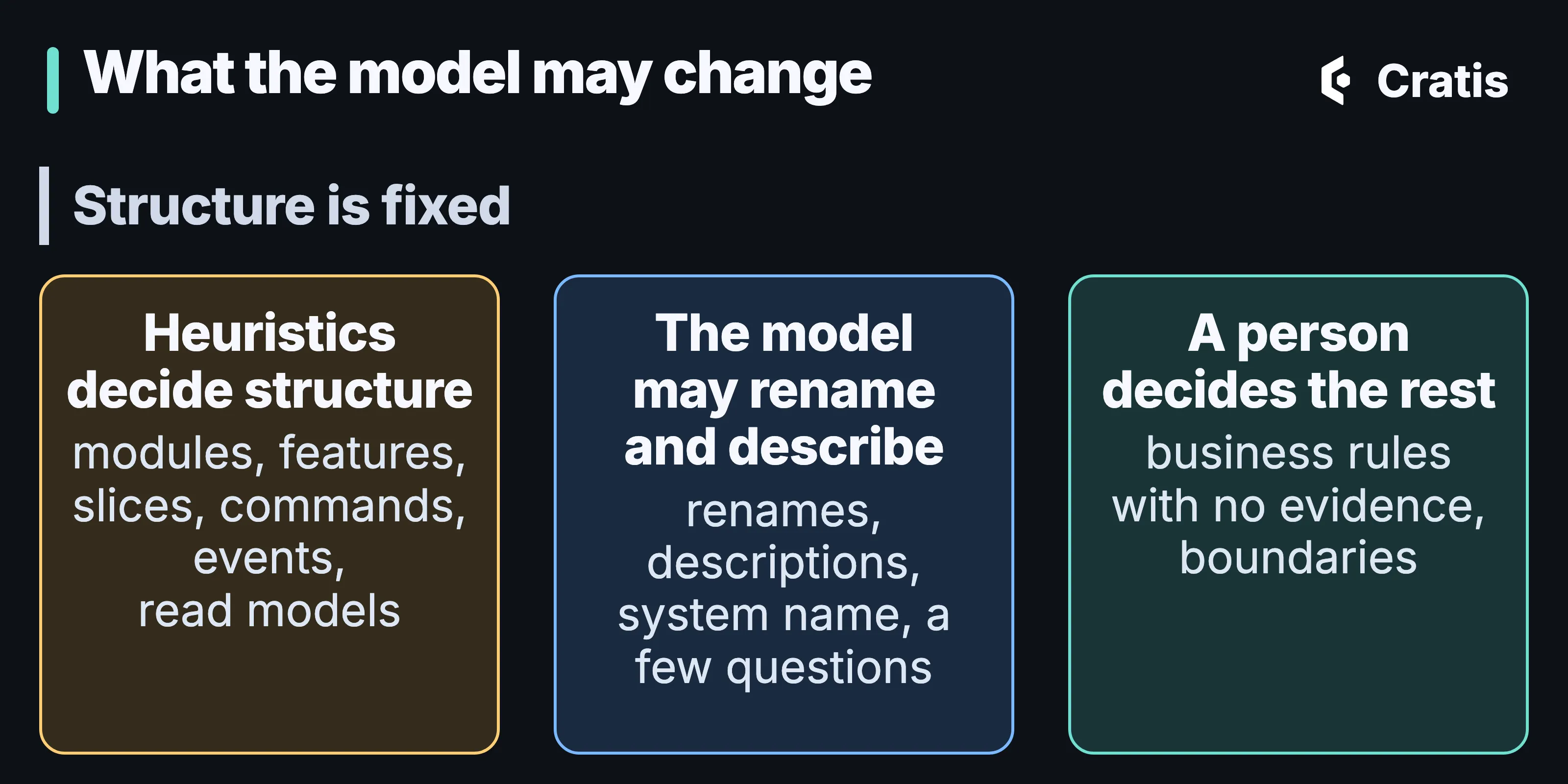
The heuristics decide the structure, a language model can only name it, and a person decides the rest.
With a hosted provider, the prompt leaves your network. It carries the provisional outline of the model, the provisional names, the observed behavior, including request paths, and the observed database schema. That’s metadata again, and a path can carry an identifier. Nothing is sent anywhere unless you enable refinement, and Ollama runs wherever you host it.
Running it
Section titled “Running it”The getting-started guide runs everything in Docker. A minimal configuration that watches only HTTP writes captures to a folder and forwards requests to the system on port 5000:
{ "prologue": { "output": { "kind": "Json", "json": { "directory": "/captures", "maxEntriesPerFile": 10000 } }, "correlation": { "windowMilliseconds": 2000 }, "sqlServer": [], "postgres": [], "openTelemetry": { "enabled": false } }, "reverseProxy": { "routes": { "monitored": { "clusterId": "monitored", "match": { "path": "{**catch-all}" } } }, "clusters": { "monitored": { "destinations": { "primary": { "address": "http://host.docker.internal:5000/" } } } } }}Create the captures and output folders first, so Docker doesn’t create them as root. Then the Extractor runs with that file and the captures folder mounted, you send state-changing requests through port 8080, and the Interpreter reads the captures and writes to output:
mkdir captures output
docker run --rm -p 8080:8080 \  -v "$(pwd)/cratis-prologue.json:/config/cratis-prologue.json:ro" \  -v "$(pwd)/captures:/captures" \  cratis/prologue-extractor
docker run --rm \  -v "$(pwd)/captures:/captures" \  -v "$(pwd)/output:/output" \  cratis/prologue-interpreter
The CLI wraps the same steps:
cratis prologue startcratis prologue interpret ./captures --file MySystem.playcratis prologue start is an interactive wizard that writes cratis-prologue.json, with the sources, the allowlists, any upstream collectors, and an output folder or Receiver endpoint. It needs a terminal and fails with -y or piped input, so in CI you write the file yourself. cratis prologue interpret reads the .jsonl files, prints the path it wrote, the system name it derived and the counts of modules, features and slices, and suggests cratis run as the next step. For the language model it uses the llm section of a cratis-prologue.json it finds, when that’s enabled, then ~/.cratis/config.json, and otherwise runs on heuristics alone and says so.
Every capture carries a prologueId. When a folder holds captures from several runs, --prologue-id picks the one to interpret. The Library sample in the Prologue repository is an ordinary ASP.NET and EF Core application with no Cratis code in it, and its Aspire composition wires up the whole pipeline, with the Receiver storing captures in MongoDB. It’s a demonstration, and not a pattern for production.
Two ways into a model
Section titled “Two ways into a model”cratis screenplay generate is the other way to get a model you didn’t write. It reads a .sln, .slnx or .csproj with Roslyn, for Arc, Marten, and Marten with Wolverine. It doesn’t start the application or connect to Chronicle or PostgreSQL, its output is byte-identical for unchanged source, and whatever it can’t express is reported with a stable diagnostic code. Generation reads what the code declares, and needs the source. Prologue records what the system did, and needs the system running with traffic going through it, though no source.
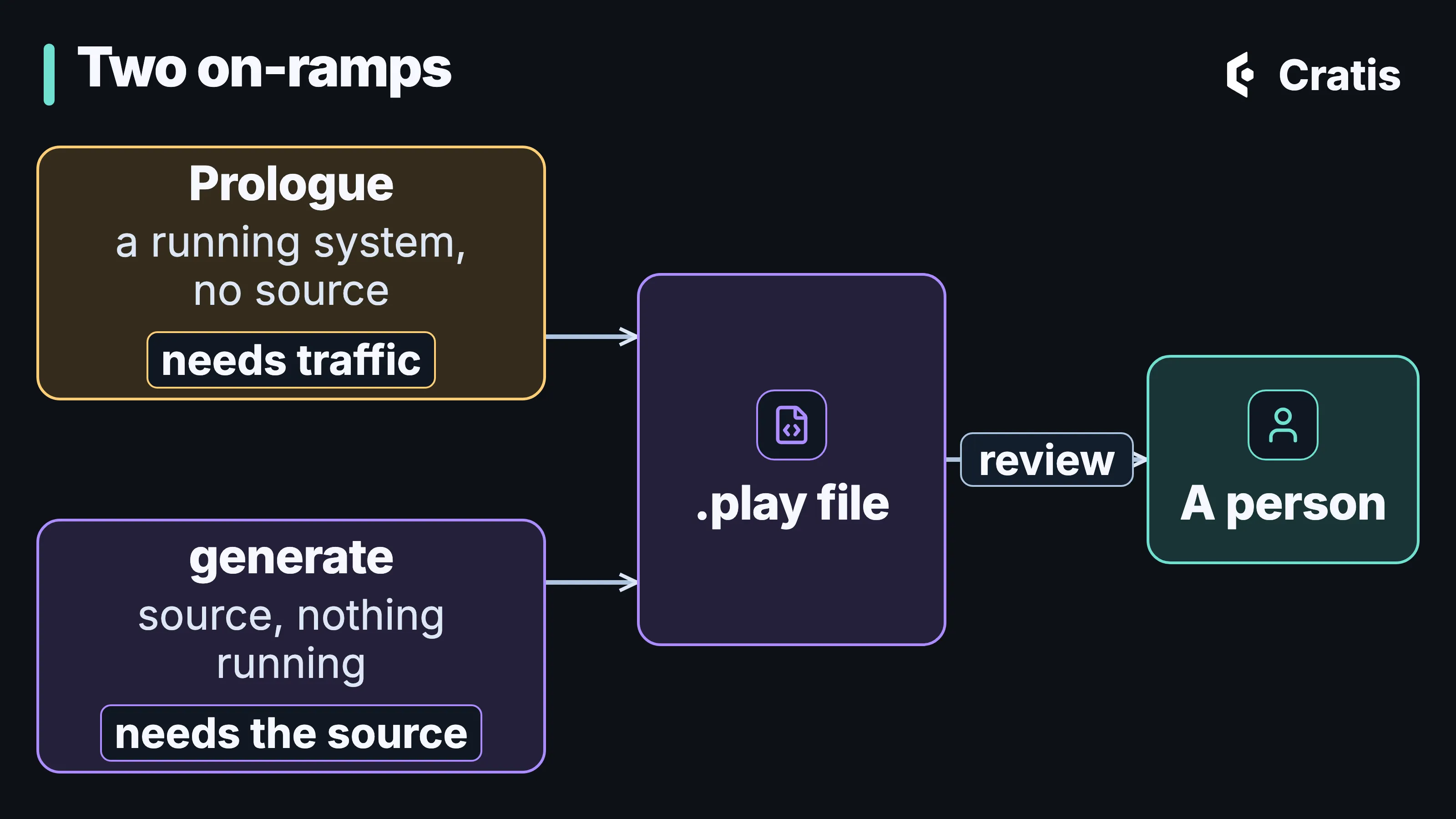
Two ways to a first model, and both end with a person reviewing it.
Neither one replaces the person who reviews the model, and neither is a migration tool.
What the draft is for
Section titled “What the draft is for”A Prologue draft is a provisional model built from evidence. It isn’t the system’s recovered intent, and it isn’t a lossless reconstruction. It shows only the traffic you sent through the proxy, the database changes on SQL Server or PostgreSQL, and the telemetry you allowed. Reads, message queues with no database effect, and requests that went around the proxy are absent, and so is any path nobody exercised while it was watching. Its names stay mechanical until a language model or a person renames them.
For the author feature, the draft gets you a slice with a command, an event and the tables behind them, maybe with a sensible name. It won’t know that names are unique per organization unless the system rejected a duplicate while Prologue was watching, and it can’t know what an author means in your domain. That’s what the review is for. The draft enters the loop at the same point a hand-written model does, as a proposal a person corrects, then validates with cratis screenplay validate. A corrected model can go on to cratis run, and Stage and Scene covers what Stage will and won’t do with it. Stage renders a narrow vertical, so don’t expect a draft of an old system to render unchanged.
Prologue is the wrong tool for a system that doesn’t exist yet, for moving data out of an old database, and for a system with neither an HTTP surface nor database access to watch.