

From script to stage · Part 15: Arc gotchas: where a convention decides for you

Cratis: from script to stage, and the long run · Part 15 of 26
A validation rule that applies only sometimes on the server can apply every time in the browser. Arc’s proxy generator copies the rules it recognizes from a C# validator into the generated TypeScript, and it doesn’t copy When or Unless conditions. A rule that sat inside a condition can arrive on the client without it, and a form will then refuse input the server would have accepted.
Most of what Arc saves you comes from conventions. A namespace becomes a route, a validator becomes browser rules, a property becomes a field in the generated TypeScript. Each convention makes one decision in the place that owns it, and each has an edge that’s documented but easy to miss until it costs an afternoon.
Arc: commands and queries without the plumbing covers the pipeline and the proxies in general, and Validation all the way down follows a rule through every layer it can live in.
Validation that runs in two places
Section titled “Validation that runs in two places”The server is where validation counts. For a command, Arc runs authorization first, then validation, from data annotations, FluentValidation validators and concept validators, and only then Provide() and Handle(). POST <command-route>/validate runs the same authorization and validation without calling the handler.
The browser gets a copy. At build time the proxy generator loads the compiled assembly, finds the validator for each command, creates an instance and inspects its rules, then writes the ones it can express into the generated TypeScript. In the Arc and React sample the idea title is a concept with a validator of its own:
public class IdeaTitleValidator : ConceptValidator<IdeaTitle>{ public IdeaTitleValidator() => RuleFor(_ => _.Value).NotEmpty().MaximumLength(72);}These rules run on the server only. Unlike the .NET generator described on this page, Arc for Kotlin doesn’t copy them into the generated TypeScript.
@Componentclass IdeaTitleValidator : ConceptValidator<IdeaTitle> {    override val conceptType: Class<IdeaTitle> = IdeaTitle::class.java
    override fun validate(concept: IdeaTitle): List<ValidationResult> = buildList {        if (concept.value().isBlank()) add(ValidationResult.error("A title is required."))        if (concept.value().length > 72) add(ValidationResult.error("A title can be at most 72 characters."))    }}
These rules run on the server only. Unlike the .NET generator described on this page, Arc for Kotlin doesn’t copy them into the generated TypeScript.
@Componentpublic final class IdeaTitleValidator implements ConceptValidator<IdeaTitle> {    @Override    public Class<IdeaTitle> getConceptType() {        return IdeaTitle.class;    }
@Override public List<ValidationResult> validate(IdeaTitle concept) { var results = new ArrayList<ValidationResult>(); if (concept.value().isBlank()) results.add(ValidationResult.error("A title is required.")); if (concept.value().length() > 72) results.add(ValidationResult.error("A title can be at most 72 characters.")); return results; }}@validator(IdeaTitle)export class IdeaTitleValidator extends ConceptValidator<IdeaTitle> { constructor() { super(); this.ruleFor(title => title.value).notEmpty().maxLength(72); }}Arc for Elixir doesn’t exist; use the Chronicle Elixir client directly.
and the generated command proxy carries one statement per rule:
this.ruleFor(c => c.title).notEmpty();this.ruleFor(c => c.title).maxLength(72);The copy covers a fixed set. From FluentValidation that’s NotEmpty, NotNull, EmailAddress, the length rules, Matches and the four numeric comparisons against constants. From data annotations it’s [Required], [EmailAddress], the length attributes, [Range], [RegularExpression], [Url] and [Phone]. Per member, an explicit FluentValidation validator wins, a concept validator’s rules add to it, and data annotations fill in only where neither contributed anything.
Everything else stays on the server. Must, MustAsync, custom validators and any check that needs a service are never turned into browser logic. The author feature’s name-uniqueness rule never reaches the browser either, because it’s a Chronicle constraint checked when the event is appended, as Rules that hold when you write explains. Comparisons between two properties and comparisons against a constant that isn’t a number, a date for example, aren’t projected. A .NET regular expression is copied as it is, so it has to mean the same thing in JavaScript.
Conditions are the sharp edge. When, Unless, rule sets, cascade behavior and severity that depends on runtime values aren’t reproduced. Say the author feature lets people register under a pen name, and the validator says PenName must not be empty When the author chose to use one. The browser can receive the notEmpty() rule without its condition and block every registration that leaves the pen name blank. A blocking result in the browser can stop the request, so the server never gets to say otherwise.
A few quieter cases pass the .NET build:
- The generator runs the validator’s constructor. It prefers a parameterless one, and otherwise passes
nullfor reference dependencies and defaults for values. If construction or reflection fails, it can extract no FluentValidation rules at all, and a green build is not proof that the rules were emitted. - A message built with a
.WithMessage(x => ...)factory isn’t evaluated, so the browser shows its default message for that rule. A literal message is copied. - Rules at Error severity block in the browser by default. Warning and Info block only with
[BlockOnValidationSeverity], and a severity decided at runtime is left out of the client so it can’t block by mistake. Extraction happens at build time, so a change to FluentValidation’s global default severity isn’t seen. [CreditCard]emits acreditCard()call the client rule builder doesn’t implement, so the generated file fails TypeScript checking.Required.AllowEmptyStringsisn’t projected, and messages from resource files aren’t resolved.- On a positional record, the server’s data-annotations filter reads property attributes, not constructor-parameter ones. Write
[property: Required].
After changing a validator, open the generated file, then try one accepted and one rejected value against both the form and the server. Never patch the generated validator. When a rule must stay server-only, write it in a form the generator doesn’t translate, a Must predicate for example. The browser rules are a convenience copy, and the server decides. Live UIs shows how forms use them, and the proxy boundary explains what crosses from C# into TypeScript.
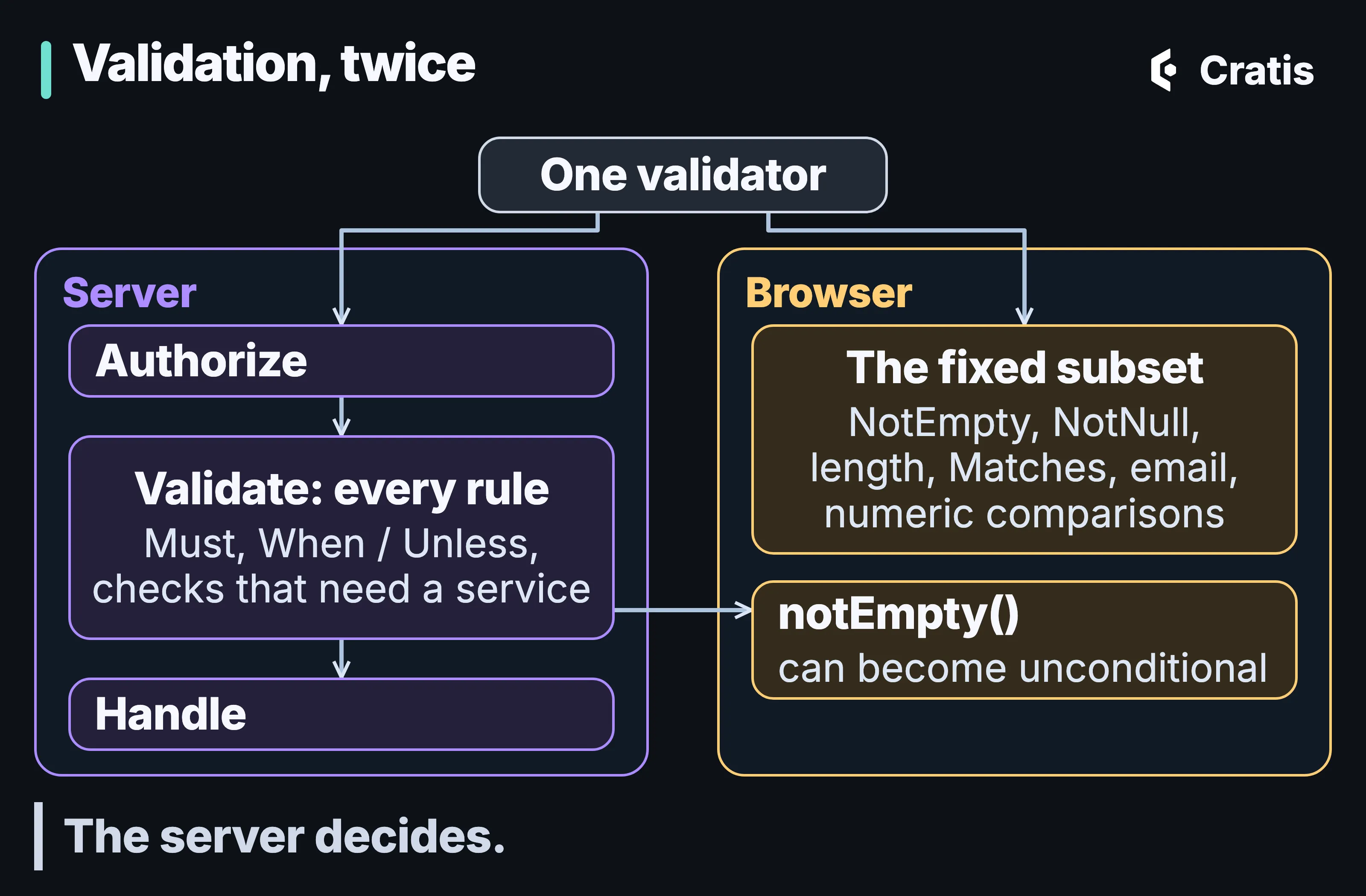
One validator, two programs.
A folder the generator owns
Section titled “A folder the generator owns”Every generated TypeScript file starts with a header in the form // @generated by Cratis. Source: <type>. Time: <utc>. Hash: <sha256>, followed by a DO NOT EDIT banner. In incremental mode, that header decides what the generator may delete.
There are two ways to run the generator, and their defaults differ. The MSBuild integration keeps the output directory, updates it incrementally and skips a write when the content hash matches. The generator executable run directly deletes the output directory first, unless you pass --skip-output-deletion. You can make the build do the same:
<PropertyGroup> <CratisProxiesSkipOutputDeletion>false</CratisProxiesSkipOutputDeletion></PropertyGroup>With that output behavior, the generator recursively deletes the entire output directory, handwritten files and indexes included, before it writes the proxies. Never point it at your frontend source root.
Incremental mode deletes too. After each run the generator scans the .ts files below its output path, finds the ones with valid generated metadata that this run didn’t produce, and removes them. That’s how renaming UpdateOrder to ModifyOrder gets rid of the old file. The scan covers the whole output tree, not one input assembly, so two independent generation runs writing into the same tree can each take the other’s proxies for orphans. CratisProxiesSkipFileIndexTracking is still forwarded by the build package, and the executable ignores it. There’s no supported way to turn orphan cleanup off.
Only files with the header are eligible for that cleanup, so a handwritten file in the same folder isn’t swept by it. Even so, incremental mode doesn’t guarantee to preserve a mixed source tree, and a separate cleanup phase for emptied directories can remove an index.ts. The generator treats index.ts differently from its other files. It never carries the header, because it’s a file you edit. The generator adds exports for the files it generated and removes exports whose target is gone, and it leaves exports for your own files for you to write.
Two side effects follow from the header. It embeds the generation time, so a full regeneration that deletes files defeats the hash check and can produce Git diffs for contracts that didn’t change. And tools can recognize generated files by it. The skip-generated-proxies processor in @cratis/eslint-plugin-arc skips linting them, and the Cratis AI write guard refuses to let an assistant edit them, as AI across the Cratis stack describes.
Arc’s recommendation is to “use a dedicated, generated-only directory with one generation owner.” The cratis template, from Getting started with Cratis, and the tools around it, and the Arc and React sample both do the opposite on purpose. They set CratisProxiesOutputPath to the project directory, write each proxy beside its C# source, run in incremental mode and rely on the header. It works, and it isn’t the recommended arrangement. In a project set up that way, full regeneration would delete the project folder, so leave CratisProxiesSkipOutputDeletion at true.
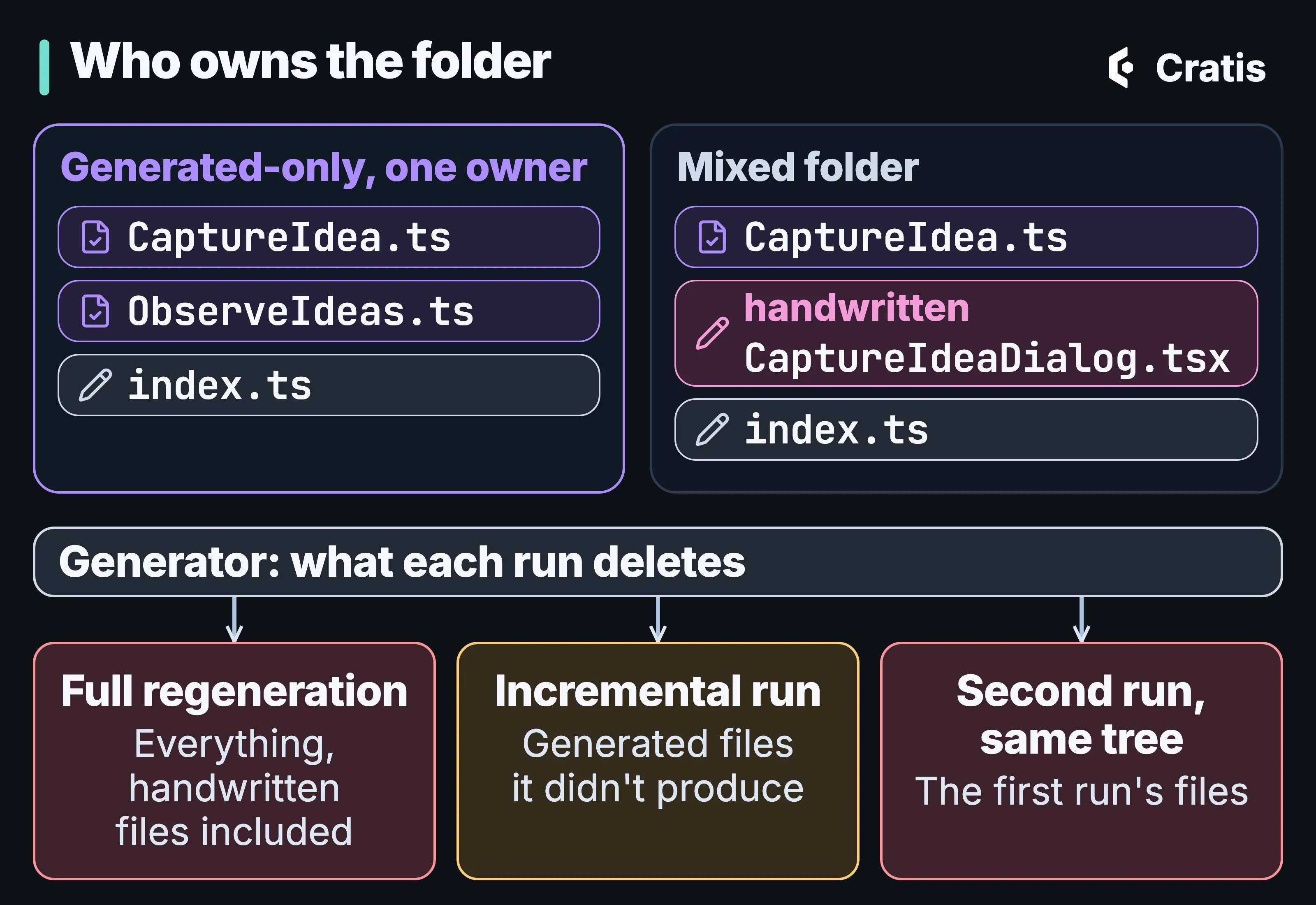
Give the generator a folder of its own.
Names that do the mapping
Section titled “Names that do the mapping”Several things in Arc and Chronicle are resolved by name, with defaults that are usually right. Each default is a decision made somewhere you may not be looking.
Routes are computed twice
Section titled “Routes are computed twice”A conventional route is the API prefix, the artifact’s namespace with a configured number of leading segments skipped, in kebab case, and the artifact’s name. A query uses its method name, not its read-model type, as the last segment. For namespace MyApp.Orders.Registration and command CreateOrder, with one segment skipped, the route is /api/orders/registration/create-order.
The generator and the server each compute that route from their own settings. The Arc and React sample sets both sides, in the project file and in Program.cs, and the generated client for its CaptureIdea command in Arc.React.Ideas.Board carries route = '/api/ideas/board':
<CratisProxiesSegmentsToSkip>2</CratisProxiesSegmentsToSkip><CratisProxiesSkipCommandNameInRoute>true</CratisProxiesSkipCommandNameInRoute>cratisArc { endpoints { segmentsToSkip.set(2) includeCommandNames.set(false) }}cratisArc { endpoints { segmentsToSkip.set(2) includeCommandNames.set(false) }}arc-proxygenerator --project tsconfig.json --artifacts src --output src \ --use-proxy-file-suffix --segments-to-skip 2 --skip-command-name-in-routeArc for Elixir doesn’t exist; use the Chronicle Elixir client directly.
builder.AddCratisArc(options =>{ options.GeneratedApis.RoutePrefix = "api"; options.GeneratedApis.IncludeCommandNameInRoute = false; options.GeneratedApis.SegmentsToSkipForRoute = 2;});cratis.arc.endpoints.route-prefix=apicratis.arc.endpoints.include-command-name-in-route=falsecratis.arc.endpoints.segments-to-skip-for-route=2cratis.arc.endpoints.route-prefix=apicratis.arc.endpoints.include-command-name-in-route=falsecratis.arc.endpoints.segments-to-skip-for-route=2const builder = ArcApplication.createBuilder({ generatedApis: { routePrefix: 'api', includeCommandNameInRoute: false, segmentsToSkipForRoute: 2 }});Arc for Elixir doesn’t exist; use the Chronicle Elixir client directly.
The build properties configure the generator only and don’t change the running application’s endpoints. IncludeCommandNameInRoute and IncludeQueryNameInRoute are the inverse of the generator’s skip properties, and both sides default to skipping no segments. The templates skip one and put the server side in appsettings.json. Change one side without the other and the generated client calls a route the backend doesn’t map.
With command-name skipping on, the generator restores command names when more than one command shares a namespace after skipping. A namespace with one command gets a route without the command’s name. Add a second command to that namespace and the first one’s generated route moves, from /api/orders/registration to /api/orders/registration/create-order. An explicit [Path] pins a route, and the generator uses it as written, without the API prefix.
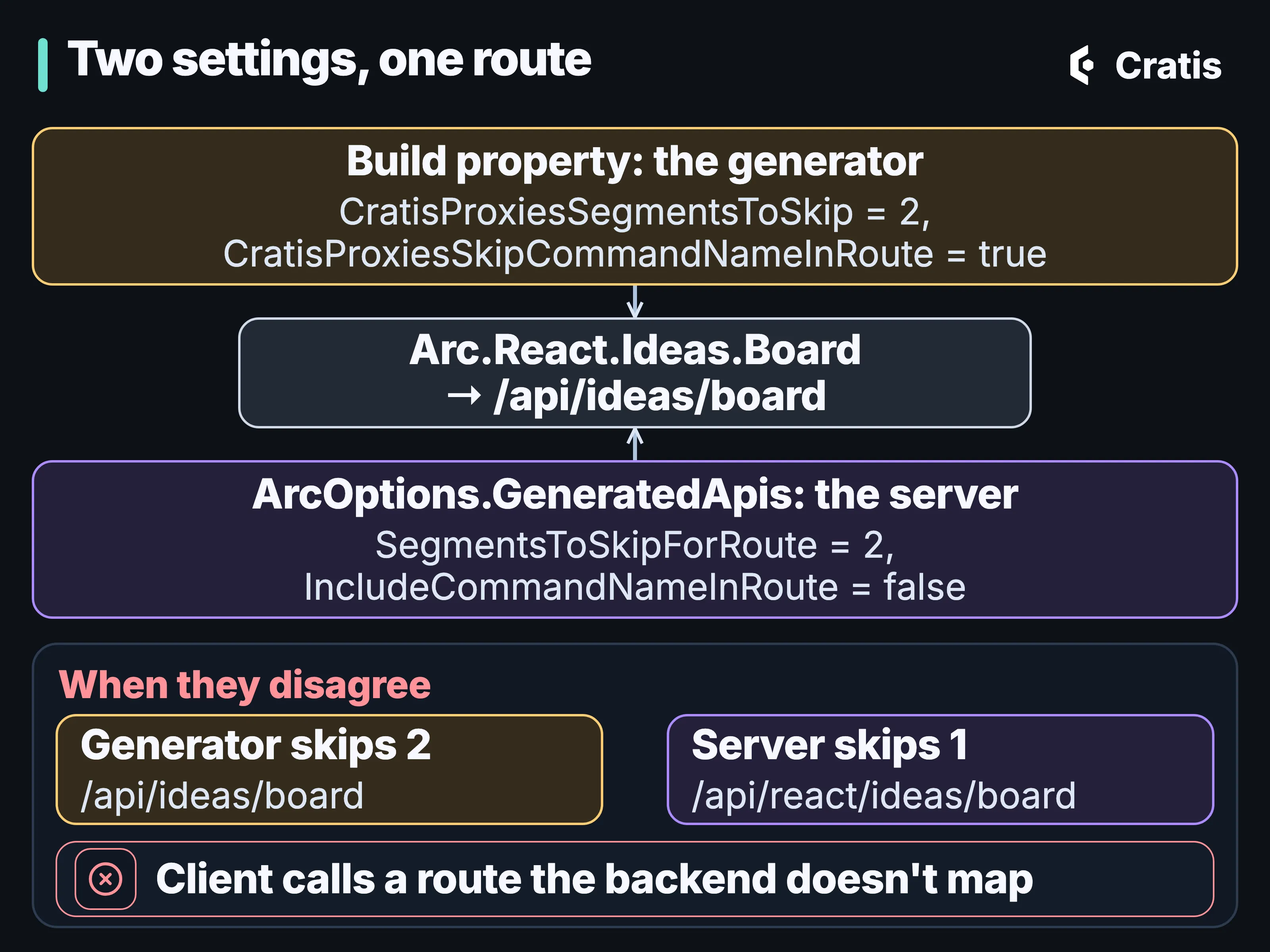
The generator and the server have to agree.
Which stream a command appends to
Section titled “Which stream a command appends to”A command that appends through Arc’s Chronicle integration needs an event source ID. ICanProvideEventSourceId wins if the command implements it. Otherwise Arc takes the first property that is an EventSourceId, derives from EventSourceId<T> or carries [Key], with no preference for the typed one, so a command should have exactly one candidate. If no property matches, a new EventSourceId is created so the append still succeeds. A command meant to add to an existing author’s stream then starts a new stream, and nothing reports an error.
Returning the identity with the event, as the cratis template’s Register command does with (SomeId, Registered), works only for a type that derives from EventSourceId. A raw Guid in the same tuple is just a response value, and the event goes to the fallback stream. The ARCCHR0010 analyzer flags that shape, and ARCCHR0002 flags a command with more than one candidate property.
An event’s name is its identity
Section titled “An event’s name is its identity”[EventType] takes an optional ID, and without one the event type is identified by its type name:
/// <param name="id">Optional identifier of the event type, if not used it will default to the type name.</param>/// <param name="generation"><see cref="EventTypeGeneration"/> represented as <see cref="uint"/>.</param>public sealed class EventTypeAttribute(string id = "", uint generation = EventTypeGeneration.FirstValue) : Attribute/** * @property id The UUID string identifier for this event type. If empty, the class simple name is used. * @property generation The generation number of this event type. Defaults to 1. */annotation class EventType( val id: String = "", val generation: Int = 1)Java uses the Kotlin client’s @EventType annotation, and the class’s simple name is the identity when id is empty.
/** * - `@eventType()` -> uses class name as id, generation 1, tombstone false. */export function eventType(): ChronicleClassDecorator;export function eventType(id: string): ChronicleClassDecorator;export function eventType(id: string, generation: number): ChronicleClassDecorator;The Elixir client has no default: id: is required in use Chronicle.Events.EventType.
Rename AuthorRegistered and the events you append from then on carry the new identity, while the ones already stored keep the old one. Give an event that has to last an explicit ID. When you add a generation, put [EventTypeGenerationFor<T>] on the previous one. It takes the ID from the current generation’s own [EventType], so the two can’t drift apart the way hand-typed IDs on both can. Analyzer CHR0037 warns when the generations a migration names don’t resolve to the same event type differing only by generation. It looks at migrations, so a rename without one gets no warning from it. Year two goes further into changing events.
Projections and proxies match by name
Section titled “Projections and proxies match by name”Declarative projections map matching names by default. An event property and a read-model property map when their names match after the client’s serialization naming policy is applied and the value can be assigned to the read-model property. Where they differ, you write the mapping. An event a projection only counts, increments or adds from contributes nothing to that automatic mapping. From event to read model covers the rest of it.
The proxy generator collects the public properties declared directly on a command type, so a property inherited from a base record doesn’t become a field in the TypeScript. Field names are the C# names in camel case.
The tenant arrives by header name
Section titled “The tenant arrives by header name”In .NET, Arc’s header resolver reads the header named in Tenancy.HttpHeader, x-cratis-tenant-id by default, and a missing header gives an empty tenant:
var headerName = options.Value.Tenancy.HttpHeader;return context.Headers.TryGetValue(headerName, out var tenantId) ? tenantId : string.Empty;In Kotlin a missing or blank header gives no tenant (null), not an empty string.
context.header(options.headerName).toTenantIdOrNull()Java uses the Kotlin implementation, HeaderTenantIdResolver, which gives no tenant (null) for a missing or blank header.
In TypeScript a missing header gives undefined, not an empty string.
if (source === TenantResolverType.Header) selected = request.headers.get(header) ?? undefined;Arc for Elixir doesn’t exist; use the Chronicle Elixir client directly.
AuthProxy forwards the tenant it resolved as Tenant-ID, so Arc has to be told that name, with options.UseHeaderTenancy(...) in .NET, or the tenant never arrives. A resolver selects a tenant and doesn’t check that the user belongs to it. Tenancy and identity end to end follows the header from AuthProxy to a Chronicle namespace.
Spotting them early
Section titled “Spotting them early”| What you see | The convention behind it | The fix |
|---|---|---|
| The form rejects input the server accepts | A condition wasn’t carried to the browser | Test both layers; keep conditional rules server-only |
| No client rule for a validator, and a green build | The validator’s constructor failed during extraction | Don’t call services while building rules, and check the generated file |
| A handwritten file is gone after a build | Full regeneration, or a second run into the same tree | One generated-only folder with one owner |
| A generated call hits a route the backend doesn’t map | Generator and server route settings disagree | Change CratisProxies* and ArcOptions.GeneratedApis together |
| A route moved after a new command | Command-name fallback in a shared namespace | Pin important routes with [Path] |
| Events land in a new stream | No property matched the event source ID convention | One unambiguous EventSourceId or [Key] property, or return an EventSourceId-derived identity |
| New events carry a different type after a class rename | Event type identity came from the type name | An explicit [EventType] ID on events that last |
| Every request gets an empty tenant | The header name isn’t the one the proxy sends | UseHeaderTenancy with the proxy’s header |
This part was checked against Arc v22.42.0 and Chronicle v19.25.1; other parts retain the versions they were checked against. The pages linked in each section have the complete rule lists. Before you rely on the browser to reject anything, read the validation page, and Validation all the way down for what each layer behind the browser holds.
- Previous: Part 14 — Year two
- Next: Part 16 — Chronicle Workbench, screen by screen