

Where does each tenant's data live? Storage connection resolution in Chronicle and Arc

Until now, Chronicle and Arc decided for themselves where a tenant’s data lives. Chronicle derived a database name for every event store and namespace and connected with one credential. Arc’s MongoDB integration appended the tenant to a database name, and Entity Framework Core used the same connection for everyone. That’s fine until your platform has opinions: a server per region, a database per customer, a login that can see one tenant and nothing else.
Connection resolution lets them ask instead. When a connection is needed, the caller describes what it’s for, and a resolver answers with the parts it decides. Anything it leaves out stays as configured. Nothing changes until you configure it.
This post explains how that works, and then builds one example you can run: a Chronicle kernel that places each namespace by a naming rule, an Arc application that asks an HTTP endpoint for each tenant’s database and login, and a small client with no Arc in it that asks the same endpoint. Arc is a convenience here, not a requirement.
The example uses .NET 10, Chronicle 19.77.2, Arc 22.112.0, MongoDB 8.2 and MongoDB.Driver 3.12.0. Connection resolution needs Chronicle 19.74.2 or later and Arc 22.109.0 or later.
The question and the answer
Section titled “The question and the answer”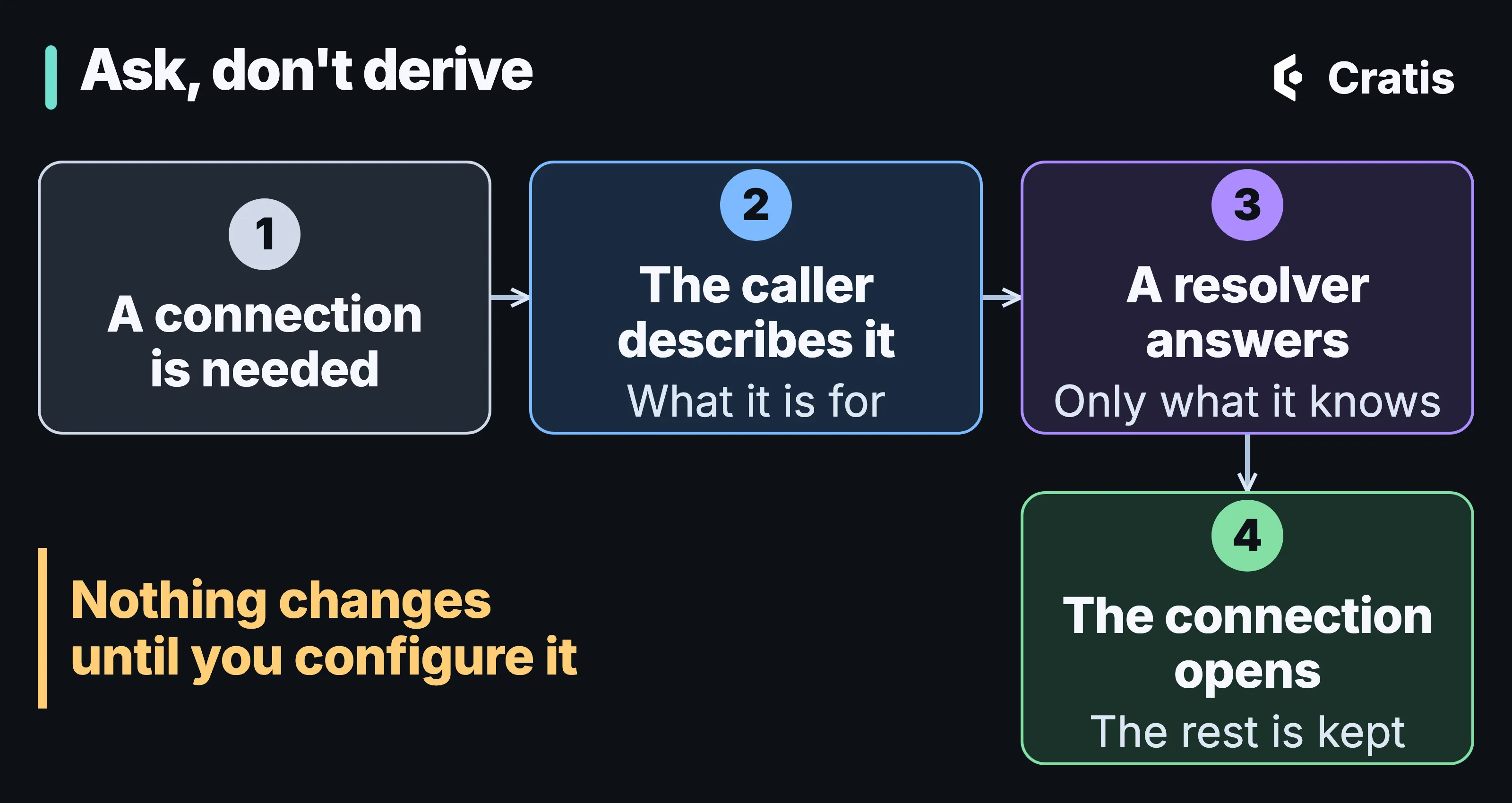
The caller says what it needs the connection for. The resolver says what it knows.
The caller describes the connection with a few fields. Arc sends three: the storage (MongoDB, SqlServer, PostgreSql or Sqlite), the purpose (Runtime for reading and writing, Schema for migrations and creating tables) and a scope, which for Arc holds the tenant. Chronicle sends the same storage and purpose, and a scope that says which database it’s about: the cluster, an eventStore, a namespace (its events) or readModels (its projected read models), with the event store and namespace names.
The resolver answers with any of these, and every part is optional:
| Part | What it does |
|---|---|
connectionString |
Replaces the configured connection string |
database |
The database to use |
schema |
The schema, for storage that has one |
identity |
userName and password, or an accessToken |
expiresAt |
When to ask again |
Arc and Chronicle share this model, and it has two slots: Connection decides where to connect and Identity decides who connects. They apply what’s configured, then what the Connection slot resolved, then what the Identity slot resolved, and a later part wins. That’s how the common split becomes a configuration choice. Keep the server in configuration and fetch only the credential, or the other way around.
Each slot takes one of four resolvers: Default leaves things alone, Template fills in a naming rule such as tenant-{tenant}, Http calls an endpoint you write, and Custom is your own code behind IConnectionResolver. The Arc docs cover them all, and Chronicle’s storage connection resolution page covers what the kernel asks and answers, including SQL storage and schemas.
The contract is plain REST
Section titled “The contract is plain REST”The Http resolver posts to one endpoint, and that endpoint can be written in anything. This is the request Arc sends for a tenant:
POST /connectionsContent-Type: application/json; charset=utf-8X-Api-Key: dev-only-key
{ "storage": "MongoDB", "purpose": "Runtime", "scope": { "tenant": "acme" } }
This is an answer that places a tenant in its own database with its own login:
{ "database": "acme-arc", "identity": { "userName": "acme", "password": "acme-pw" }, "expiresAt": "2026-10-17T07:05:51+00:00"}204 No Content means “keep the configured connection”, and any other status except 200 fails the connection. That’s the whole connection resolution contract, which also covers caching and security and ships an OpenAPI description. Because the contract doesn’t mention Arc, it’s the seam for the last part of this post.
The example
Section titled “The example”You’ll run four things: MongoDB and a Chronicle kernel in Docker, a small endpoint that knows your tenants, an Arc application, and a plain client. Two tenants, acme and globex, and one that nobody told the endpoint about, initech.
The infrastructure
Section titled “The infrastructure”MongoDB has to be a replica set because Chronicle appends in transactions, and a replica set with authentication needs a key file:
openssl rand -base64 756 > keyfileThe init script creates one login per tenant. It only allows that tenant into its own -arc database, which is where the Arc application will keep its data:
const admin = db.getSiblingDB("admin");for (const tenant of ["acme", "globex"]) { admin.createUser({ user: tenant, pwd: `${tenant}-pw`, roles: [{ role: "readWrite", db: `${tenant}-arc` }] });}The kernel is configured in the Compose file. The environment variables at the bottom are the whole of Chronicle’s side: a Template resolver on the Connection slot, with a naming rule for the database. The cluster database stays on connectionDetails, as before. The images are pinned by digest, and this is the development image, so it generates its own certificate and OAuth keys. Running Chronicle in production covers what changes for a real deployment.
services:  mongo:    image: mongo:8.2@sha256:e0ce8c35124d4a9f9785532d1f268f39e9728ffa1cb38f46fa482436424c4bd3    command: >      bash -c "cp /run/keyfile-src /data/keyfile && chmod 400 /data/keyfile && chown mongodb:mongodb /data/keyfile &&      exec docker-entrypoint.sh mongod --replSet rs0 --bind_ip_all --keyFile /data/keyfile"    environment:      MONGO_INITDB_ROOT_USERNAME: root      MONGO_INITDB_ROOT_PASSWORD: rootpw    volumes:      - ./keyfile:/run/keyfile-src:ro      - ./mongo/init-tenants.js:/docker-entrypoint-initdb.d/init-tenants.js:ro    ports:      - "127.0.0.1:27017:27017"    healthcheck:      test: ["CMD", "mongosh", "-u", "root", "-p", "rootpw", "--quiet", "--eval", "try { rs.status().ok } catch (e) { rs.initiate({_id:'rs0',members:[{_id:0,host:'mongo:27017'}]}).ok }"]      interval: 5s      timeout: 10s      retries: 20
  chronicle:    image: cratis/chronicle:19.77.2-development@sha256:91abcf6bc1eba69b7a3887f3dd800ca2630ca39e79c87bb9c01c765047f0c232    depends_on:      mongo:        condition: service_healthy    environment:      Cratis__Chronicle__Storage__ConnectionDetails: mongodb://root:rootpw@mongo:27017/?authSource=admin&replicaSet=rs0      Cratis__Chronicle__Storage__ConnectionResolution__Connection__Resolver: Template      Cratis__Chronicle__Storage__ConnectionResolution__Connection__Template__Database: "{eventStore}-{namespace}-{kind}"    ports:      - "127.0.0.1:35000:35000"
Save the script as mongo/init-tenants.js, the Compose file as compose.yaml, and start it with docker compose up -d.
Chronicle on its own
Section titled “Chronicle on its own”No Arc yet. This console program uses only the Chronicle client. It appends one event to the orders event store in each of two namespaces:
dotnet new console -n OrdersClientcd OrdersClientdotnet add package Cratis.Chronicle --version 19.77.2using Cratis.Chronicle;using Cratis.Chronicle.Events;
var client = new ChronicleClient(new ChronicleOptions());
foreach (var tenant in new[] { "acme", "globex" }){ var store = await client.GetEventStore("orders", tenant); await store.EventLog.Append(Guid.NewGuid().ToString(), new OrderPlaced(tenant, 42)); Console.WriteLine($"{tenant}: appended");}
[EventType]public record OrderPlaced(string Customer, int Total);Run it, then look in MongoDB. Each namespace’s events are in a database of their own, named by the rule in the Compose file:
docker compose exec mongo mongosh -u root -p rootpw --quiet --eval ' print("acme:", db.getSiblingDB("orders-acme-namespace").getCollection("event-log").countDocuments({})); print("globex:", db.getSiblingDB("orders-globex-namespace").getCollection("event-log").countDocuments({}))'acme: 1globex: 1The projected read models of each namespace get their own database too, orders-acme-readModels, because the rule has {kind} in it. Use {kind} when a namespace’s events and its read models shouldn’t share one. The rule applies to every database Chronicle asks about, so the Default namespace and the event store itself get names from it too, such as orders-Default-namespace and orders--eventStore, where there’s no namespace to fill in. A template only needs configuration, so it works with the standard image. When a rule can’t express your placement, or a login has to differ per tenant, Chronicle’s storage connection resolution page shows the resolvers that call an endpoint or your own code.
The endpoint that knows your tenants
Section titled “The endpoint that knows your tenants”Now the application side. An application that stores its own data per tenant needs somewhere to ask where that is. This is the endpoint. In a real platform it fronts your tenant directory and a secret store, and here it’s a dictionary:
dotnet new web -n Directoryvar builder = WebApplication.CreateBuilder(args);var app = builder.Build();
// Your tenant directory. In a real platform this is a service or a database, and the passwords live in a secret store.var tenants = new Dictionary<string, TenantConnection>{ ["acme"] = new("acme-arc", "acme", "acme-pw"), ["globex"] = new("globex-arc", "globex", "globex-pw")};
app.MapPost("/connections", (HttpRequest http, ConnectionRequest request) =>{ // The answer holds credentials, so authenticate the caller first. if (http.Headers["X-Api-Key"] != "dev-only-key") { return Results.StatusCode(StatusCodes.Status401Unauthorized); }
// Resolution chooses a destination, so refuse a tenant you do not know instead of guessing one. if (!request.Scope.TryGetValue("tenant", out var tenant) || !tenants.TryGetValue(tenant, out var connection)) { return Results.StatusCode(StatusCodes.Status403Forbidden); }
return Results.Ok(new ResolvedConnection( Database: connection.Database, Identity: new Identity(connection.UserName, connection.Password), ExpiresAt: DateTimeOffset.UtcNow.AddMinutes(5)));});
app.Run("http://localhost:5099");
record TenantConnection(string Database, string UserName, string Password);record ConnectionRequest(string Storage, string Purpose, Dictionary<string, string> Scope);record Identity(string? UserName = null, string? Password = null, string? AccessToken = null);record ResolvedConnection(string? ConnectionString = null, string? Database = null, string? Schema = null, Identity? Identity = null, DateTimeOffset? ExpiresAt = null);Two things in there matter more than the dictionary. It checks a key before it answers, because the answer holds credentials. And it says no to a tenant it doesn’t know. Resolution picks a destination. It isn’t an authorization check on the person asking, so what the endpoint does with a tenant it can’t place is part of your security model. Run it with dotnet run.
Arc, with Chronicle behind it
Section titled “Arc, with Chronicle behind it”The Arc application does two things per tenant. A command records an OrderPlaced event in Chronicle, and another command stores a note in MongoDB. Arc picks the tenant from a header, x-cratis-tenant-id by default, and maps it to the Chronicle namespace, so the first command lands in the namespace the kernel placed above. The second goes through Arc’s own connection resolution, which is configured to call the endpoint.
dotnet new web -n OrdersAppcd OrdersAppdotnet add package Cratis --version 22.112.0dotnet add package Cratis.Arc.MongoDB --version 22.112.0using Cratis.Arc;
var builder = WebApplication.CreateBuilder(args);
builder.AddCratis( configureArcBuilder: arc => arc.WithMongoDB(), configureChronicleOptions: chronicle => chronicle.EventStore = "orders");
var app = builder.Build();app.UseCratis();app.Run();using Cratis.Arc.Commands.ModelBound;using Cratis.Arc.Queries.ModelBound;using Cratis.Chronicle.Events;using MongoDB.Driver;
[EventType]public record OrderPlaced(string Customer, int Total);
[Command]public record PlaceOrder(string Customer, int Total){ public OrderPlaced Handle() => new(Customer, Total);}
[ReadModel]public record Note(Guid Id, string Text){ [Path("/api/notes")] public static IEnumerable<Note> All(IMongoCollection<Note> notes) => notes.Find(_ => true).ToList();}
[Command]public record AddNote(string Text){ public async Task Handle(IMongoCollection<Note> notes) => await notes.InsertOneAsync(new Note(Guid.NewGuid(), Text));}The configuration is the other half. Cratis:Arc:ConnectionResolution is the application-wide setting, and Arc’s MongoDB integration reads it. Server and Database stay as they are for anything the endpoint doesn’t answer, and DirectConnection is there because the replica set advertises its Docker name, which your machine can’t reach:
{ "Cratis": { "Arc": { "ConnectionResolution": { "Connection": { "Resolver": "Http", "Http": { "Endpoint": "http://localhost:5099/connections", "Headers": { "X-Api-Key": "dev-only-key" } } } } }, "MongoDB": { "Server": "mongodb://localhost:27017/?authSource=admin", "Database": "arc", "DirectConnection": true } }}Run it with dotnet run --urls http://localhost:5200 and send the same two commands for each tenant:
for tenant in acme globex initech; do curl -s -X POST http://localhost:5200/api/place-order \ -H "x-cratis-tenant-id: $tenant" -H 'content-type: application/json' \ -d "{\"customer\":\"$tenant-customer\",\"total\":42}" curl -s -X POST http://localhost:5200/api/add-note \ -H "x-cratis-tenant-id: $tenant" -H 'content-type: application/json' \ -d "{\"text\":\"note for $tenant\"}"done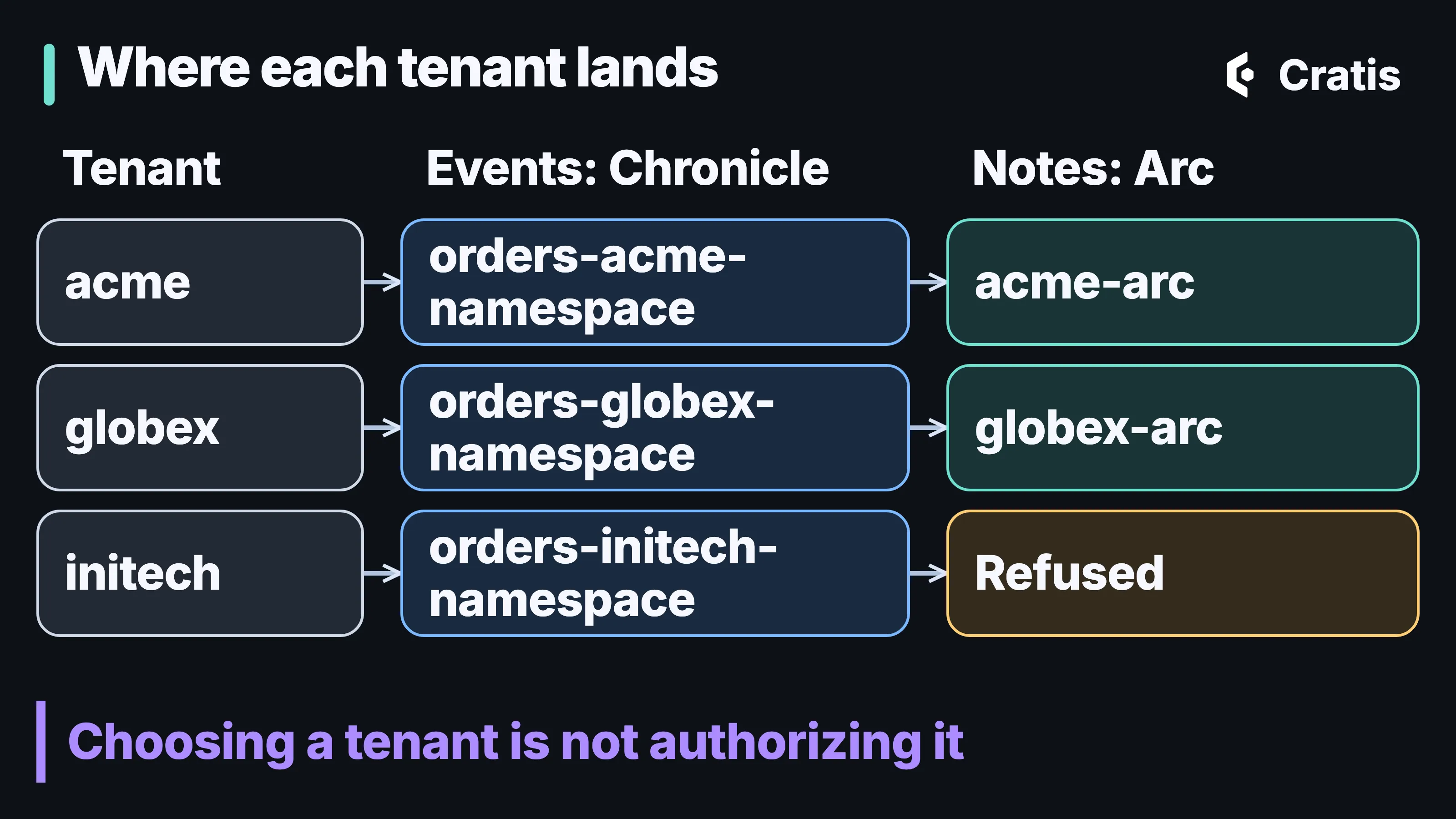
Two things decided two ways. The kernel placed the events by rule, and the endpoint placed the notes by answer.
Both commands succeed for acme and globex. For initech, the order succeeds and the note fails. Chronicle’s template doesn’t know who’s allowed to exist. It places any namespace it’s asked about, so initech got its own events database. The endpoint did know, answered 403, and Arc refused to open a connection. The kernel and your endpoint don’t coordinate, so checking that a tenant is real belongs in your application, before it touches either. The tenancy post goes through why a header isn’t proof of membership.
Each tenant now reads back only its own notes:
curl -s http://localhost:5200/api/notes -H "x-cratis-tenant-id: acme"{ "data": [{ "id": "2a861236-e51d-41f3-93fc-281d08ca1d6f", "text": "note for acme" }], "isSuccess": true }And the login the endpoint hands out really is limited. This is acme trying to read globex’s database, and then its own:
docker compose exec mongo mongosh -u acme -p acme-pw --authenticationDatabase admin --quiet --eval ' try { db.getSiblingDB("globex-arc").getCollection("Notes").find().toArray() } catch (e) { print("globex-arc:", e.codeName) } print("acme-arc:", db.getSiblingDB("acme-arc").getCollection("Notes").countDocuments({}))'globex-arc: Unauthorizedacme-arc: 1Arc is optional
Section titled “Arc is optional”Everything Arc did on the application side was ask that endpoint a question and open a connection with the answer. You can do that yourself. This console program knows nothing about Arc. It posts the same request, keeps the answer until a minute before it expires, and builds a MongoDB client with the identity it was given:
dotnet new console -n OwnClientcd OwnClientdotnet add package MongoDB.Driver --version 3.12.0using System.Collections.Concurrent;using System.Net.Http.Json;using MongoDB.Bson;using MongoDB.Driver;
var resolver = new TenantConnections(new Uri("http://localhost:5099/connections"), "dev-only-key");
foreach (var tenant in new[] { "acme", "globex", "initech" }){ try { var notes = (await resolver.DatabaseFor(tenant)).GetCollection<BsonDocument>("Notes"); await notes.InsertOneAsync(new BsonDocument { ["_id"] = Guid.NewGuid().ToString(), ["Text"] = $"own client, {tenant}" }); Console.WriteLine($"{tenant}: {await notes.CountDocumentsAsync(FilterDefinition<BsonDocument>.Empty)} notes"); } catch (HttpRequestException exception) { Console.WriteLine($"{tenant}: refused ({(int?)exception.StatusCode})"); }}
record Identity(string UserName, string Password);record Resolved(string Database, Identity Identity, DateTimeOffset ExpiresAt);
class TenantConnections(Uri endpoint, string apiKey){ const string Server = "mongodb://localhost:27017/?authSource=admin&directConnection=true";
readonly HttpClient _http = new() { DefaultRequestHeaders = { { "X-Api-Key", apiKey } } }; readonly ConcurrentDictionary<string, Resolved> _cache = new();
public async Task<IMongoDatabase> DatabaseFor(string tenant) { if (!_cache.TryGetValue(tenant, out var resolved) || resolved.ExpiresAt < DateTimeOffset.UtcNow.AddMinutes(1)) { var response = await _http.PostAsJsonAsync(endpoint, new { storage = "MongoDB", purpose = "Runtime", scope = new { tenant } }); response.EnsureSuccessStatusCode(); resolved = _cache[tenant] = (await response.Content.ReadFromJsonAsync<Resolved>())!; }
var settings = MongoClientSettings.FromConnectionString(Server); settings.Credential = MongoCredential.CreateCredential("admin", resolved.Identity.UserName, resolved.Identity.Password); return new MongoClient(settings).GetDatabase(resolved.Database); }}acme: 2 notesglobex: 2 notesinitech: refused (403)It sees the notes Arc wrote, since they’re in the same database, and initech is refused by the same endpoint for the same reason. The code isn’t production code, and the difference between it and Arc is what Arc is for. Arc builds the client and the database from the resolution for each request scope, so the IMongoCollection<Note> in a handler is already the right tenant’s. It caches the way the contract says and drops the cached answer when a login fails, so a rotated credential is picked up on the next attempt. It refreshes an access token when the MongoDB driver asks for one. And one application-wide configuration serves every storage Arc integrates with, so you set it once.
If you’re on Kotlin, TypeScript, Elixir or anything else, the contract is the thing to hold on to, not Arc’s class names. A client in another language posts the same JSON and builds a connection with the answer, and the endpoint doesn’t know the difference. Chronicle itself, whichever client you use, resolves its own storage on the kernel side as in the Compose file, so a tenant’s events are placed the same way no matter who appends them.
What this doesn’t do
Section titled “What this doesn’t do”- It doesn’t authorize anyone. The
initechrow is the example. A tenant header or tenant id selects a destination, and checking membership is your job before any tenant-scoped work. - It doesn’t move data. Changing the resolution of an existing database points Chronicle or Arc at a new place, and the old data stays where it was. In Arc, a resolved
Databasereplaces the default{Database}+{tenant}naming entirely, including for the default tenant, so switching is a data migration. - It doesn’t make secrets safe by itself. The endpoint’s answer holds credentials: serve it over HTTPS, authenticate the caller, and prefer short-lived access tokens with an
expiresAtover long-lived passwords. The example uses plain HTTP and a key in a header because it runs on one machine. - It doesn’t replace the rest of your isolation. Arc’s tenant isolation is a separate concern from where a connection goes, and the Arc tenancy docs keep the two apart.
What to take from this
Section titled “What to take from this”If your platform already knows where each tenant lives, you no longer have to bend Chronicle’s and Arc’s naming around that. Start with what you can say in configuration. A template covers a naming rule, and it needs no code on either side. Add an endpoint when you need a per-tenant login or a lookup, and write the endpoint once, because the contract is the same for MongoDB and SQL storage.
Then decide how much of the client you want to own. Arc gives you the caching, the scoping and the pooling for free. A hand-written client gives you the same placement in a few dozen lines and with whatever driver you already use.
The pages to read next are Arc’s connection resolution, the MongoDB page, Chronicle’s storage connection resolution and the contract. Tell me where it’s still confusing on Discord.